Whether you’re a solopreneur juggling multiple hats, a small business owner striving for efficiency, or part of a sprawling global enterprise aiming to optimize workflows, the software stack you meticulously build (or carelessly cobble together) will directly dictate the efficiency of your daily operations. Choosing the *wrong* tool can unleash a torrent of data silos, squander precious subscription dollars, and leave your team drowning in frustration. Conversely, making the *right* selections can unlock the power to automate repetitive tasks, liberate your time for high-value creative work, and propel your business forward. What I’ve learned after 20+ years in this field? It’s not about having *more* tools, it’s about having the *right* tools, strategically deployed.
The Foundation: Understanding How to Choose Online Tools for Your Business
Before you even *think* about diving headfirst into the dazzling array of trending software solutions showcased on platforms like Product Hunt, you absolutely *must* establish a rock-solid foundation. The process of **how to choose online tools** begins not with a features list, but with a brutally honest and in-depth audit of your current workflow. Too many teams stumble into the trap of adopting a tool simply because it’s popular or because a competitor is using it, only to discover that it doesn’t actually address their specific pain points, or worse, creates new ones.
I recommend starting by meticulously listing *every* repetitive task your team performs on a daily or weekly basis. Identify the bottlenecks that consistently impede progress, the manual processes that drain productivity, and the communication breakdowns that lead to errors and delays. Ask yourself: Where are we losing time? Where are we wasting resources? What tasks do my team members dread the most? According to a 2022 report by McKinsey, companies that effectively streamline their workflows see an average productivity increase of 20-25%. That’s a significant competitive advantage.
According to research by Gartner, organizations often underutilize a staggering 40% of their purchased software licenses because the initial selection process failed to align with the actual needs and workflows of the end-users. To avoid becoming another statistic, actively involve the people who will be using the tool day in and day out in the decision-making process. Their hands-on experience will provide invaluable insights that a high-level manager or executive might completely miss. Don’t just ask for their opinions; solicit their input, observe their workflows, and genuinely listen to their concerns.
And here’s a critical question to ponder: Is the problem truly a *lack* of features in your current tools, or is it a *lack* of well-defined processes? Sometimes, the most effective solution isn’t a new piece of software at all, but rather a re-engineered process or a more disciplined approach to task management. Before you spend a dime on new tools, explore whether you can optimize your existing workflows to achieve the desired results. Trust me, I’ve seen companies waste thousands of dollars on software that ultimately went unused simply because they failed to address the underlying process issues.
Practical Steps on How to Choose Online Tools Effectively
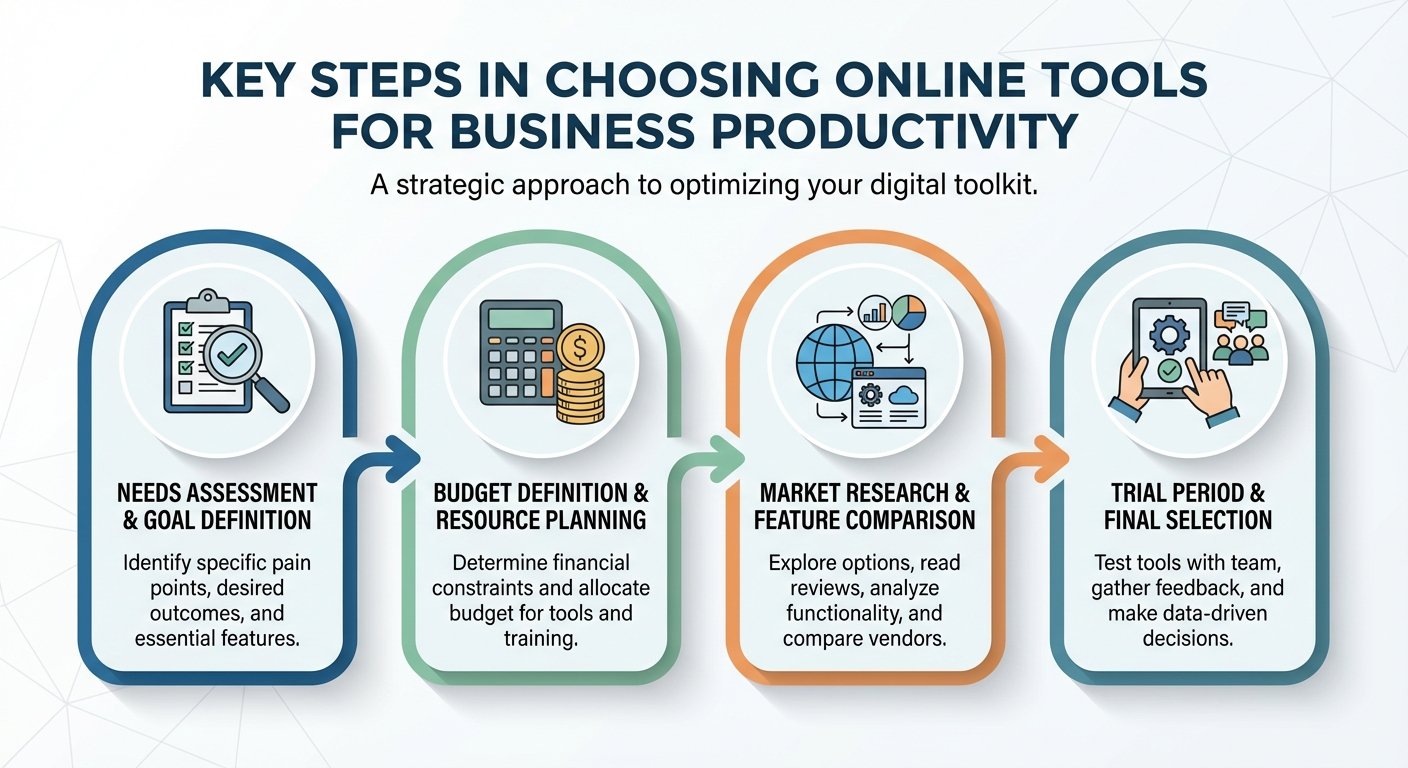
To make an informed decision and avoid costly mistakes, you need a structured, repeatable approach to evaluating and selecting online tools. Here’s the framework I’ve used for years with my clients:
1. Needs Assessment
Identify the specific gap or inefficiency in your workflow that you’re trying to address. Are you losing valuable time on internal communication? Is manual data entry consuming your team’s bandwidth? Are you struggling to track project progress and deadlines effectively? Be as specific and granular as possible. Instead of saying “we need better project management,” try “we need a tool that allows us to visualize project timelines, assign tasks with clear deadlines, and track progress in real-time.”
2. Budget Definition
Establish a realistic monthly or annual budget for your software investments. Don’t forget to factor in not only the direct subscription costs but also the indirect costs, such as the time spent on training, the potential downtime during data migration, and the ongoing maintenance and support. It’s also wise to allocate a buffer for unexpected expenses or add-ons that you might need down the road. Remember, the cheapest tool isn’t always the most cost-effective in the long run if it lacks essential features or requires extensive customization.
3. Market Research
Once you have a clear understanding of your needs and budget, it’s time to explore the market and shortlist 3-5 tools that appear to meet your core requirements. Don’t rely solely on vendor websites or marketing materials. Seek out independent reviews on reputable platforms like G2, Capterra, and TrustRadius. Ask for recommendations from your peers in the industry or consult with trusted advisors who have experience with different software solutions. Look for case studies or testimonials that demonstrate how the tool has helped other businesses solve similar problems. And, of course, take advantage of free trials or demos whenever possible to get a firsthand feel for the tool’s capabilities and usability.
Key Evaluation Criteria: How to Choose Online Tools Based on Features
When you’ve carefully curated your shortlist of potential software solutions, it’s time to roll up your sleeves and delve into the nitty-gritty technical specifications. Remember, the most expensive tool isn’t always the best, and the cheapest is rarely the most efficient or effective in the long run. When considering **how to choose online tools**, I always advise my clients to prioritize the user interface (UI) and user experience (UX) above all else. After all, even the most powerful tool is useless if your team finds it clunky, confusing, or frustrating to use. If a tool is difficult to navigate or requires extensive training, your team will likely abandon it in short order, leading to a dismal return on investment.
Functionality, of course, should be a primary focus. Does the tool perform the core task exceptionally well? Does it offer the features you absolutely *must* have to solve your identified problems? For instance, if you’re a video creator looking to boost your search engine optimization (SEO) efforts, you might leverage a YouTube description generator to rapidly craft compelling and keyword-rich descriptions. This is a specific, functional need that directly impacts your content’s visibility and reach.
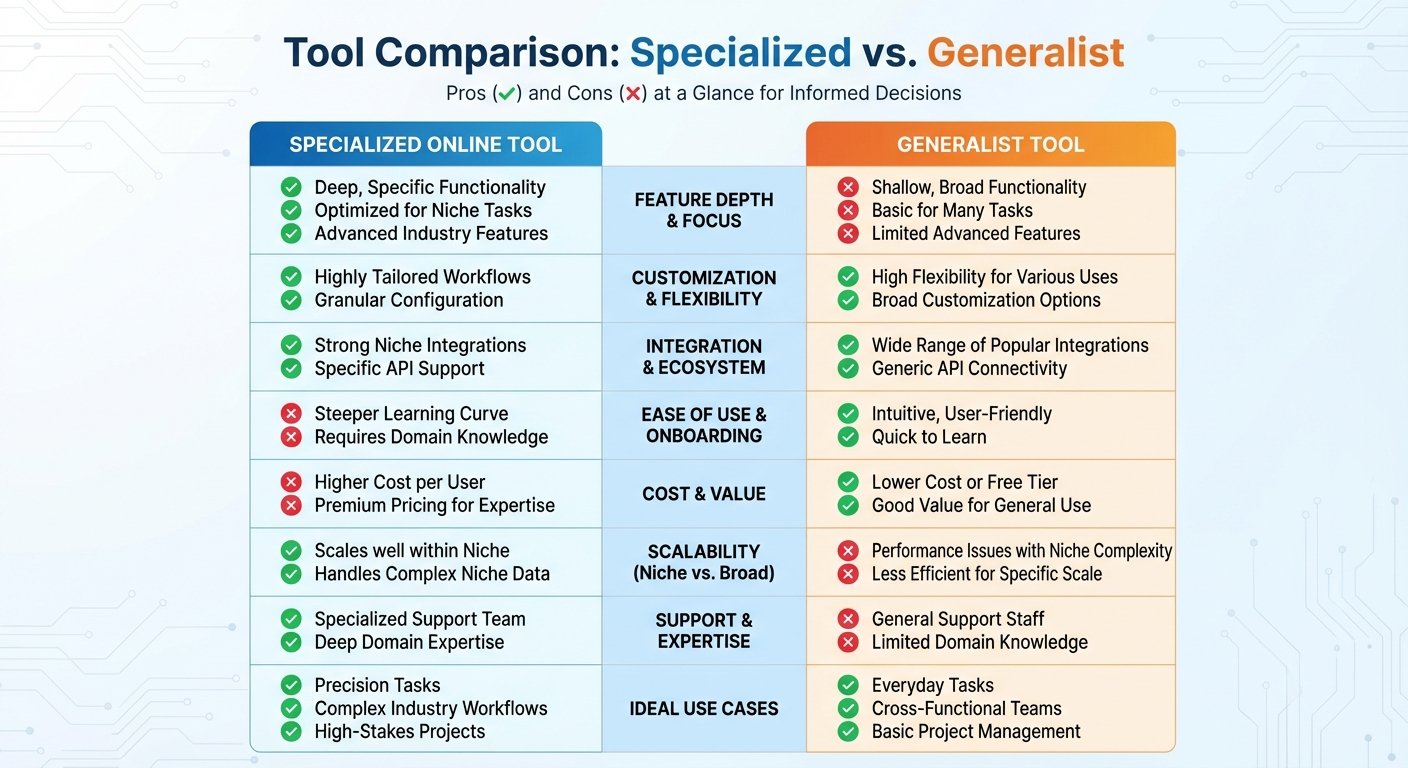
Here’s the deal: a specialized tool that does one thing perfectly is often far more valuable than a generalist tool that attempts to do ten things adequately but masters none. Think of it like a Swiss Army knife versus a dedicated chef’s knife. The Swiss Army knife is versatile, but the chef’s knife is the tool you reach for when you need precision and performance. In the same vein, if you are analyzing complex data sets, you might opt for a radar chart generator to visually compare different software performance metrics. This allows you to see at a glance which tool excels in areas like speed, security, or ease of use.
Another critical factor that often gets overlooked is mobile accessibility. In today’s increasingly remote and hybrid work environments, being able to seamlessly access your workflow from a smartphone or tablet is no longer a luxury—it’s an absolute necessity. Ensure that the tool you choose offers a responsive web version or a dedicated mobile app that faithfully maintains the core functionality of the desktop experience. Can you easily manage tasks, collaborate with colleagues, and access critical information while on the go? If not, you’re likely to encounter significant productivity bottlenecks.
Integration and Scalability: How to Choose Online Tools That Grow with You
Let me be blunt: No tool exists in a vacuum. One of the most crucial aspects of **how to choose online tools** is ensuring that they can seamlessly “talk” to each other, sharing data and automating workflows without requiring manual intervention. This is what we call integration, and it can be a massive time-saver. A tool that integrates smoothly with your existing email platform, calendar application, and cloud storage provider will save you countless hours of tedious manual data transfer and eliminate the risk of errors.
Look for native integrations or compatibility with popular automation platforms like Zapier or Make (formerly Integromat). These platforms act as bridges between different applications, allowing you to create automated workflows that trigger actions in one tool based on events in another. For example, you could automatically create a new task in your project management tool whenever a new lead is added to your CRM. According to a 2023 study by Forrester, companies that effectively leverage automation can reduce operational costs by as much as 30%.
Scalability is equally vital, especially if you anticipate growth in the near future. You don’t want to choose a tool that works perfectly well for a team of three but completely breaks down when you expand to a team of thirty. Carefully examine the pricing tiers to see if the jump from the “Starter” plan to the “Pro” plan is reasonable and justifiable. Does the pricing scale linearly with the number of users, or does it jump exponentially? Are there hidden costs associated with adding more storage or features?
Forbes often highlights that “tech debt”—the accumulated cost of fixing problems caused by poor initial software choices—is one of the biggest and most insidious hidden expenses for growing companies. Choosing a scalable tool from the outset can prevent the agonizing and disruptive process of migrating your data to a completely new platform down the road. It’s an investment that will pay dividends in the long run.
Seamless Integrations
Does the tool seamlessly connect with your existing ecosystem of applications, such as Slack, Google Workspace, or Microsoft 365? Does it offer an open API (Application Programming Interface) that allows you to build custom integrations with other tools or systems? The more seamlessly your tools integrate, the more efficient your workflows will become.
Future-Proofing
Can the tool handle a significant increase in data volume and user activity without experiencing a noticeable drop in performance? Does the vendor have a clear roadmap for future development and innovation? Choosing a tool that’s built to scale will save you headaches down the road.
Security, Privacy, and Customer Support
In an era of increasingly sophisticated data breaches and growing concerns about privacy, security simply cannot be an afterthought. When researching **how to choose online tools**, you absolutely *must* meticulously investigate the provider’s security protocols and privacy policies. Do they offer robust two-factor authentication (2FA) to protect user accounts? Are they compliant with relevant data privacy regulations like GDPR (General Data Protection Regulation) or SOC 2 (System and Organization Controls 2)? Do they encrypt data both in transit and at rest?
Your data is arguably your most valuable asset, and you have a responsibility to protect it by choosing reputable vendors who prioritize security and privacy. Don’t be afraid to ask tough questions and demand transparency. A responsible vendor should be able to clearly articulate their security measures and provide evidence of their compliance with industry standards. According to a 2021 report by IBM, the average cost of a data breach is over $4 million, so investing in secure tools is a smart business decision.
Furthermore, carefully evaluate the quality and responsiveness of their customer support. Even the most well-designed and intuitive software will inevitably have occasional bugs or learning curves. Check to see if the company offers a variety of support channels, such as live chat, email support, or a comprehensive knowledge base. A tool with a thriving online community forum or a library of video tutorials is often easier to master than one with obscure or outdated documentation.
During your free trial period, make it a point to test their support response time by submitting a few sample inquiries. How quickly do they respond? Are their answers helpful and accurate? Do they go the extra mile to resolve your issue? A vendor that provides excellent customer support is a valuable partner that can help you maximize the value of your software investment.
Final Comparison: How to Choose Online Tools Without Breaking the Bank
The final step in the selection process is a thorough and objective cost-benefit analysis. Many online tools offer a “Freemium” model, which can be an excellent way to test out the basic functionality before committing to a paid subscription. However, be wary of tools that gate essential features behind an excessively expensive paywall or that nickel-and-dime you for every little add-on.
When you calculate the total cost of ownership, be sure to look beyond the monthly subscription fee. Consider the “hidden” costs, such as the time spent training staff, the cost of integrating the tool with your existing systems, and the potential cost of third-party add-ons or plugins required to make the tool fully functional. A seemingly inexpensive tool can quickly become a budget-buster if you have to pay extra for essential features or integrations.
One great way to assess value and discover specialized utilities is to explore platforms like Tools River. They offer a wide array of focused tools that are often free or highly accessible, allowing you to perform specific tasks without committing to a massive and expensive enterprise suite. By strategically combining these specialized tools with a core project management platform or CRM, you can create a custom, cost-effective workflow that’s perfectly tailored to your exact needs and budget. It’s like building your own custom software suite, one tool at a time.
Common Mistakes to Avoid
* **Chasing the Shiny Object:** Don’t get distracted by the latest trends or hyped-up features. Focus on solving *your* specific problems.
* **Ignoring User Feedback:** Involve your team in the selection process and listen to their concerns and suggestions.
* **Failing to Plan for Integration:** Ensure that your new tools will seamlessly integrate with your existing systems.
* **Neglecting Security:** Prioritize security and privacy when evaluating potential software solutions.
* **Overlooking Scalability:** Choose tools that can grow with your business.
* **Skimping on Training:** Invest in proper training to ensure that your team can effectively use the new tools.
Frequently Asked Questions
Choosing the right online tools is an ongoing journey of trial and error, but by adopting a structured evaluation process and focusing on your specific needs, you can minimize the risks and maximize the rewards. Prioritize functionality, integration, security, and scalability, and never compromise on user experience. By taking the time to choose wisely, you can build a digital environment that empowers you and your team to do your best work with less effort and greater efficiency. What I’ve found in my years of experience is that the right tools aren’t just about doing things faster; they’re about enabling you to do things better, smarter, and more creatively.
Read Also:
- Truth or Dare Game
- Image Cropper
- LaTeX to Image Converter
- 7 Ways to Grow Wealth with an Investment Calculator
- 10 Reasons Why Using a Schema Generator Is Essential for SEO Success
- Seconds to Sense: Your 2026 Time Guide
- Your 2026 SERP Checker Guide
- Your 2026 Secret to Faster Laps
- Stop Content Theft in 2026
- 10 Proven Strategies to Master Your To Do List App for Maximum Productivity – Visual Story
- Linear Foot to Feet: The 2026 Guide to Accurate Measurement