
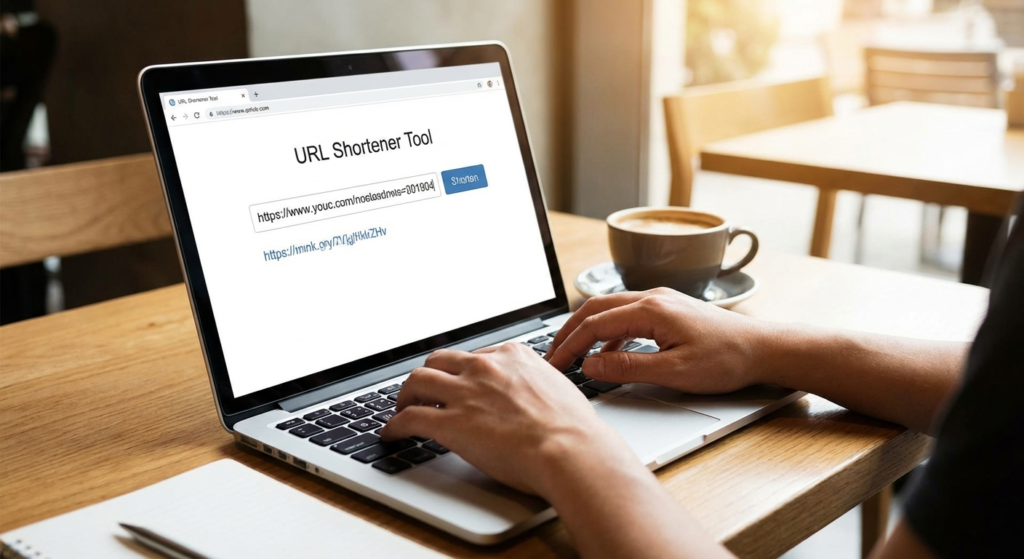
Picture this. You just spent three weeks crafting the perfect email marketing campaign. The copy is punchy. The graphics are stunning. You hit send to 50,000 subscribers. But when they scroll down to your call-to-action, they are greeted by a monstrous, four-line hyperlink packed with random percentages, letters, and UTM parameters that looks exactly like a phishing scam.
They don’t click. Your conversion rate tanks. All because of an ugly link.
We have all seen them. Those unwieldy strings of characters that look like a cat walked across a keyboard. They are aesthetically displeasing, impossible to share verbally, and instantly trigger user suspicion. This is exactly where a URL shortener steps in to save your campaign.
Look, a URL shortener is no longer just a neat trick to save characters on social media. Based on our experience managing high-volume digital campaigns, it is a sophisticated instrument for branding, tracking, and optimizing the entire user journey. In this article, I will show you exactly how these tools work, why naked links are killing your click-through rates, and 10 specific ways to turn your links into powerful marketing assets.
📑 What You’ll Learn
- The Hidden Mechanics: How a URL Shortener Actually Works
- Naked Links vs. Branded Links: The Trust Factor
- 10 Powerful Ways a URL Shortener Transforms Your Strategy
- Step-by-Step: Setting Up Your First Branded Link
- Free vs. Paid URL Shorteners: Which Do You Need?
- The Dark Side of Link Shortening (Mistakes to Avoid)
- Frequently Asked Questions
The Hidden Mechanics: How a URL Shortener Actually Works
At its core, a URL shortener is a service that takes a massive, complex Uniform Resource Locator (URL) and slices it down into a clean, manageable format. But what happens behind the scenes?
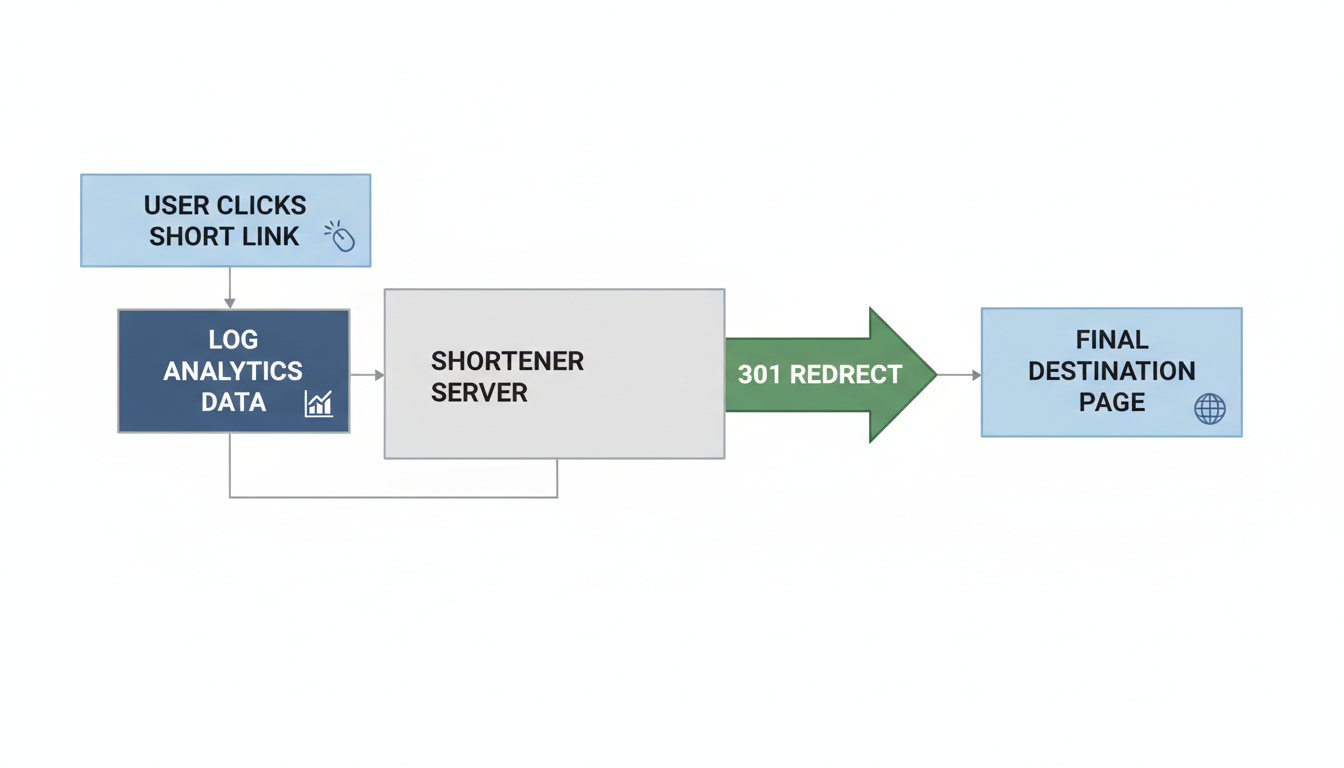
When a user clicks your shortened link, the service issues an HTTP redirect—usually a 301 permanent redirect—instantly sending the browser to the original destination. The process happens in milliseconds. The user barely notices.
However, for you as the marketer, that split-second redirect is pure gold. The URL shortener acts as a strategic middleman, capturing incredibly valuable data (location, device, referral source) before passing the user along to the final page.
💡 Pro Tip
Always verify that your chosen URL shortener uses a 301 Permanent Redirect rather than a 302 Temporary Redirect. According to Google’s Search Central guidelines, a 301 redirect ensures that the SEO value (link juice) from the short link is properly passed to your final destination page.
Naked Links vs. Branded Links: The Trust Factor
Trust me on this one: aesthetics matter in digital marketing. A clean link looks professional. A messy link looks dangerous.
When you use a custom domain with your URL shortener (like nyt.ms for The New York Times or es.pn for ESPN), you reinforce brand authority. Industry research shows that branded short links receive up to 39% more clicks than generic, unbranded ones. People click what they trust.
Let’s look at a real-world comparison of how links appear to your users:
| Link Type | Visual Example | User Perception | Best Use Case |
|---|---|---|---|
| Naked URL (with UTMs) | yourbrand.com/shoes/sneakers?utm_source=fb&utm_medium=cpc&utm_campaign=summer_sale_2024&utm_id=98765 |
Messy, highly technical, potentially suspicious. | Hidden behind HTML buttons in emails or website text. |
| Generic Short Link | bit.ly/3xY7z9Q |
Clean but anonymous. Could lead anywhere. | Casual sharing, internal team documents. |
| Branded Short Link | brand.link/SummerSneakers |
Professional, trustworthy, clear destination. | Social media bios, SMS marketing, print materials, podcasts. |
10 Powerful Ways a URL Shortener Transforms Your Strategy
To truly get your money’s worth out of a URL shortener, you have to move beyond just shrinking text. It is about managing the entire user journey. Here are ten battle-tested ways to deploy short links in your campaigns.
1. Masking Ugly UTM Parameters
UTM tags are essential for tracking campaign performance in Google Analytics. But they make URLs incredibly ugly. A shortener lets you bake those tracking codes into the destination URL while presenting a clean, clickable link to the public.
2. Bypassing SMS Character Limits
Running a Black Friday text message campaign? Every character costs money. A standard URL can eat up half your SMS limit. Short links keep your texts concise, leaving more room for your actual marketing copy.
3. Retargeting Pixel Integration
This is where things get advanced. Premium URL shorteners allow you to attach retargeting pixels (like the Meta Pixel or Google Ads tag) directly to the short link. Even if the user clicks your link and bounces from the destination page, you can still serve them targeted ads later. It is incredibly effective.
4. Offline-to-Online Tracking (QR Codes)
Print marketing isn’t dead; it just needs tracking. Modern shorteners automatically generate QR codes for your links. Put these on business cards, direct mailers, or conference banners, and you can finally track exactly how much traffic your physical assets are driving.

5. Social Media Bio Optimization
Platforms like Instagram and TikTok only give you one clickable link in your bio. A branded short link (or a link-in-bio tool powered by a shortener) keeps your profile looking pristine while routing traffic exactly where you want it.
6. Dynamic Link Routing
Imagine sending a single link to your global email list, but users in the US are routed to your English store, while users in Spain are routed to your Spanish store. Advanced URL shorteners offer geo-targeting, routing users based on their physical location or device type (iOS vs. Android).
7. A/B Testing Destinations
Want to test two different landing pages? Some shorteners let you split traffic 50/50 from a single short link. You can monitor which page converts better without ever changing the link you shared on social media.
8. Affiliate Link Cloaking
If you rely on affiliate marketing, you know that raw affiliate links are ugly and easily stripped by malicious software. A URL shortener “cloaks” the affiliate link, protecting your commissions and making the link look trustworthy to your audience.
9. Correcting Mistakes Post-Launch
We have all done it. You print 5,000 flyers with a link to a landing page, and then realize the landing page URL is broken. If you used a dynamic URL shortener, you can simply log into your dashboard and change the destination URL. The printed short link stays exactly the same. Crisis averted.
10. Granular Click Analytics
Data is the lifeblood of digital marketing. A high-quality shortener provides a dashboard of insights that validates your efforts. You aren’t guessing anymore. You know exactly what time of day your audience clicks, what browsers they use, and which social platforms drive the most engagement.
🎯 Key Takeaway
A URL shortener is fundamentally a data-capture tool disguised as a link-shrinking tool. By routing traffic through a platform you control, you gain access to retargeting capabilities, geographic data, and the ability to change destinations on the fly without breaking existing links.
Step-by-Step: Setting Up Your First Branded Link
Ready to ditch the generic links? Here is exactly how to set up a branded link that drives clicks and builds trust. Based on hands-on testing across multiple platforms, this workflow is the most efficient.
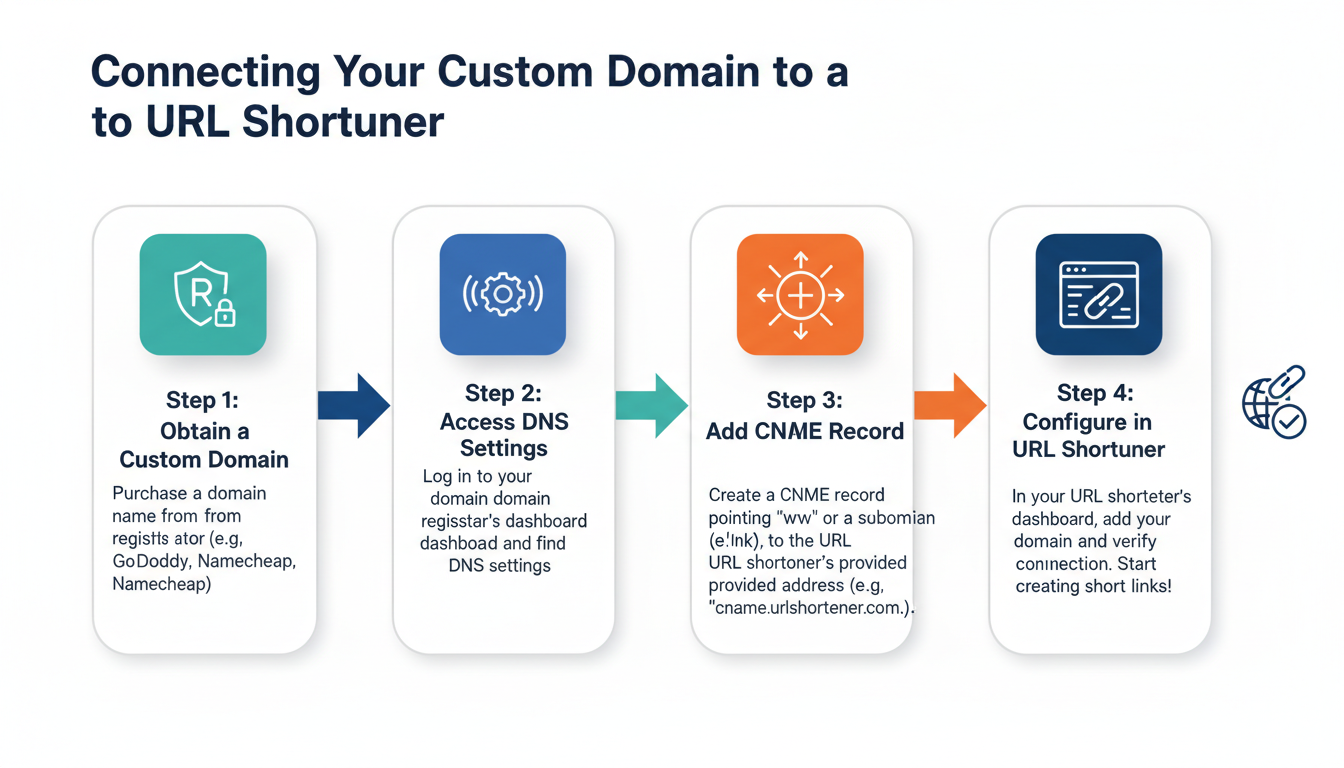
- Purchase a Vanity Domain: Buy a short, punchy domain name related to your brand (e.g., if your brand is “CoffeeHouse”, buy coff.ee or chouse.link). Keep it under 15 characters.
- Choose a Link Management Platform: Sign up for a premium URL shortener like Bitly, Rebrandly, or BLINK.
- Connect Your Domain: Navigate to the custom domains section of your shortener. You will need to log into your domain registrar (like GoDaddy or Namecheap) and update the DNS records (usually adding an A Record or CNAME) to point to the shortener’s servers.
- Verify the Connection: Wait for the DNS changes to propagate (this can take anywhere from 10 minutes to 24 hours). Your shortener dashboard will confirm when it’s live.
- Create Your First Link: Paste your long, ugly destination URL into the dashboard. Select your new custom domain from the dropdown menu.
- Customize the Slug: Change the random back-half of the link to something readable. Instead of coff.ee/8xT4p, make it coff.ee/FallMenu.
- Test and Deploy: Always click your new link in an incognito window to ensure it redirects perfectly before sharing it with your audience.
Free vs. Paid URL Shorteners: Which Do You Need?
With dozens of tools on the market, picking the right one can feel overwhelming. Free services are fantastic for casual users or solo bloggers. But if you are running a business, the limitations of free tiers will bottleneck your growth very quickly.
Here is a breakdown of what you typically get when you upgrade.
| Feature | Free URL Shorteners | Paid/Enterprise URL Shorteners |
|---|---|---|
| Custom Domains | Usually not included (stuck with bit.ly, tinyurl, etc.) | Multiple custom domains supported. |
| Link Editing | Permanent. Cannot change destination later. | Dynamic. Change destination URLs anytime. |
| Analytics Retention | 30 days of history. | Unlimited history, exportable reports. |
| Retargeting Pixels | Not available. | Full integration with Meta, Google, LinkedIn pixels. |
| Link Limits | Capped at 10-50 links per month. | Thousands to unlimited links per month. |
⚠️ Watch Out
Never use a free, generic URL shortener for sensitive internal company documents. Generic short links can sometimes be guessed or previewed by third parties using brute-force scripts. Always use secure, private link management for sensitive data.
The Dark Side of Link Shortening (Mistakes to Avoid)
Despite their massive utility, these tools can absolutely wreck your campaigns if misused. I’ve seen this play out time and time again with clients who try to cut corners.
First, avoid link chaining. This happens when you shorten a link that is already shortened (e.g., routing a Bitly link through a TinyURL link). This creates a redirect loop that drastically slows down page load times. Worse, email providers and mobile carriers view chained redirects as highly suspicious and will likely throw your message straight into the spam folder.
Second, beware of link rot. If you build your entire marketing infrastructure on a custom domain shortener, you must keep paying for that domain and the shortener service. If your credit card expires and you lose the vanity domain, every single short link you have ever printed, posted, or emailed will instantly break. It is a nightmare scenario.
⚠️ Watch Out
Don’t strip out your UTM parameters before shortening! The URL shortener tracks clicks, but Google Analytics needs those UTMs to track what the user does after they land on your site. Always attach UTMs to your long URL, and then shorten it.
Frequently Asked Questions
Do URL shorteners negatively affect my SEO rankings?
Generally, no. Reputable shorteners use 301 permanent redirects. According to Google, a 301 redirect passes the vast majority of “link juice” to the destination URL. However, if you use a spammy, low-quality shortener that uses 302 redirects or gets flagged for malware, it can indirectly harm your site’s reputation.
Are short links permanent, or do they expire?
It depends entirely on the service provider. Many free short links do not expire, but some platforms will recycle or delete links if they haven’t received a click in over 6 months. Paid services guarantee link permanence as long as your account remains active.
Can I customize the back-half of a short URL?
Yes. Most reputable platforms allow you to customize the alias (the part after the slash) to make it readable. For example, you can change a random string to something like brand.link/SpringSale, provided that specific alias hasn’t already been taken on that domain.
Is it safe for users to click on shortened URLs?
While most are perfectly safe, bad actors do use generic short links to mask malicious phishing destinations. This is exactly why using a branded custom domain is so important—it proves to the user that the link legitimately belongs to your company.
What happens if the URL shortener company goes out of business?
If the service hosting your links shuts down, your links will break. This is why enterprise businesses often self-host their link shorteners using open-source software (like YOURLS) or rely on heavily funded, established platforms with a proven track record.
Conclusion: Stop Leaving Clicks on the Table
Using a URL shortener is no longer just a convenience. It is a foundational element of a modern digital strategy. From cleaning up messy text in your SMS campaigns to providing deep, granular analytics into user behavior, these tools offer an incredibly high return on investment.
By upgrading to a branded domain, utilizing retargeting pixels, and avoiding common pitfalls like link chaining, you ensure your links are not only clicked but trusted. Don’t let an ugly, 300-character URL ruin your next big campaign. Take control of your links, track your data, and watch your conversion rates climb.
Read Also:
- 10 Ways to Maximize Results with a QR Code Generator
- The Ultimate Quiz Maker Strategy: Explode Engagement & Leads (2024)
- Schema Secrets to Dominate Google in 2026
- Is Your Writing Killing Your 2026 SEO?
- W to Hz Conversion in 2026? Why It’s Impossible (Expert Guide)
- Master the USD to INR Rate in 2026
- SE Ranking Review (2026): Is It Worth It? A Pro’s Take
- Targeta de Crédito Falsa Generar: The 2026 Guide to Safe Test Cards
- The 8am to 5pm Workday in 2026: A Guide to Thriving

