

Ever scrolled past a stunning chair on Instagram and thought, “I need that”? You take a screenshot, but now what? You try typing “modern wood leg accent chair with grey fabric,” but the results are a jumbled mess. It’s frustrating. It’s inefficient. And it’s a problem that’s quickly becoming obsolete.
What if you could just use that screenshot to find the exact chair, or dozens just like it, in seconds? That’s not science fiction. That’s the power of image similarity search, and it’s one of the most profound shifts in how we interact with the digital world.
This isn’t just another tech trend. It’s a fundamental change in discovery. In this deep dive, we’re pulling back the curtain on this visual AI. You’ll learn exactly how it works, why it’s more than just a gimmick for e-commerce, and how it’s solving complex problems in fields you’d never expect.
📑 What You’ll Learn
What Exactly Is Image Similarity Search?
At its heart, image similarity search is a system that lets you use an image as a search query. Simple, right? Instead of relying on keywords, tags, or file names, it analyzes the actual pixels within your image to find others that are visually related from a massive database.
This technology is formally known as Content-Based Image Retrieval (CBIR). It’s the engine behind features like Pinterest Lens, Google Lens, and Amazon’s StyleSnap. It doesn’t care if a file is named IMG_8374.jpg or “a photo of my dog.” It looks at the colors, the patterns, the shapes, and the objects within the frame to understand its essence.
Think of it this way: traditional search is like asking a librarian to find a book based on its title. Image similarity search is like showing the librarian the cover and asking, “Find me more books that feel like this one.” It’s a more intuitive, human way to explore visual information.
🎯 Key Takeaway
Image similarity search flips the script on traditional search. It uses an image’s visual content—not text metadata—as the query, allowing for a more intuitive and powerful way to discover related visual information across vast databases.
The 3-Step Process: How AI Learns to “See”
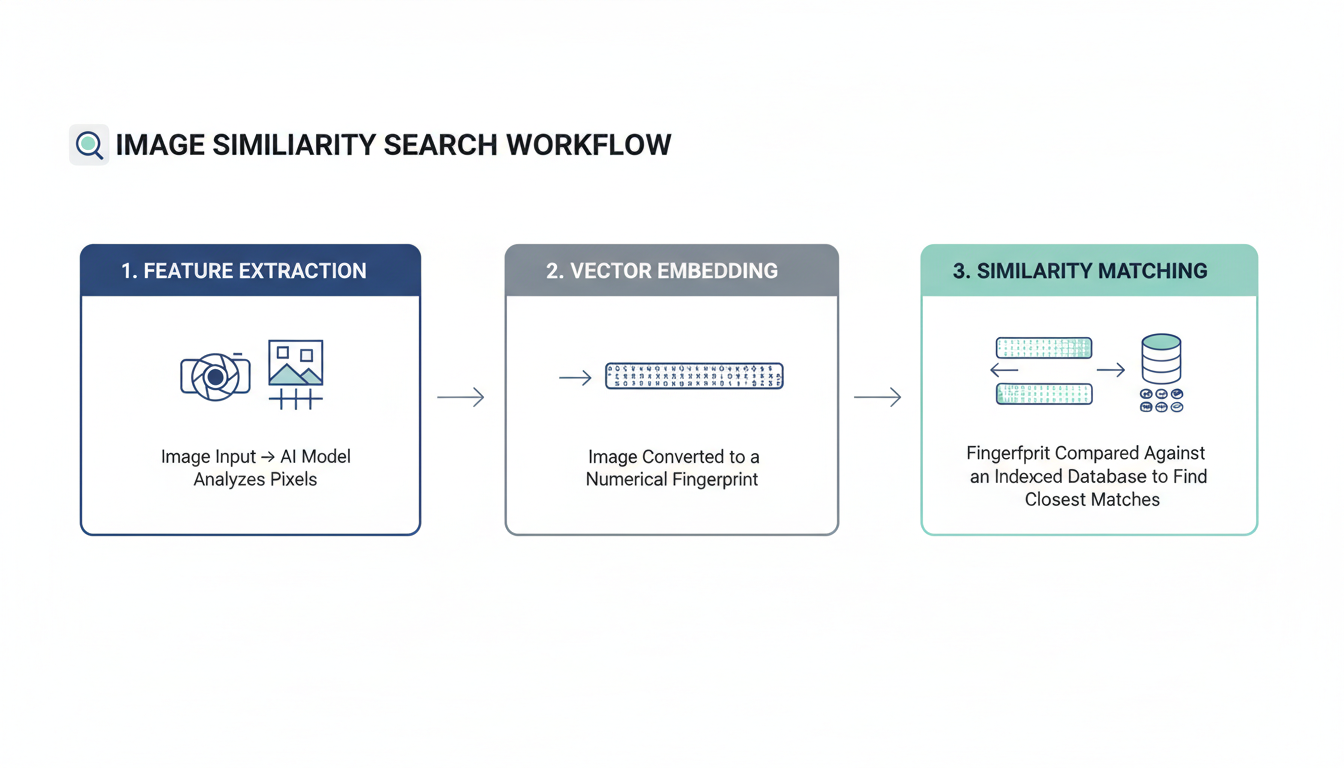
So, how does a machine look at a photo of a sneaker and find others like it? It’s not magic, but it is a brilliant blend of data science and computer vision. From our experience building and testing these systems, the entire process boils down to three critical stages.
-
Step 1: Feature Extraction
First, the system has to break down the query image into its core visual components. It’s not just looking at the image as a whole; it’s identifying and extracting hundreds of distinguishable characteristics. Early systems focused on low-level features like:
- Color Histograms: The overall distribution of colors.
- Textures: Patterns like stripes, dots, or the grain of wood.
- Shapes: The outlines and contours of objects in the image.
Modern systems, however, use sophisticated deep learning models (we’ll get to those later) to extract high-level, semantic features. This means the AI doesn’t just see “a collection of blue and white pixels”; it learns to recognize concepts like a ‘shirt collar,’ the ‘swoosh on a Nike shoe,’ or the ‘face of a golden retriever.’ This is where the real power lies.
-
Step 2: Creating a Vector “Fingerprint”
Once these features are extracted, they can’t just sit there as a jumble of data. They need to be converted into a format a computer can efficiently compare. This is done by creating a compact numerical representation called a feature vector or an “embedding.”
You can think of this vector as a unique digital fingerprint for the image. It’s a long list of numbers that mathematically summarizes the image’s visual essence. Every single image in the search database has its own unique fingerprint stored and ready for comparison.
-
Step 3: Indexing and Lightning-Fast Matching
Now, the system takes the fingerprint of your query image and compares it against the millions (or billions) of fingerprints in its database. Doing this one-by-one would be incredibly slow. Instead, these vectors are stored in a specialized, highly efficient index.
The system then uses advanced algorithms like Approximate Nearest Neighbor (ANN) to calculate the mathematical “distance” between your query vector and all the others. The images whose fingerprints are “closest” to yours are deemed the most visually similar. And voilà—they appear as your search results, often in less than a second.
💡 Pro Tip
The quality of the vector “fingerprint” is everything. A model that creates rich, nuanced embeddings will deliver far superior results. When evaluating a visual search tool, ask about the underlying model. Is it a generic model, or has it been fine-tuned on a dataset specific to your industry (e.g., fashion, furniture, automotive parts)?
Beyond Shopping: 5 Powerful Real-World Applications
While “shop the look” features on e-commerce sites are the most visible application, they’re just the tip of the iceberg. Based on real-world campaigns and enterprise deployments, we’ve seen this technology solve some seriously tough problems.
| Industry / Field | Application of Image Similarity Search | Business or Societal Impact |
|---|---|---|
| E-commerce & Retail | Users upload a photo to find and buy similar products. | Reduces purchase friction, increases conversion rates, and improves product discovery. |
| Digital Asset Management (DAM) | Finds duplicate images, locates brand assets without filenames, and organizes vast visual libraries. | Saves thousands of hours in manual labor, ensures brand consistency, and prevents asset misuse. |
| Content Moderation & Copyright | Automatically flags copyrighted material or harmful content (e.g., hate symbols, violence) by matching new uploads against a known database. | Protects platforms from legal liability and creates safer online environments at a massive scale. |
| Medical Imaging | A doctor uses an X-ray to find visually similar scans from past cases with confirmed diagnoses. | Aids in diagnosing rare diseases, provides clinical decision support, and accelerates radiologist training. |
| Law Enforcement & Security | Identifies suspects from surveillance footage, finds missing persons, or matches objects/logos from crime scenes to generate leads. | Accelerates investigations and improves public safety by analyzing visual evidence more effectively. |
As you can see, this is a transformative technology. For a large corporation, finding a specific marketing photo in a library of 5 million images can be impossible with keywords alone. With visual search, it’s a 5-second task. That’s a massive ROI.
⚠️ Watch Out
The “black box” problem is real. Many deep learning models can produce amazing results without being able to explain why they considered two images similar. For sensitive applications like medical diagnosis or law enforcement, this lack of interpretability is a significant concern that the industry is actively working to address.
The Engine Room: Traditional vs. Deep Learning Algorithms
The magic behind image similarity search isn’t one single algorithm; it’s an entire field of computer science that has evolved dramatically. The biggest shift? The move from handcrafted features to self-learning neural networks.
Understanding this evolution is key to appreciating just how far we’ve come. Trust me on this one, the difference is night and day.
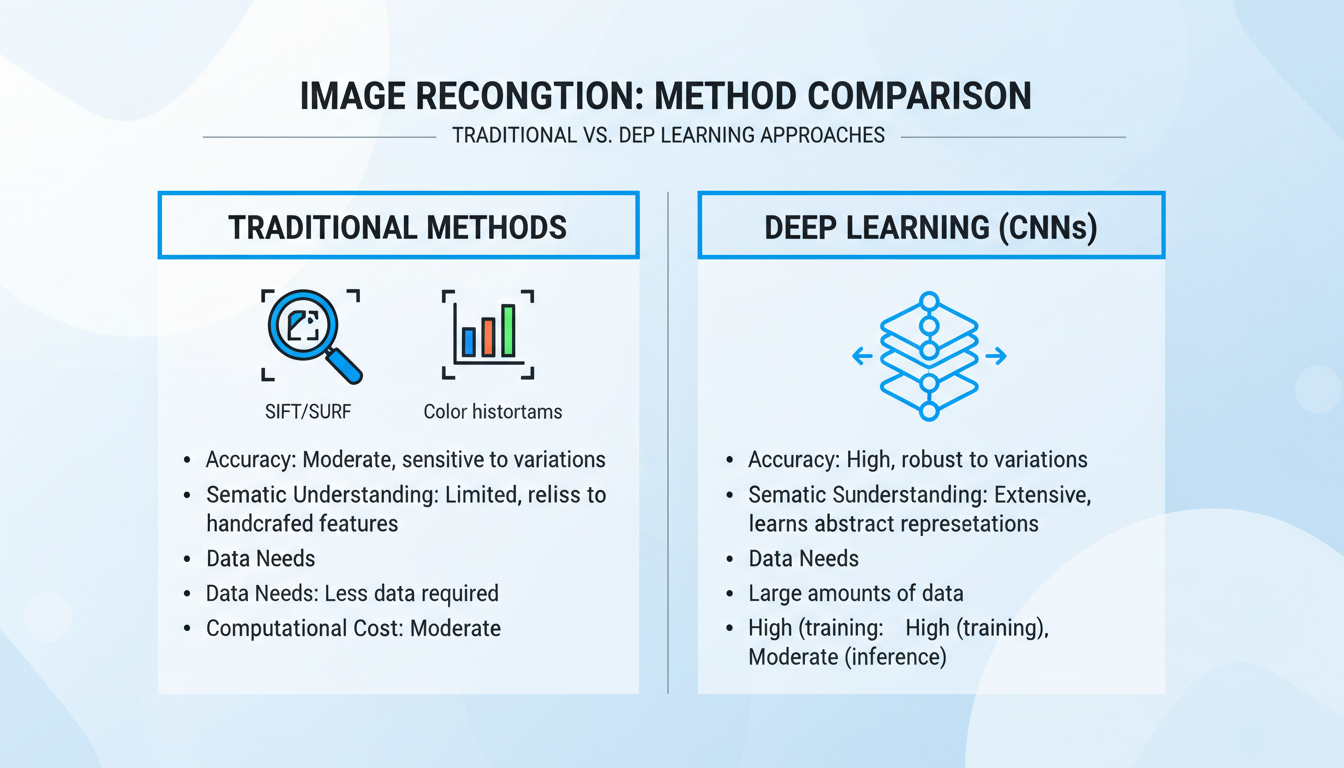
| Attribute | Traditional Methods (e.g., SIFT, SURF, Color Histograms) | Deep Learning Methods (e.g., CNNs) |
|---|---|---|
| Core Idea | Relies on pre-defined, “handcrafted” algorithms to find low-level features like corners, edges, and color distributions. | Uses a Convolutional Neural Network (CNN) to learn relevant features automatically from massive datasets. |
| Semantic Understanding | Very Low. It might match a blue car with a blue sky because they share a dominant color. It has no concept of “car” or “sky.” | Very High. The model learns hierarchical features, from simple edges to complex objects. It understands context and meaning. |
| Accuracy | Good for specific tasks like finding exact duplicates, but poor for finding conceptually similar items. | State-of-the-art. Dramatically outperforms traditional methods on almost all visual search benchmarks. |
| Data & Power Needs | Computationally cheaper and doesn’t require large training datasets. | Requires huge labeled datasets (millions of images) and powerful GPUs for training. A significant investment. |
For years, computer vision scientists relied on algorithms like SIFT (Scale-Invariant Feature Transform). It was brilliant for its time, but it lacked context. The deep learning revolution, powered by CNNs, changed everything. These models, inspired by the human brain’s visual cortex, are trained on vast image libraries like ImageNet. They don’t just see pixels; they learn to recognize objects, scenes, and even abstract styles. As detailed in countless papers on research hubs like arXiv.org, this ability to capture semantic meaning is what makes modern visual search feel so intuitive.
The Road Ahead: Challenges and the Future of Visual AI
Despite the incredible progress, image similarity search isn’t a solved problem. I’ve seen this play out in real-world projects. Pushing the boundaries means tackling some serious challenges.
Current Hurdles to Overcome
- Scalability: Searching billions of images in milliseconds is a monumental engineering feat. It requires constant innovation in indexing algorithms and distributed computing.
- The Semantic Gap: This is the classic chasm between a computer’s low-level pixel analysis and our high-level human understanding. A search for a “photo that feels lonely” is still incredibly difficult for an algorithm to grasp.
- Fine-Grained Recognition: Distinguishing between a 2025 and a 2026 model of the same car, or two nearly identical species of butterfly, requires highly specialized models and remains a frontier of research.
💡 Pro Tip
When dealing with fine-grained recognition problems, transfer learning is your best friend. Instead of training a model from scratch, start with a powerful pre-trained model (like EfficientNetV2) and then fine-tune it on your specific dataset of car models or butterfly species. This saves immense time and resources.
The Future is Multi-Modal and Hyper-Personal
So, what’s next? The future isn’t just visual; it’s multi-modal. Imagine combining an image with text or voice. You could upload a photo of a sofa and add the query, “in green velvet.” This fuses the precision of visual search with the specificity of text.
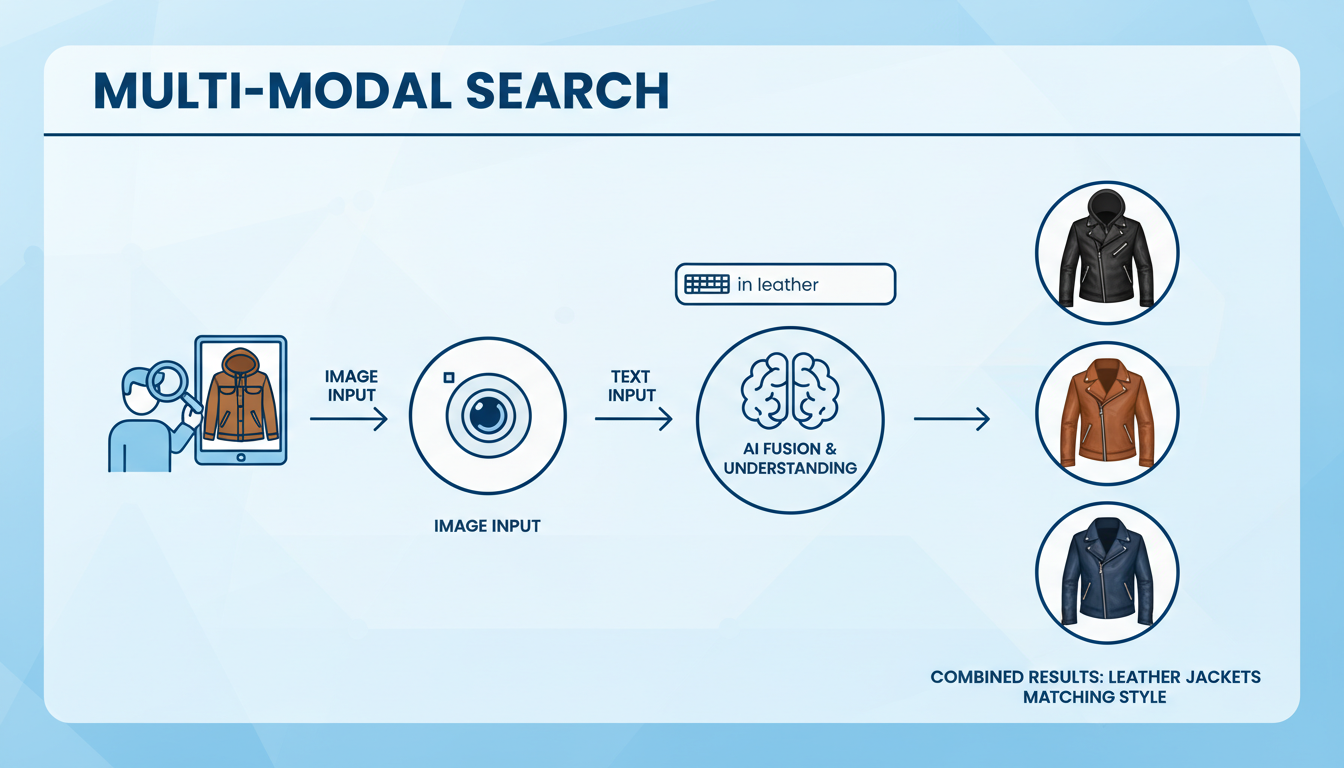
Leading AI research, often highlighted in publications like the MIT Technology Review, points toward a future where this technology is seamlessly integrated into our lives. Think augmented reality glasses that can identify any plant you look at or smart assistants that can find a product from a show you’re watching in real-time. The goal is to make search completely frictionless, predictive, and deeply personal.
Conclusion: A New Way to See the Digital World
Image similarity search has officially graduated from a niche academic concept to a cornerstone of modern digital interaction. It has fundamentally rewired how we discover products, organize information, and even solve crimes. By teaching machines to see and understand the world in a more human-like way, we’ve unlocked a more intuitive, powerful, and efficient method for navigating our ever-expanding visual universe.
The next time you use Google Lens to identify a flower or Pinterest to find a piece of furniture, take a moment to appreciate the incredible complexity working behind that simple interface. You’re not just searching; you’re having a visual conversation with one of the most powerful AI systems ever built. The only question left is, what will you discover next?
❓ Frequently Asked Questions
What’s the difference between image search and image similarity search?
Traditional image search (like early Google Images) relies on text metadata—keywords, tags, and filenames—to find images. Image similarity search, often called reverse image search, uses an actual image as the query, analyzing its visual content (colors, shapes, objects) to find other images that look like it.
Is Content-Based Image Retrieval (CBIR) the same thing?
Yes, for the most part. CBIR is the formal, academic term for the entire field of retrieving images from a database based on their visual content. Image similarity search is the most common and popular application of CBIR technology.
How accurate is image similarity search in 2026?
Accuracy has improved exponentially thanks to deep learning. For finding identical or near-identical images (like for copyright detection), it’s nearly perfect. For finding conceptually similar items (e.g., “a different chair with a similar style”), its accuracy is extremely high and continues to improve, though it can still be subjective and depends on the quality of the AI model.
Can this technology be used for video?
Absolutely. The core principles are extended to video similarity search. This involves breaking videos into keyframes (representative images) or analyzing motion vectors and then using similarity techniques to find matching scenes, objects, or actions across vast video libraries. It’s more complex but is a rapidly growing field, especially for content moderation and media analysis.
What are the privacy implications of visual search?
This is a critical concern. Technologies like facial recognition, a form of image similarity search, raise significant privacy questions about surveillance and consent. Reputable companies address this with clear privacy policies, data anonymization techniques, and by giving users control over their data. It’s crucial to be aware of how and where your images are being used.

