
Picture this: You’re sending a two-hour podcast episode to a friend because of one specific joke that happens at the 54-minute mark. You send the link. They open it. They watch the first 30 seconds of the intro, get bored, and close the tab. The moment is lost.
We’ve all been there. In the fast-paced digital landscape of 2026, attention is the most valuable currency. If you aren’t directing your audience to the exact moment that matters, you’re losing them.
Whether you are a casual viewer trying to share a clip or a content creator fighting for retention, understanding how to make a time stamp in YouTube is no longer optional—it’s a necessity. It’s the difference between a bounce and a subscriber. It’s the difference between a confused Google bot and a rich snippet on the Search Engine Results Page (SERP).
In this deep dive, we aren’t just covering the basics. We’re looking at the advanced mechanics of “Deep Linking,” the SEO implications of Video Chapters, and the specific URL hacks that power users rely on.
📑 What You’ll Learn
- The Psychology & SEO Behind Timestamps
- Method 1: The “Deep Link” (Sharing Specific Moments)
- Method 2: Community Engagement via Comments
- Method 3: Video Chapters for Creators (The SEO Goldmine)
- Mobile vs. Desktop: Navigating the Differences
- Troubleshooting: Why Your Chapters Failed
- Frequently Asked Questions
The Psychology & SEO Behind Timestamps
Before we get into the “how-to,” let’s talk about the “why.” Why does Google care so much about these little blue numbers?
It comes down to User Experience (UX). According to usability research from the Nielsen Norman Group, users often skip video content that lacks clear navigation or structure. They want to scan a video just like they scan a blog post.
When you create a timestamp, you are essentially creating an anchor tag for video. In 2026, YouTube’s algorithm—and by extension, Google’s—heavily weighs “Key Moments.” These are the segmented search results that allow a user to click directly into a specific part of a video right from Google Search.
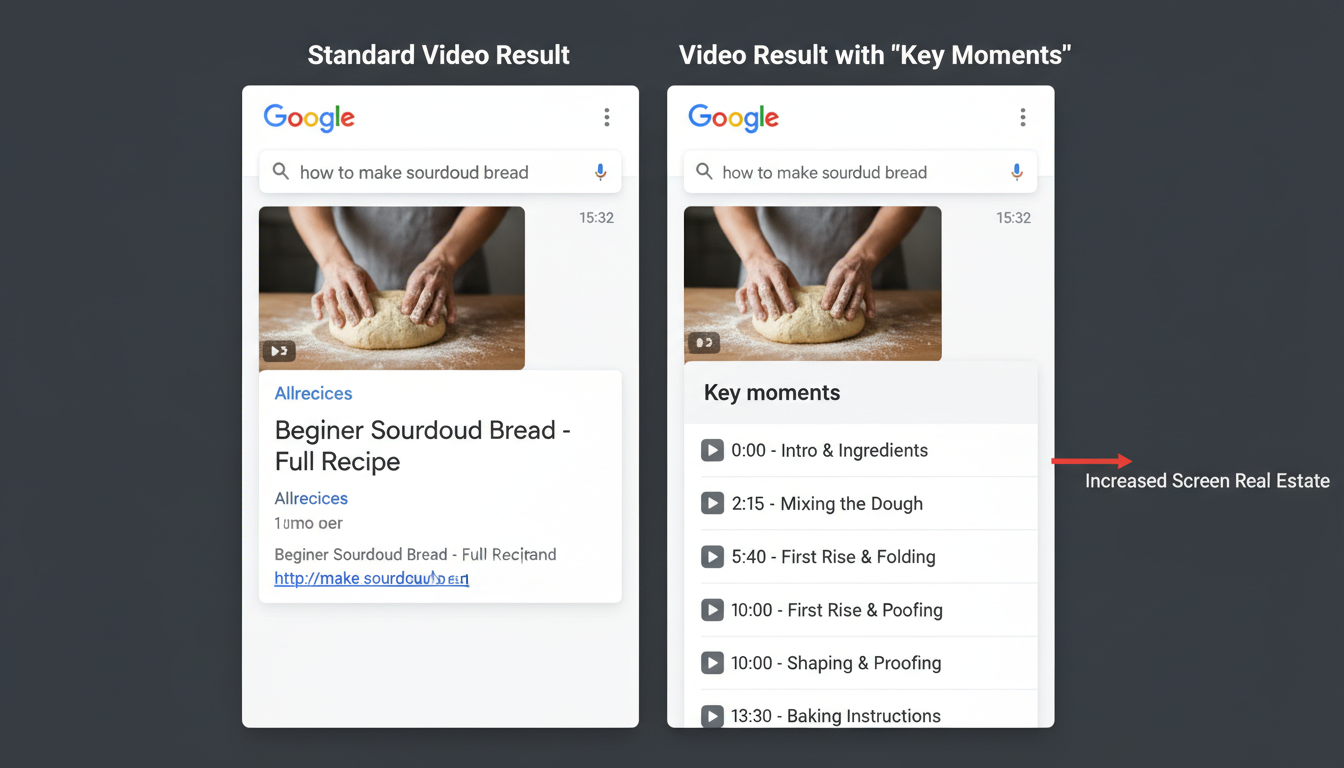
If you master how to make a time stamp in YouTube, you aren’t just being helpful; you are engineering your content to dominate search results.
🎯 Key Takeaway
Timestamps are not just navigation tools; they are SEO metadata. By structuring your video with timestamps, you increase the likelihood of appearing in Google’s “Key Moments” feature, effectively doubling your visibility on search pages.
Method 1: The “Deep Link” (Sharing Specific Moments)
This is the method for the everyday user. You want to share a video on WhatsApp, Slack, or X (formerly Twitter), and you want it to start playing immediately at the good part.
The Desktop “Right-Click” Trick
The fastest way to do this on a computer requires zero typing.
- Play the video and pause it exactly where you want the recipient to start watching.
- Right-click (or Control-click on Mac) directly on the video player window.
- Select “Copy video URL at current time”.
That’s it. The link is now in your clipboard.
The Manual URL Hack (For Power Users)
Sometimes the interface fails, or you are crafting a link manually for an email campaign. You need to understand the anatomy of the URL. You can append a simple code to the end of any YouTube link to force a start time.
The Formula: ?t=XmYs
- ? = This tells the browser a query is starting.
- t = Stands for “time.”
- Xm = The number of minutes.
- Ys = The number of seconds.
Example: To link to 2 minutes and 30 seconds:
youtube.com/watch?v=12345?t=2m30s
💡 Pro Tip
If the URL already has a question mark in it (like ?feature=share), you cannot use another question mark. You must switch to an ampersand (&).
Correct: youtube.com/watch?v=12345&feature=share&t=2m30s
Method 2: Community Engagement via Comments
Have you ever scrolled through the comments and seen someone list out all the songs in a mix, or the funny moments in a gaming compilation? These users are the unsung heroes of the platform.
Learning how to make a time stamp in YouTube comments is incredibly straightforward, but it builds massive community trust. Here is the workflow:
- Identify the Time: Look at the player clock (e.g., 04:15).
- Type it Out: In the comment box, type “04:15” (the colon is crucial).
- Add Context: Always explain what happens. “04:15 – The moment he realized his mistake.”
Once you hit “Comment,” YouTube’s backend script automatically detects the Number:Number pattern and converts it into a clickable hyperlink (HTML anchor).
⚠️ Watch Out
Avoid using periods (4.15) or hyphens (4-15). YouTube only recognizes the colon format (4:15). If you use the wrong punctuation, the text will remain plain text and won’t be clickable.
Method 3: Video Chapters for Creators (The SEO Goldmine)
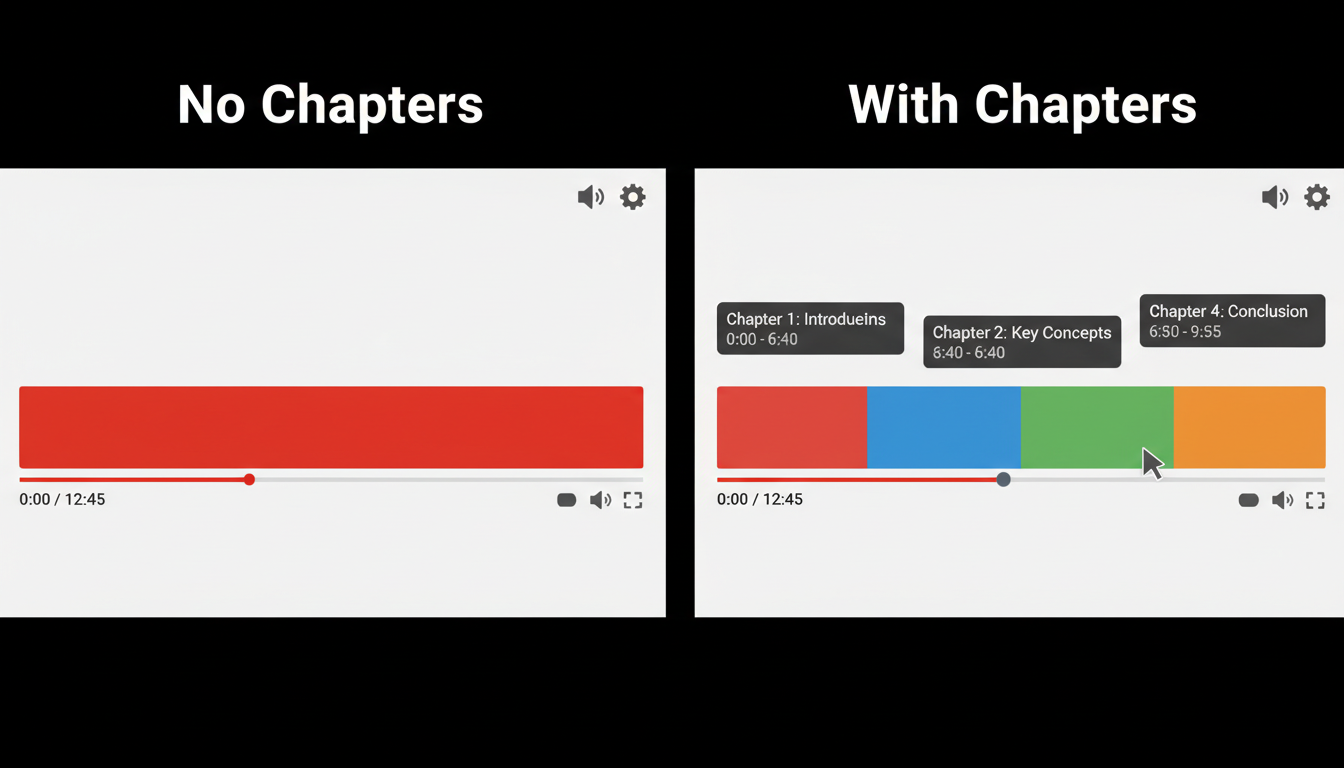
This is the most critical section for creators. Video Chapters split your progress bar into distinct blocks. This allows viewers to hover over the timeline and see the title of the section they are watching.
But more importantly, this data is fed directly to Google Search. If you want to rank for “How to tie a tie,” but your video is “Men’s Fashion Basics,” a chapter titled “How to tie a tie” can help you rank for that specific query.
The Strict Rules of Chapters
YouTube is very particular about this. If you miss one of these requirements, your chapters will not render.
| Requirement | Why it Matters |
|---|---|
| The 00:00 Rule | You MUST start the list with 00:00. No exceptions. |
| Minimum Quantity | You need at least 3 timestamps in the list. |
| Minimum Length | Each chapter must be at least 10 seconds long. |
| Chronological Order | Times must go from start to finish (no jumping back). |
Step-by-Step Implementation
- Go to YouTube Studio and select your video.
- Open the Description field.
- Create a section called “Timestamps” or “Chapters.”
- Type your list following the format:
MM:SS Chapter Title.
Example of a Perfect Description:
00:00 Intro & Welcome
01:30 Why Timestamps Matter
04:45 How to Create Links
08:20 Conclusion
If you are repurposing this video content for your blog, you can use tools like an AI Text Summarizer Guide to quickly extract these key points from your transcript, ensuring your blog post matches your video structure perfectly.
Mobile vs. Desktop: Navigating the Differences
In 2026, mobile usage dominates, but the functionality for creating timestamps differs slightly between the app and the desktop site.
On Desktop: You have full control. You can right-click, you can see the exact frame, and copying URLs with time parameters is native.
On Mobile (App): The “Copy at current time” feature is often missing or buried depending on the latest app update. The most reliable method on mobile is to copy the generic share link, paste it into your text message or social post, and manually type &t=1m30s at the end of it.
If you are embedding these videos on your own website, simply pasting the link won’t work. You need the iframe code. To ensure the start time triggers correctly on your site, I recommend using a Free YouTube Embed Code Generator. This ensures the start= parameter is placed correctly within the HTML code.
Troubleshooting: Why Your Chapters Failed
We see this all the time. A client spends hours optimizing their description, hits save, and… nothing. The timeline is still a solid red bar. What went wrong?
Here is the diagnostic checklist used by SEO professionals:
- The “Intro” Mistake: Did you start at
00:05? Change it to00:00. Even if your real content starts later, the list must initialize at zero. - Formatting Errors: Did you use
02.30instead of02:30? - Copyright Strikes: This is a big one. If your video has a “Content ID” claim (even a partial one for background music), YouTube may disable the automatic chapter feature for that specific video.
- Too Short: Do you have a chapter that is only 4 seconds long? Merge it with the previous one.
For a deeper understanding of how video metadata affects search visibility, Google Search Central provides excellent documentation on video structured data.
❓ Frequently Asked Questions
Can I add timestamps to a video I don’t own?
You can add timestamps in the comments of any video, which creates clickable links for other viewers. However, you cannot add Video Chapters to the progress bar or description unless you are the channel owner.
Do timestamps help with YouTube monetization?
Indirectly, yes. While they don’t change ad rates, they improve audience retention. When users can skip to what they want, they stay on the platform longer rather than clicking away in frustration. Higher retention signals to the algorithm that your video is valuable, leading to more impressions.
How do I timestamp a video longer than one hour?
For videos exceeding 60 minutes, you must switch your format to H:MM:SS. For example, a timestamp for 1 hour, 5 minutes, and 20 seconds should be written as 1:05:20. If you write 65:20, it may not link correctly.
Why do some timestamps appear as “Key Moments” in Google and others don’t?
Google’s algorithm decides which videos get the “Key Moments” treatment based on channel authority, video clarity, and the descriptiveness of the chapter titles. Vague titles like “Step 1” are less likely to be featured than descriptive ones like “Step 1: Installing the Drivers.”
Conclusion
Mastering how to make a time stamp in YouTube is a micro-skill with macro results. In the attention economy of 2026, respecting your viewer’s time is the ultimate sign of quality.
By implementing the 00:00 rule, using descriptive chapter titles, and utilizing deep links when sharing content, you elevate your video strategy from amateur to professional. You aren’t just making a video easier to watch; you are making it easier for search engines to understand and rank.
Your next step? Go to your most popular video right now. Check the description. If it doesn’t have a timestamp list starting at 00:00, add it immediately. The SEO benefits might just surprise you.

