
Ever send a message that landed completely wrong? A serious comment taken as a joke, or a lighthearted jab that came off as just… mean. We’ve all been there. In the world of text, tone is invisible, and miscommunication is the default. But then, a tiny, pixelated hero swoops in: 😂.
This isn’t just about texting, though. For marketers, designers, and creators, that simple laughing face is a powerful tool. But grabbing a low-quality screenshot won’t cut it. You need a high-resolution, transparent laughing emoji PNG to truly unlock its potential.
Forget generic advice. This is your masterclass. You’re about to learn the critical difference between emoji types, where to find professional-grade files (for free and paid), and how to use them to create content that genuinely connects and converts. Let’s get started.
📑 What You’ll Learn
The Great Emoji Divide: Why a PNG Isn’t Just a Picture
First things first, let’s clear up a massive point of confusion. The emoji you type on your phone (like this: 😂) and a laughing emoji PNG are two completely different beasts. One is text, the other is an image. Understanding this is the key to using them professionally.
- Unicode Characters (😂): This is essentially a font character. Your device reads a code (U+1F602) and displays the corresponding image from its built-in emoji set (Apple, Google, Samsung, etc.). You can’t control its style, and it can look different on other people’s devices.
- Image Files (PNG, SVG, JPG): These are actual graphics. A PNG (Portable Network Graphics) is a designer’s best friend because it supports transparency. This means you can place it on any background—a photo, a colored banner, a video—without that ugly white box around it. It’s the ultimate in creative control.
Here’s a quick breakdown of the technical differences. Trust me, knowing this will save you headaches later.
| Feature | Unicode Emoji (😂) | PNG Image | SVG Image |
|---|---|---|---|
| Type | Text/Font Character | Raster Image (Pixel-based) | Vector Image (Code-based) |
| Transparency | Yes (by default) | Yes (Alpha Channel) | Yes |
| Scalability | Loses quality when enlarged | Loses quality when enlarged | Infinitely scalable (perfect quality) |
| Best For | Texting, social media comments | Web graphics, social posts, presentations | Logos, animations, high-res print |
| Consistency | Varies by device/platform | 100% consistent everywhere | 100% consistent everywhere |
💡 Pro Tip
When you download a PNG, make sure it’s high-resolution (at least 500×500 pixels for web use). A small, low-quality PNG will look blurry and unprofessional the moment you try to make it bigger. It’s always better to scale down a large image than to scale up a small one.
Decoding the Nuances: Which Laughing Emoji Should You Use?
Not all laughter is the same. A quiet chuckle is different from a hysterical, can’t-breathe laugh. The emoji world gets this, offering a spectrum of emotions. Choosing the right one is crucial for setting the correct tone in your content. Based on our experience analyzing social media engagement, the specific emoji you choose can dramatically alter how your message is received.
- 😂 Face with Tears of Joy: The undisputed champion. This is for something genuinely hilarious. It’s the digital equivalent of a belly laugh. Use it for memes, punchlines, and relatable “fail” content.
- 🤣 Rolling on the Floor Laughing (ROFL): The next level up. The tilted head and bigger tears signal something so funny it’s absurd. This is for pure comedic gold, over-the-top situations, and when 😂 just isn’t enough.
- 😄 Grinning Face with Smiling Eyes: This is a softer, warmer laugh. It’s less about a joke and more about general happiness, friendliness, and positive amusement. It’s a safe, approachable choice for brand announcements or friendly replies.
- 🥲 Smiling Face with Tear: The most complex of the bunch. This emoji walks the line between joy and sadness. It’s perfect for bittersweet moments, laughing through a tough situation, or expressing overwhelming gratitude. It adds a layer of emotional depth.
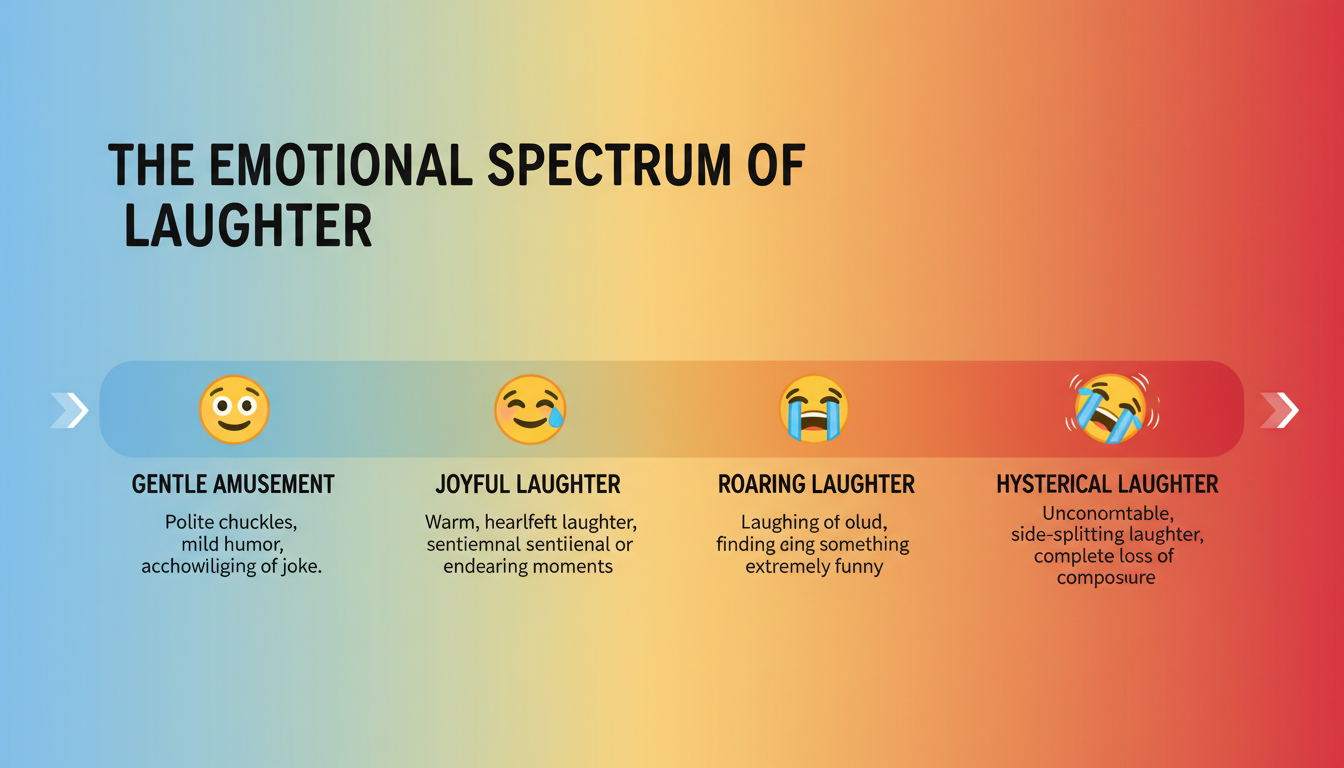
To make it even clearer, here’s a cheat sheet for your content strategy.
| Emoji | Vibe | Best Use Case in Marketing | Example |
|---|---|---|---|
| 😂 | Hilarious / Relatable | Reacting to a funny user-generated comment or a relatable meme. | “Our face when we see someone try to assemble our product without instructions 😂” |
| 🤣 | Hysterical / Absurd | Highlighting a blooper reel or an incredibly funny customer story. | “The server crashing during our biggest sale of the year 🤣 We’re back now!” |
| 😄 | Happy / Friendly | Announcing a new feature or celebrating a company milestone. | “We just hit 50,000 happy customers! Thank you all so much 😄” |
| 🥲 | Bittersweet / Touched | Sharing a heartwarming customer testimonial or a nostalgic post. | “Reading your amazing reviews from the past 10 years has us like 🥲” |
🎯 Key Takeaway
The emoji you type is just text that changes based on the viewer’s device. A laughing emoji PNG is a consistent, high-quality image file that gives you complete creative control, making it the only professional choice for design and marketing projects.
7 Game-Changing Ways to Use a Laughing Emoji PNG in 2026
Okay, you’ve got the perfect, high-quality PNG file. Now for the fun part. How do you actually use it to make your content better? Here are seven powerful applications we use in our own campaigns.
- Stop Thumbs with Dynamic Social Graphics: The social media feed is a war for attention. A large, crisp laughing emoji PNG layered onto an image or video can stop the scroll. Use it to emphasize a funny quote or as a visual punchline.
- Humanize Your Email Marketing: Emails can feel cold and corporate. A well-placed laughing emoji in your newsletter design (not the subject line!) can make your brand feel more approachable and human, potentially boosting click-through rates.
- Create Engaging Reaction Polls: On platforms like Instagram Stories, use different emoji PNGs as voting options. It’s far more visually appealing than the default poll sticker and encourages interaction.
- Energize Your Website’s Micro-interactions: Who said websites have to be boring? Use a laughing emoji PNG as a custom icon, a fun loading animation, or a hover effect on a button. These small details create a delightful user experience.
- Design On-Brand Custom Stickers: Create a custom sticker pack for WhatsApp or Telegram featuring a laughing emoji styled with your brand’s colors or logo. It’s a fantastic way to build a community and let your fans share your brand.
- Level-Up Your Presentations: Break up dense, text-heavy slides in your pitch deck or webinar. A full-screen slide with just a single, high-quality laughing emoji after a joke or a positive data point can re-engage your audience instantly.
- Craft Your Own Viral Memes: Memes are the language of the internet. Having a go-to folder of transparent emoji PNGs makes it incredibly easy to jump on a trending meme format, creating timely and relevant content for your brand.
⚠️ Watch Out
More is not better. Overloading your graphics with emojis makes your brand look unprofessional and desperate. Use them strategically as a single, impactful accent, not as digital confetti. One strong emoji is better than five weak ones.
Your Step-by-Step Guide: Adding a PNG to a Social Media Post
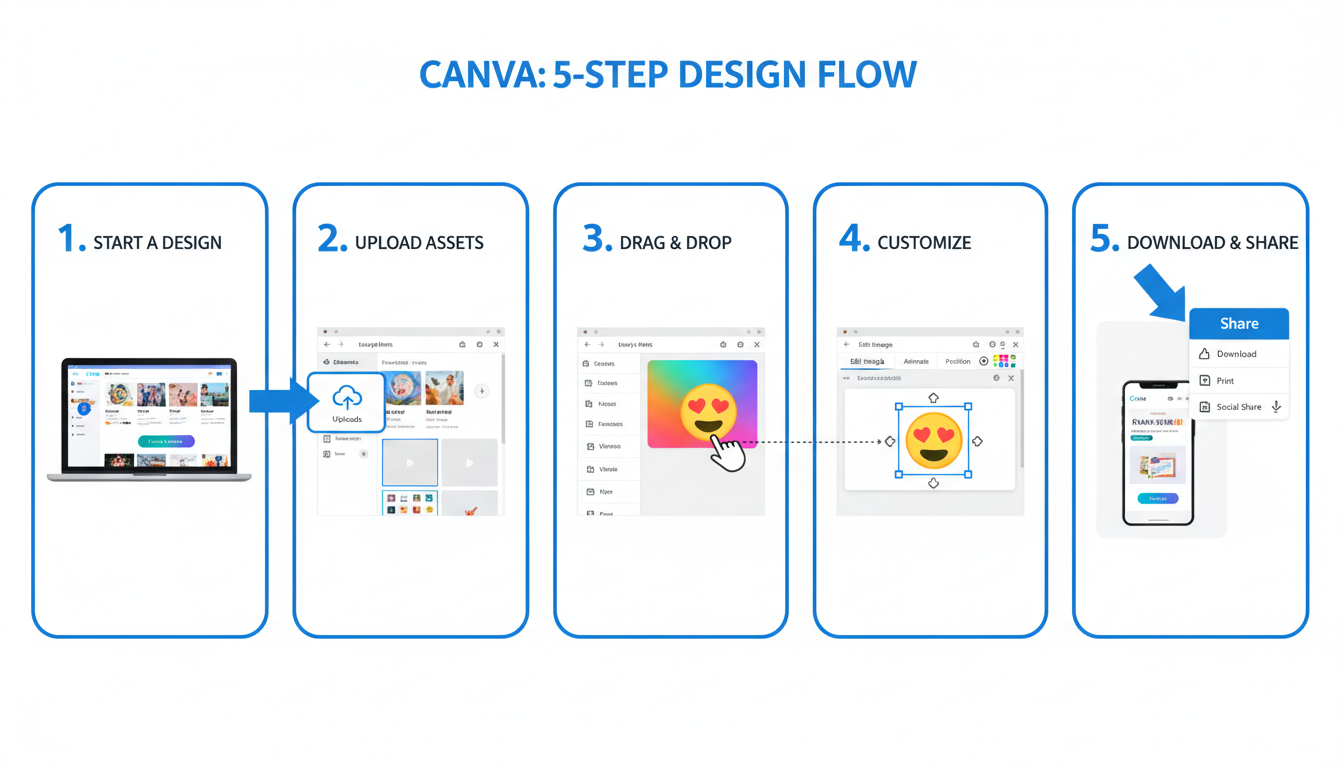
Let’s make this practical. Here’s how you can add a laughing emoji PNG to a photo for your Instagram feed using a free tool like Canva.
- Start a New Design: Open Canva and choose the “Instagram Post (Square)” template.
- Upload Your Base Image: Upload the photo you want to use as the background and fit it to the template.
- Upload Your Emoji PNG: On the left-hand menu, go to “Uploads” and upload your transparent laughing emoji PNG file.
- Drag, Drop, and Resize: Click on the uploaded emoji to add it to your design. Drag it into position. Use the corner handles to resize it. Because it’s a high-quality PNG, it won’t get blurry!
- Add Text & Export: Add any necessary text or other elements, then click “Share” and “Download” to save your final image.
The Ultimate Source List for High-Quality Laughing Emoji PNGs
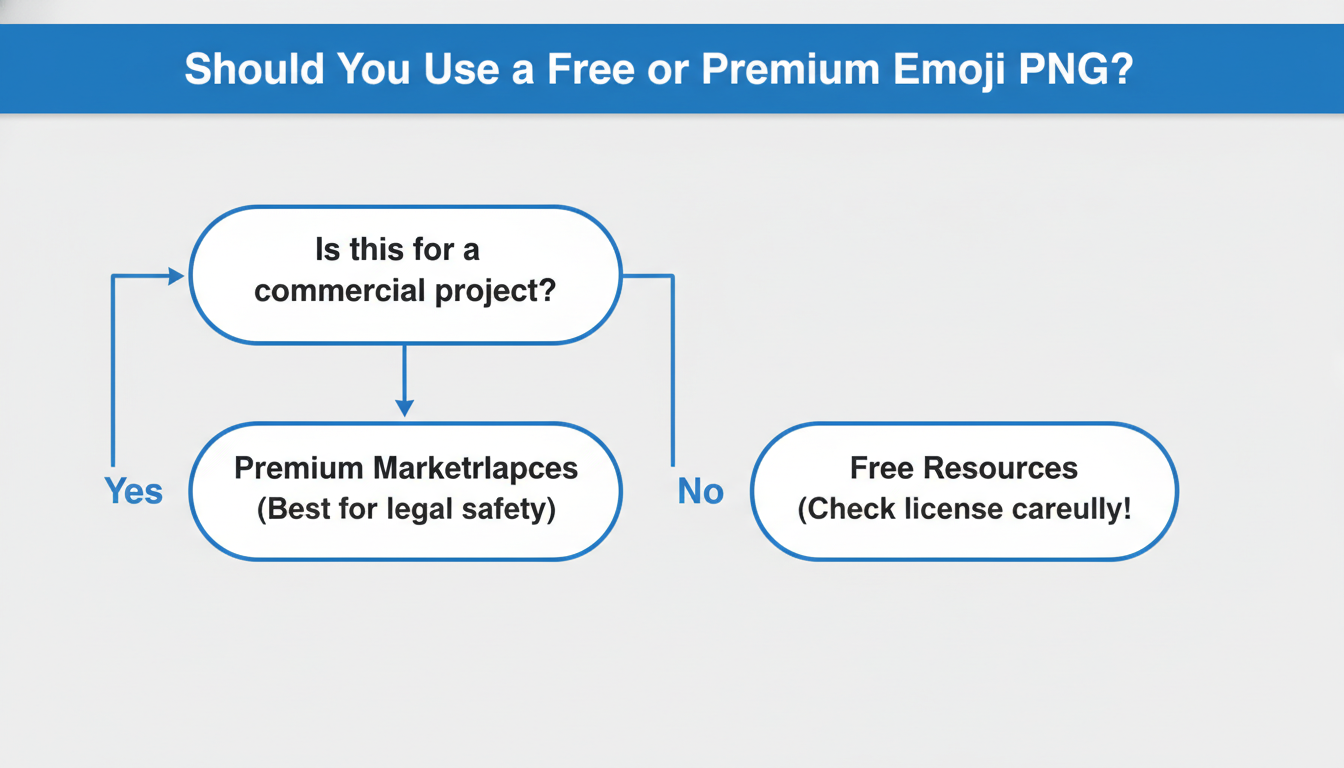
Finding a good PNG file can be a minefield of low-res images and shady licensing. Here’s a curated list of reliable places to look, broken down by free and premium options.
Free Resource Hubs (Use with Caution)
These sites are great for personal projects or internal presentations, but always double-check the license before using them for commercial marketing.
- CleanPNG / Pngtree: These sites specialize in transparent PNGs and have massive libraries. The catch? They often have download limits and may require attribution.
- Pixabay & Pexels: While known for photos, they also have a good selection of illustrations and graphics. Use the search filter to look for “transparent” or “vector” images.
Premium Marketplaces (The Professional’s Choice)
When you need guaranteed quality and a rock-solid commercial license, premium is the only way to go. It’s a small investment that protects your business legally.
- Adobe Stock: Offers incredibly high-quality, professionally designed emoji sets and illustrations that are consistent in style.
- Shutterstock: A massive library with millions of vector emojis (which can be saved as PNGs) in every conceivable style.
- Envato Elements: A subscription service that gives you unlimited downloads of millions of assets, including countless emoji packs.
💡 Pro Tip
Pay attention to style! Don’t just grab the first emoji you see. Does your brand have a flat, minimalist aesthetic? Or is it 3D and glossy? Find an emoji PNG that matches your existing brand guidelines. Consistency is what separates professional design from amateur work.
⚠️ Watch Out for Copyright Traps
You cannot use another company’s emoji design in your logo or for merchandise. Apple, Google, and Microsoft’s emoji designs are their copyrighted intellectual property. Using them can lead to serious legal trouble. For these uses, you must use a generic open-source version or design your own unique character.
The Psychology Behind Why This Tiny Image Has Such a Huge Impact
So why does this little yellow face work so well? It’s pure psychology. In face-to-face conversation, we rely on non-verbal cues—a smile, a nod, a laugh—to understand the true meaning behind words. According to research on computer-mediated communication, emojis serve as digital body language, re-inserting that crucial emotional context into our flat, text-based world.
A laughing emoji doesn’t just say “this is funny.” It builds rapport. It signals friendliness. It prevents a sarcastic comment from being misinterpreted as an attack. It makes digital interactions feel more human.
The global standardization of these symbols by the Unicode Consortium ensures that a 😂 sent from an iPhone is recognizable as a laughing face on an Android or a Windows PC. This creates a shared visual language understood by billions. For an exhaustive look at how each emoji appears on different platforms, the authoritative resource is Emojipedia, which documents every single character in detail.
By using a laughing emoji PNG in your designs, you’re tapping into this universal language to make your brand more relatable, understandable, and emotionally resonant.
❓ Frequently Asked Questions
What’s the main difference between a JPG and a PNG laughing emoji?
Transparency. A PNG file can have a transparent background, so you can place it on any color or image without a white box around it. A JPG cannot. PNGs also use lossless compression, meaning they don’t lose quality when saved, unlike JPGs.
Can I use a laughing emoji PNG in my business logo?
It’s strongly advised against. Most emoji designs are copyrighted by platforms like Apple or Google. Using one in a logo is a trademark and copyright risk. Always create a 100% unique logo for your business.
How do I make an emoji PNG bigger without it getting blurry?
You need to start with a high-resolution file. A small image (e.g., 100×100 pixels) will always look blurry when enlarged. Download a PNG that is at least 500×500 pixels, or even better, find a vector version (SVG or AI file) which can be scaled to any size with perfect clarity.
Are all laughing emoji PNGs on the internet free to use?
Absolutely not. “Free” often comes with strings attached. Many sites require you to give credit (attribution) or restrict use to personal projects only. For business or marketing, always read the license carefully or pay for a file from a reputable stock site to be legally safe.
Which laughing emoji is the most popular in 2026?
The ‘Face with Tears of Joy’ (😂) has been the most-used emoji for nearly a decade. While the ‘Loudly Crying Face’ (😭) is sometimes used ironically for laughter, and the ‘Skull’ (💀) has become slang for “I’m dead from laughing,” the classic 😂 remains the most universally understood symbol for pure amusement.
Your Next Step: Elevate Your Visuals
The laughing emoji PNG is so much more than a simple graphic. It’s a bridge in digital communication, a tool for brand personality, and a shortcut to emotional connection. You now have the knowledge to use it like a pro.
You understand the critical technical differences, you can decode the subtle emotional cues of each variation, and you know exactly where to find high-quality, legally safe files. You’re no longer just dropping pictures into your content; you’re making strategic design choices.
So here’s your next step: Go to one of the resource sites mentioned above, find one high-quality, transparent laughing emoji PNG that fits your brand’s style, and save it. The next time you create a social media post or a presentation, use it. See how it changes the tone. That’s how you start building a more human, engaging, and effective brand online.

