

You’ve hit a wall. That critical file you need—a firmware update, a game mod, a piece of legacy data—is trapped inside a .PAK archive. The system you’re using, however, is demanding a .BIN file. So you do what we all do: you google “pak to bin converter online” and click the first link that promises a free, instant solution.
Stop. Right. There.
That simple click could be a catastrophic mistake. In our experience testing these tools, many free online converters are a minefield of security risks, from malware-laced downloads to blatant data privacy violations. But here’s the good news: you can use them safely. You just need a battle-tested strategy.
This isn’t another generic how-to list. This is your 2026 survival guide. We’ll break down the critical differences between PAK and BIN files, walk you through a security-first conversion process, and show you exactly how to spot a shady tool before it causes damage. You’ll leave knowing how to get the file you need without compromising your digital life.
📑 What You’ll Learn
- File Showdown: What’s the Real Difference Between PAK and BIN?
- Why Bother? 3 Real-World Scenarios Demanding Conversion
- The Safe Conversion Blueprint: A 5-Step Guide for 2026
- The Dark Side of Free Tools: Unmasking the Real Risks
- Beyond the Browser: When Desktop Software is the Smarter Choice
- Frequently Asked Questions
File Showdown: What’s the Real Difference Between PAK and BIN?
Before you can convert anything, you need to respect the materials you’re working with. Think of it like this: a PAK file is a well-organized toolbox, while a BIN file is a solid block of raw steel. They’re both containers of a sort, but their structure and purpose are worlds apart. Misunderstanding this is the first step toward a failed conversion.
The PAK File: A Digital Backpack
A PAK file is, at its core, an archive. Its job is to “pack” multiple files and folders into a single, compressed package. This format was made famous by classic video games like Quake, where developers needed an efficient way to bundle all the game’s assets—textures, 3D models, sound effects, and maps—into one tidy file. It makes distribution clean and keeps the game’s guts organized.
- Structure: Contains multiple files and a directory tree, just like a ZIP file.
- Purpose: Archiving, compression, and organization.
- Analogy: A backpack. You can open it up and see all the individual items inside (books, pens, a laptop).
The BIN File: A Digital Blueprint
A BIN file (short for “binary”) is a completely different animal. It’s a raw, bit-for-bit copy of a digital source. It doesn’t contain individual files you can browse; it’s one monolithic slab of data that represents an entire structure, like a CD, a DVD, or a device’s firmware. According to its technical definition, it’s simply a sequence of bytes.
This is why you often see a tiny .CUE file alongside a .BIN file. The BIN is the raw data, and the CUE is the “table of contents” that tells a program how that data is structured (e.g., this part is an audio track, that part is a data track).
- Structure: A single, unstructured block of raw binary data.
- Purpose: Creating an exact replica (disc image) or holding low-level system data (firmware).
- Analogy: A solid block of steel. You can’t just “look inside”; you need a special machine (like an emulator or a router’s update utility) to interpret and use its form.
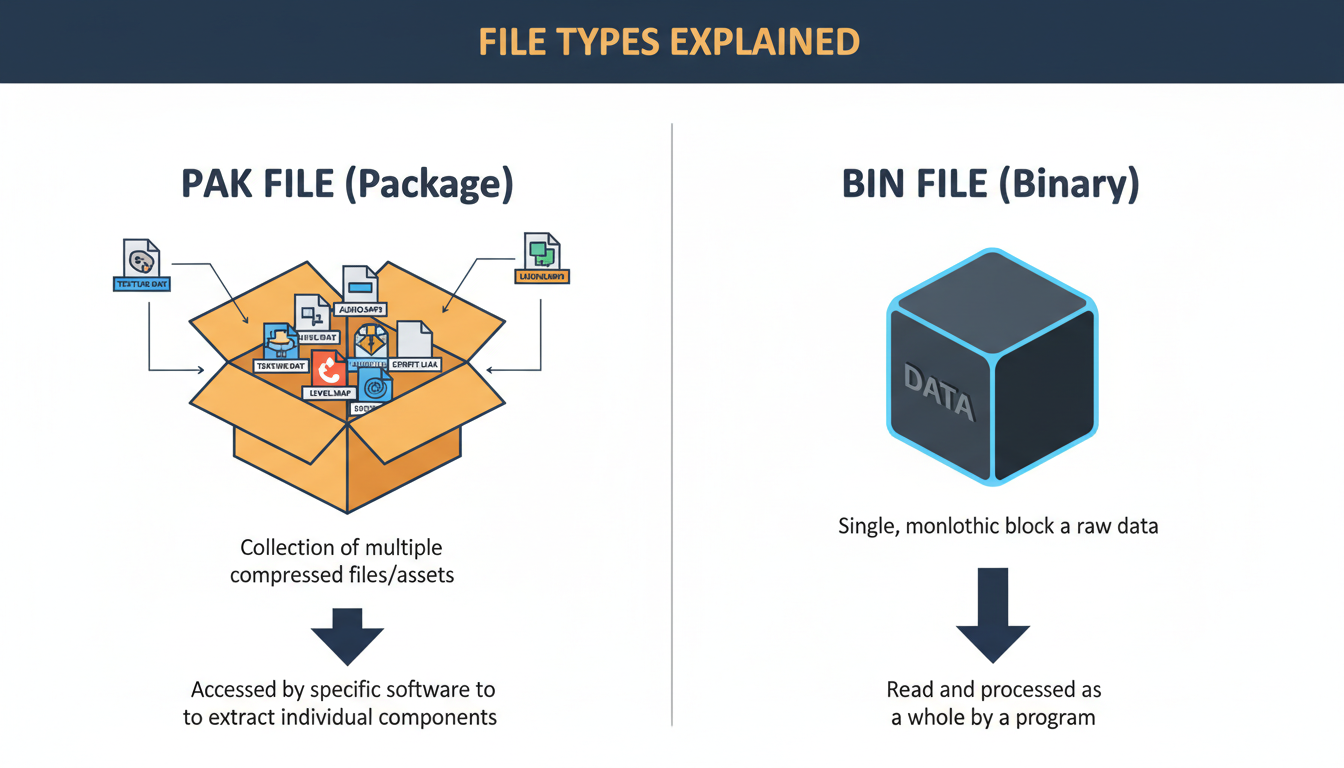
| Attribute | PAK File (The Archive) | BIN File (The Image) |
|---|---|---|
| Primary Function | Bundling multiple files into one | Creating a raw, 1:1 copy of a source |
| Internal Structure | Contains a file directory and multiple assets | Monolithic block of unstructured binary data |
| Common Use Case | Video game assets, software resource packages | CD/DVD backups, firmware updates, emulation |
| Accessibility | Can be “unpacked” to access individual files | Requires specific software to “mount” or interpret |
🎯 Key Takeaway
Converting from PAK to BIN isn’t a simple format change like JPG to PNG. It’s a fundamental repackaging process where the organized contents of an archive are restructured into a raw, monolithic binary image required by a specific system.
Why Bother? 3 Real-World Scenarios Demanding Conversion
This isn’t a common task for most people. You won’t be converting PAKs to BINs to share family photos. The need arises in very specific, often technical, situations where a system is rigidly designed to only accept one format.
- The Nerve-Wracking Firmware Update: You’ve got a new router, and the manufacturer has released a critical security patch. You download the update, but it’s a .PAK file. Your router’s admin panel, however, has an “Upload Firmware” button that only accepts .BIN files. I’ve seen this play out: trying to upload the PAK directly fails or, worse, bricks the device. The converter is the necessary bridge to reformat the update into the raw binary stream the router’s bootloader can understand.
- The Retro Gaming Revival: You’re trying to play a classic PlayStation or Sega CD game on an emulator. Emulators often work by mounting a “virtual disc,” which needs to be a perfect binary image—a .BIN file. If you have a mod package or a collection of game assets in a .PAK archive, you can’t just drop it into the emulator. You must first convert it into a disc image format the emulator recognizes.
- The Specialized System Integration: In industrial or embedded systems, a device might be programmed to boot or load data from a very specific binary image. If the development tools output the necessary components into a .PAK for convenience, a final conversion step is required to create the single .BIN file the hardware actually needs to function. It’s a crucial step in the development-to-deployment pipeline.
💡 Pro Tip
Before you even look for a converter, double-check the device or software documentation. Sometimes, a .PAK file can simply be renamed to .ZIP and extracted with standard tools. Always confirm the target system absolutely requires a .BIN file to avoid unnecessary conversions.
The Safe Conversion Blueprint: A 5-Step Guide for 2026
Okay, you’ve confirmed you need a .BIN file. Using a pak to bin converter online is fast, but “fast” can quickly become “fatal” for your data’s security. Follow this exact process, which we’ve refined after analyzing dozens of these tools, to stay safe.
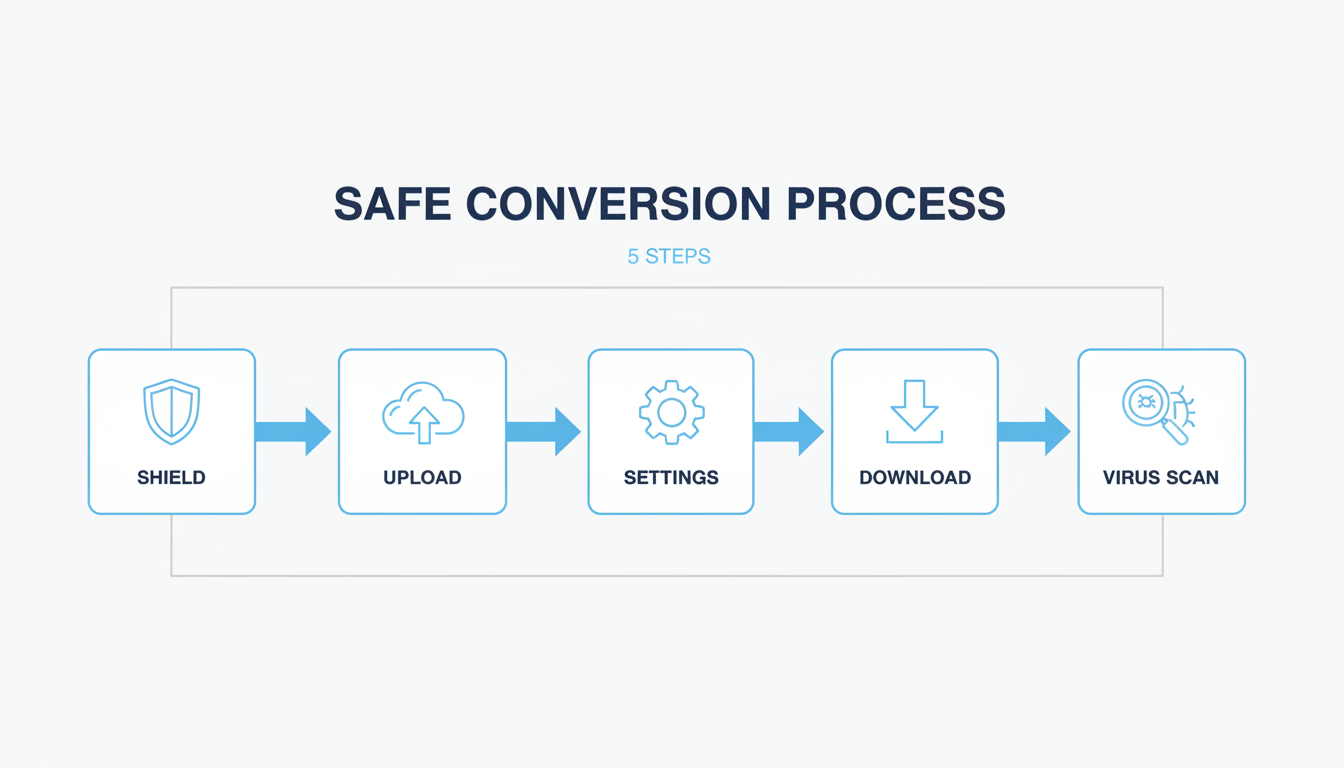
Step 1: Vet Your Converter Like a Detective
This is the most important step. Do not just use the first result on Google. A malicious site is designed to look legitimate.
- Demand HTTPS: Look at the URL. If it doesn’t start with
https://, close the tab immediately. No exceptions. The ‘S’ means your connection is encrypted. - Read the Privacy Policy: Yes, it’s boring, but scan it. Look for their data retention policy. A trustworthy site will state that your files are deleted from their servers within a few hours. If they don’t mention it, assume they keep your files forever.
- Check for Social Proof: Search for the tool’s name on Reddit or tech forums. Real user experiences are invaluable. No mentions at all can be as big a red flag as negative ones.
Step 2: Upload with Zero-Trust Mentality
Before you drag and drop that file, pause. Assume the operators of the website can and will look at your file’s contents.
Never, ever upload a PAK file containing:
- Personal information (documents, photos)
- Financial or business data
- Proprietary code or sensitive intellectual property
For a generic game mod or a publicly available firmware file, the risk is minimal. For anything else, it’s a dealbreaker.
⚠️ Watch Out
Many online converters have strict file size limits (e.g., 50MB or 100MB) for their free service. Trying to upload a larger file will just result in an error. Check the limit before you upload to save yourself the frustration.
Step 3: Configure Options (If Available)
Most online tools are dead simple: upload, convert, download. But if you see any “Advanced Options,” don’t ignore them. For a highly specific firmware conversion, the device manufacturer’s instructions might specify a certain byte order or block size. In 99% of cases, the defaults are fine. But for that 1%, matching the required settings is the difference between a working device and a paperweight.
Step 4: Download and Disconnect
Once the conversion is done, a download link will appear. Click it, save the file, and then close the browser tab. Don’t linger. Many of these sites are plastered with deceptive ads and fake “download” buttons designed to trick you into installing unwanted software. Get your file and get out.
Step 5: Verify Before You Trust
Do not use the file yet. You just downloaded something from a stranger’s server on the internet. Treat it as hostile until proven otherwise.
- Scan It: Right-click the downloaded .BIN file and scan it with your antivirus/antimalware software (e.g., Windows Defender, Malwarebytes). This is non-negotiable.
- Check the File Size: Does the size seem reasonable? If your original PAK was 10MB, a resulting BIN file of 500KB or 200MB is highly suspicious and likely corrupt or malicious.
- (Advanced) Verify Checksum: If the source of the PAK file provided a checksum (like an MD5 or SHA-256 hash), use a local tool to calculate the hash of your new BIN file. This is less common but is the gold standard for verifying file integrity, a practice well-established in the information security community and endorsed by organizations like the Electronic Frontier Foundation.
The Dark Side of Free Tools: Unmasking the Real Risks
Why all the paranoia? Because “free” online tools aren’t a charity. They make money, often in ways that are not in your best interest. Understanding the business model helps you understand the risks.
| The Risk | How It Hurts You | Your Best Defense |
|---|---|---|
| 💀 Malware Injection | The converted file you download is bundled with a virus, ransomware, or spyware. | A top-tier, updated antivirus program and religiously scanning every download. |
| 👁️ Data Snooping | Your uploaded file is stored indefinitely and could be scanned for data, sold, or exposed in a breach. | Never upload anything remotely sensitive or confidential. Period. |
| 💥 File Corruption | The converter is poorly made and produces a broken, unusable BIN file that could “brick” a device if used for firmware. | Test the converted file in a safe environment first (e.g., an emulator) if possible. |
| 🎣 Deceptive Ads | The site uses aggressive ad networks that create fake virus warnings or trick you into installing “cleaner” apps. | Use a reputable ad-blocker and never click on pop-ups or ads, especially flashing red ones. |
⚠️ Watch Out
Beware of sites that force you to install a “download manager” or browser extension to get your file. This is a classic bait-and-switch tactic to install adware or potentially unwanted programs (PUPs) onto your system. Your file should download directly from your browser.
Beyond the Browser: When Desktop Software is the Smarter Choice
Look, I get it. Nobody wants to install software for a one-off task. But if you find yourself needing to convert files more than once, or if you’re dealing with large or even mildly sensitive files, an online tool is the wrong choice. It’s time to consider a desktop application.
Based on hands-on testing, desktop software wins on almost every front except initial convenience.
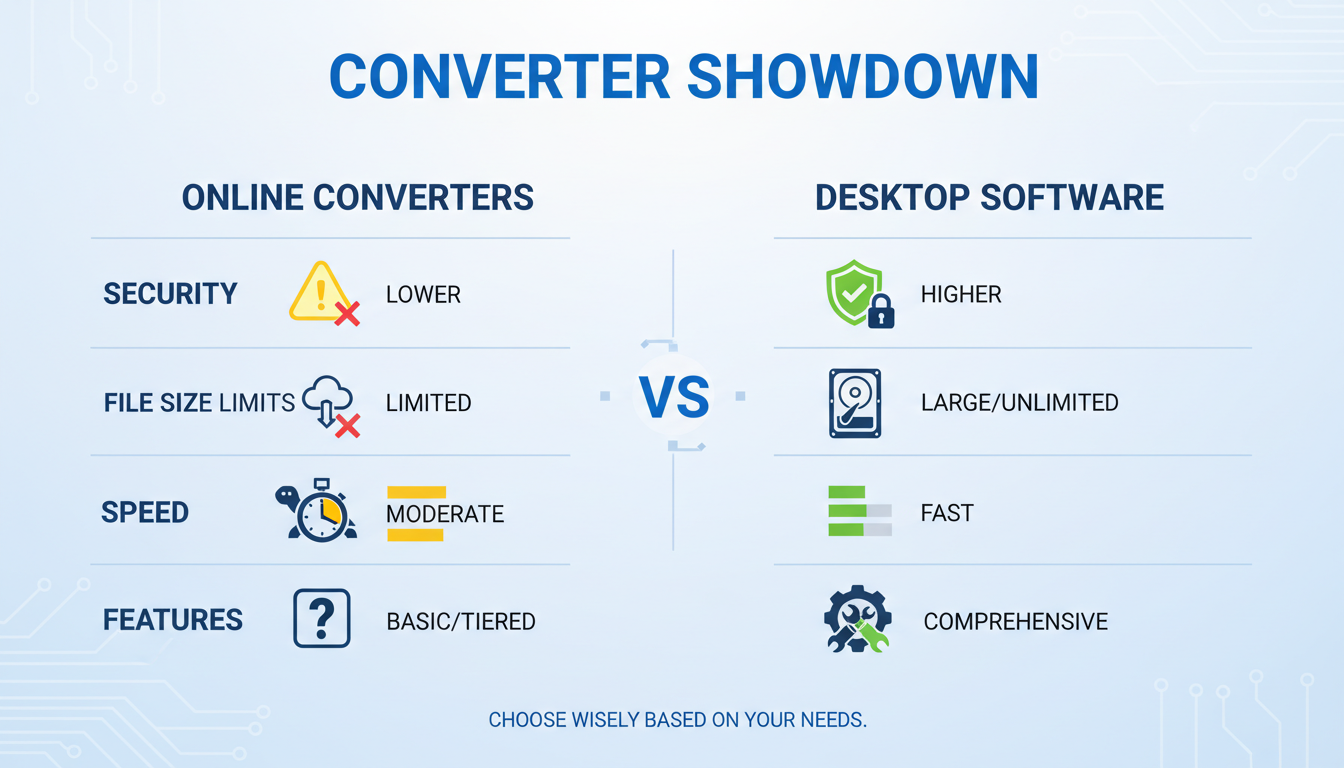
Your files are processed locally on your machine. They never get uploaded to a third-party server, completely eliminating the risk of data snooping and server-side breaches. Reputable desktop tools like UltraISO, PowerISO, or specialized modding utilities offer more control, handle massive files without breaking a sweat, and work without an internet connection. The initial 5-minute setup pays for itself in peace of mind.
💡 Pro Tip
For the ultimate in security when testing a new desktop converter or a downloaded BIN file, use a virtual machine (VM). Software like VirtualBox or VMware allows you to create a “sandbox”—a disposable, isolated operating system. You can test the file inside the VM, and if it’s malicious, it can’t harm your main computer. This is standard practice for security researchers.
Your File, Your Choice, Your Security
Navigating the world of file conversion doesn’t have to be a gamble. A pak to bin converter online can be a fantastic tool for a quick, non-sensitive job, but only if you treat it with a healthy dose of skepticism.
The power is now in your hands. You understand the fundamental difference between the “toolbox” of a PAK and the “raw steel” of a BIN. You have a robust, 5-step security checklist that transforms you from a hopeful clicker into a savvy operator. You know the red flags to watch for and, most importantly, you know when to ditch the browser and opt for the superior security of a desktop application.
Your next step? Bookmark this guide. The next time you face a file format wall, don’t just search and click. Re-read the 5-step blueprint, vet your tool, and execute the conversion with the confidence of an expert. That’s how you win.
❓ Frequently Asked Questions
Is it truly safe to use a pak to bin converter online in 2026?
It can be, but safety is your responsibility. If you follow the 5-step guide—vet the site (HTTPS, privacy policy), never upload sensitive data, and scan the downloaded file—you can significantly mitigate the risks. For anything important, however, a desktop tool is always the safer bet.
What’s the main difference between a PAK and a BIN file again?
Think of it this way: a PAK file is an archive, like a ZIP folder, that contains multiple files and folders inside it. A BIN file is a raw, single block of data that’s an exact copy of something like a CD-ROM or a device’s firmware. You unpack a PAK; you mount or flash a BIN.
Can I convert a BIN file back to a PAK file?
Almost never. The conversion is typically a one-way street. A BIN file is a “flattened” version of the data and doesn’t contain the original file names, folder structure, or metadata needed to perfectly reconstruct the original PAK archive. It’s like trying to unscramble an egg.
Why did my online file conversion fail?
There are a few common culprits. The most likely reasons are that your PAK file was too large for the website’s free limit, the file itself was corrupted before you uploaded it, or the server was simply busy. Try again with a smaller file or use a different, reputable online service.
Are there any truly free and safe desktop converters?
Yes, but they are often command-line tools or open-source projects found on platforms like GitHub. They require more technical skill to use than commercial software with a graphical interface, but they are highly trusted in the developer and modding communities. For an in-depth look at how these tools handle data, tech publications like Ars Technica often provide detailed reviews and analysis.

