

You sit down at your desk at 9:00 AM with a full cup of coffee and a to-do list. You blink, and suddenly it’s 5:00 PM. The coffee is cold, the list is half-finished, and you’re left wondering: “Where on earth did the day go?”
If that scenario sounds painfully familiar, you aren’t alone. In our experience working with hundreds of agencies and freelancers, this “time blindness” is the single biggest killer of profitability. It’s not that you aren’t working hard. It’s that you lack visibility.
Here is the hard truth: You cannot manage what you do not measure. The effective use of time tracker software isn’t about policing yourself or your employees—it’s about gathering intelligence. It’s the difference between feeling busy and actually being productive.
In this guide, we’re moving past the basics. We aren’t just going to tell you to “turn on the timer.” We’re going to share seven advanced strategies that turn raw data into actionable insights, helping you reclaim your schedule and significantly boost your bottom line.
📑 What You’ll Learn
Strategy 1: The “Baseline Audit” Technique
Before you change anything, you need to know where you stand. Most people skip this step. They download a tool and immediately try to force a new “perfect” schedule. That’s a recipe for failure.
Instead, spend the first week doing a “Baseline Audit.” Run your time tracker in the background without trying to change your behavior. Don’t judge yourself for spending 45 minutes on Reddit or two hours in a chaotic email thread. Just track it.
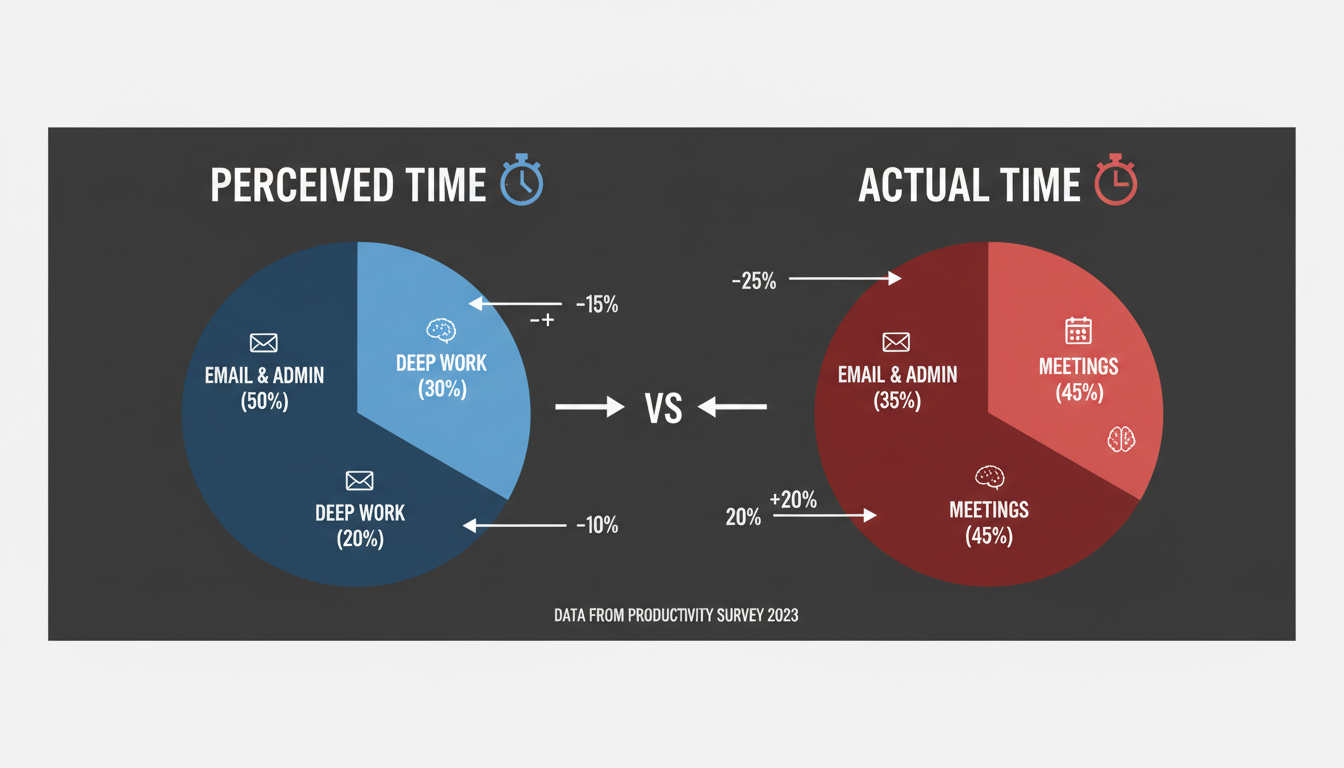
After testing this method with our own content teams, the results were shocking. We found that tasks we thought took 30 minutes were actually taking 90 minutes due to context switching. This data is gold. It allows you to build a schedule based on reality, not optimism.
🎯 Key Takeaway
Don’t try to fix your schedule on day one. Use the first week to gather unbiased data on your current habits. You need an accurate diagnosis before you can prescribe the cure.
Strategy 2: Categorization for Profitability
A common mistake in the effective use of time tracker tools is lazy labeling. Logging 8 hours under “Work” tells you nothing. To unlock real value, you need a granular taxonomy.
We recommend breaking your time down into three distinct buckets:
- Billable Work: Direct client deliverables.
- Strategic Overhead: Sales, marketing, and business development (high value).
- Administrative Churn: Email, file management, invoicing (low value).
If you discover that “Administrative Churn” is eating up 40% of your week, you have a clear business case to hire a virtual assistant or automate those processes. For example, if you’re spending hours manually checking metrics, using a keyword density checker tool is a smart automation, but you need to track the time saved to verify the ROI.
⚠️ Watch Out
Avoid “Tag Fatigue.” If you create 50 different tags for every tiny action, you’ll stop tracking because it’s too tedious. Stick to 5-7 main categories and use sub-projects if necessary.
Comparison: Manual vs. Automatic Tracking
One of the most frequent debates we hear is between manual timers (start/stop) and automatic background trackers. Which leads to the most effective use of time tracker software? Let’s look at the data.
| Feature | Manual Tracking (e.g., Toggl, Harvest) | Automatic Tracking (e.g., RescueTime, Timely) |
|---|---|---|
| Accuracy | High for billable hours; relies on memory. | High for total screen time; captures everything. |
| User Effort | High (Must remember to click start/stop). | Low (Set and forget). |
| Psychological Effect | Encourages “Deep Work” focus. | Provides “Big Picture” habits. |
| Best For | Freelancers billing hourly; Agencies. | Productivity hackers; Salaried employees. |
| Privacy Concerns | Low. | Medium/High (Requires configuration). |
In our view, a hybrid approach often works best. Use automatic tools to audit your personal productivity, but use manual timers to bill clients. This ensures you get paid for every minute of focused work without billing them for your Spotify browsing.
Strategy 3: The “Real-Time” Rule
Here is a golden rule for the effective use of time tracker systems: Track in real-time, or don’t track at all.
We’ve seen it happen a thousand times. A project manager thinks, “I’ll just fill in my timesheet on Friday afternoon.” By Friday, that timesheet is a work of fiction. You are guessing. And when you guess, you almost always underestimate how long tasks took, which means you are effectively giving your time away for free.
💡 Pro Tip
Use browser extensions or mobile widgets. If opening your time tracker takes more than two clicks, you won’t do it. Remove the friction to ensure consistent real-time logging.
Mastering Tracking for Remote Teams
Remote work is here to stay. As noted by Forbes, the shift is permanent. But managing a remote team requires a delicate balance between visibility and trust.
The effective use of time tracker tools in a remote setting is not about spying. If you are using software to take screenshots of your employees’ desktops every 10 minutes, you aren’t building a company; you’re building a prison. High-performers will leave.
Instead, frame time tracking as a tool for Capacity Planning. When a team member logs 50 hours in a week, the conversation shouldn’t be “Why are you so slow?” It should be, “You are overloaded; let’s move some tasks off your plate.”

Step-by-Step: Setting Up Your Workflow
Ready to implement a system that actually sticks? Follow this workflow to integrate tracking into your daily routine.
- Select Your Tool: Choose based on the table above. Ensure it integrates with your project management software (like Asana or Trello).
- Define Your “Billable” Unit: Decide if you track by the minute, 15-minute increments, or hour. (Hint: 15-minute blocks are usually the industry standard).
- Create Project Templates: Don’t create new projects from scratch every time. Have a template with pre-set tasks like “Research,” “Drafting,” and “Client Comms.”
- Install Integrations: Connect your tracker to your browser and email.
- The Morning Review: Spend 5 minutes each morning reviewing yesterday’s data. Where did you leak time?
For students or academics trying to manage study time, this same workflow applies. Just as you might calculate grades using a guide on how to calculate SRM CGPA from SGPA, you should calculate your “study efficiency score” by reviewing your tracked hours against your exam results.
The Future of Time Intelligence
The landscape of time tracking is shifting rapidly toward AI. We are moving away from manual entry entirely. The next generation of tools will use Natural Language Processing (NLP) to read your file names, calendar invites, and email subject lines to automatically categorize your day with 95% accuracy.
Imagine finishing a day of work and having your timesheet already filled out, waiting only for your approval. That is the future we are heading toward. However, until AI becomes perfect, the human element of review remains critical.

⚠️ Watch Out
Don’t rely 100% on AI categorization just yet. Algorithms struggle with nuance. They might categorize a client strategy call on YouTube as “Entertainment” rather than “Research.” Always do a manual spot-check.
Conclusion: Take Control of Your Most Valuable Asset
Time is the only resource you can’t buy more of. The effective use of time tracker tools isn’t about squeezing every ounce of labor out of yourself; it’s about ensuring that the energy you spend yields the results you want.
Whether you are running essential SEO checks or managing a million-dollar development project, the principles remain the same. Track honestly, analyze deeply, and adjust constantly.
Your next step? Don’t overthink it. Pick a tool today, install the browser extension, and commit to tracking just one week of work. The data you uncover might just change your entire career trajectory.
❓ Frequently Asked Questions
How do I get my team to use a time tracker without them hating it?
Focus on the “Why.” Explain that the data is used to prevent burnout and justify hiring more staff, not to micromanage. When employees see that tracking leads to a more balanced workload, resistance usually fades.
Should I track non-billable time?
Absolutely. If you only track billable time, you have no idea what your true hourly rate is. Tracking non-billable time reveals operational inefficiencies that are silently killing your profit margins.
What is the best time tracking tool for freelancers?
There is no single “best” tool, but freelancers generally benefit from tools like Toggl Track or Harvest because of their strong invoicing integrations. Look for a tool that can turn tracked hours directly into a PDF invoice.
Can time tracking improve my work-life balance?
Yes. It provides a definitive “clock out” moment. When you hit your target hours for the day, you can close your laptop with the psychological satisfaction that you have done enough, reducing the guilt often associated with remote work.
Is manual or automatic tracking better for ADHD?
Many professionals with ADHD find automatic tracking (like RescueTime) less stressful because it removes the pressure to remember to click a button. However, some find the “gamification” of manual timers helpful for maintaining focus.
Read Also:
- 7 Essential Uses of a Temperature Converter: A Complete Guide to Celsius, Fahrenheit, and Kelvin
- Image Compression: Boost Website Speed & SEO
- Square Yards to Tons: The Ultimate Construction Conversion Guide (2026)
- Your 2026 SERP Checker Guide
- Laughing Emoji PNGs: Your 2026 Marketing Guide
- Horse Height Conversion Guide for 2026

