
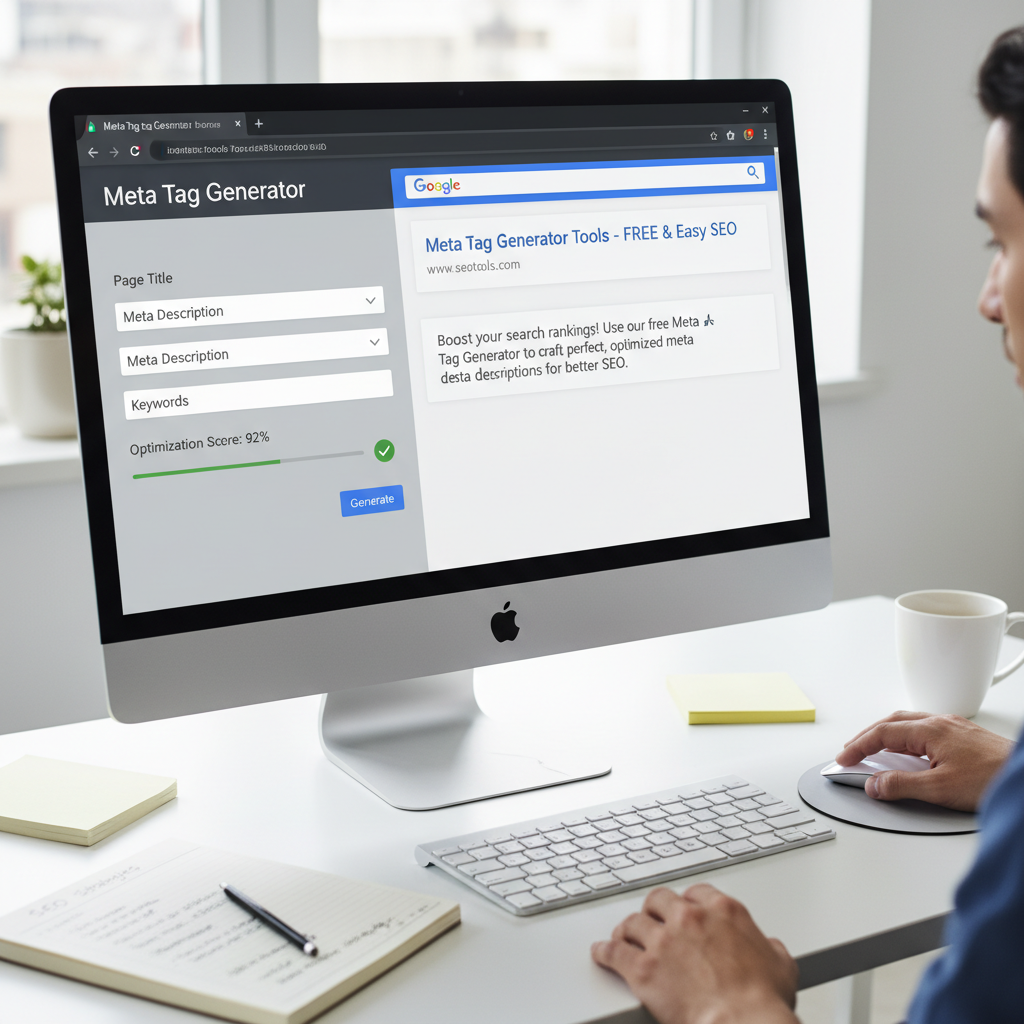
Imagine spending weeks crafting the perfect piece of content. You’ve done the research, the writing is sharp, and the value is undeniable. You hit publish, wait for the traffic to roll in… and get crickets.
Here’s the hard truth: In 2026, having great content isn’t enough. If your digital “curb appeal”—your search snippet—looks messy or boring, users will scroll right past you to a competitor.
This is where a meta tag generator becomes your secret weapon. It’s not just about ticking a technical SEO box; it’s about engineering the first interaction a potential customer has with your brand. In my decade of managing SEO campaigns, I’ve seen pages jump from page two to the top three simply by tightening up their metadata. It’s the difference between a user seeing a random string of text and a compelling invitation to click.
In this guide, we’re going to strip away the jargon and show you exactly how to use these tools to dominate the SERPs (Search Engine Results Pages). We aren’t just talking theory; we’re talking about actionable strategies you can apply today.
📑 What You’ll Learn
The Anatomy of a High-Converting Snippet
Before we start generating code, you need to understand what we are actually building. A search result is essentially a digital billboard. You have limited space to make a massive impact.
When you use a meta tag generator, you are primarily manipulating three core elements. Get these right, and you win the click.
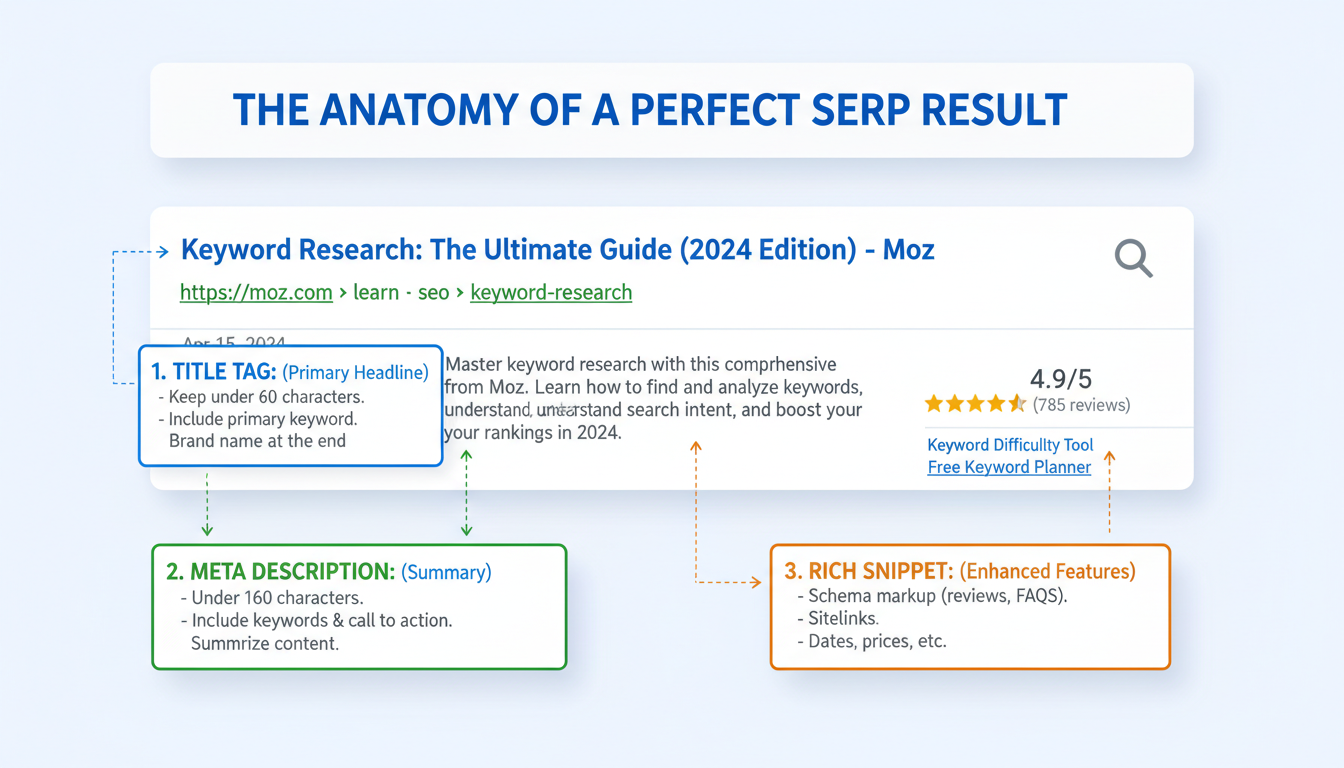
1. The Title Tag (The Headline)
This is the blue clickable link. It is, without a doubt, the single most impactful on-page SEO element regarding rankings. Google looks here first to understand what your page is about.
2. The Meta Description (The Pitch)
This is the grey text under the link. Here’s the thing: Google has officially stated that meta descriptions are not a direct ranking factor. But don’t let that fool you. They are a massive indirect factor because they influence Click-Through Rate (CTR). A higher CTR signals to Google that your content is relevant, which eventually boosts your rank.
3. Robots & Social Tags (The Instructions)
These are invisible to the user on the search page but crucial for the engine. They tell Google “index this” or “ignore that,” and tell Facebook which image to show when your link is shared.
🎯 Key Takeaway
Your meta tags are your elevator pitch to the internet. A generator ensures this pitch is technically flawless, perfectly sized, and optimized for both human psychology and robot crawlers.
Why Manual Coding is a Recipe for Disaster
I often hear developers say, “I’ll just hand-code the header.” While that’s possible, it’s inefficient and prone to human error. In 2026, speed and precision are the name of the game.
Using a dedicated meta tag generator safeguards you against syntax errors—like a missing closing bracket—that can break your entire site’s head section. Furthermore, these tools provide real-time validation for character limits. Google measures titles in pixels, not just characters, but sticking to the standard 60-character limit is a safe bet that generators help you visualize instantly.
Let’s look at the difference between the approaches:
| Feature | Manual HTML Entry | Meta Tag Generator |
|---|---|---|
| Speed | Slow (requires typing code) | Fast (fill-in-the-blanks) |
| Error Rate | High (typos, syntax errors) | Zero (automated syntax) |
| Preview Capability | None (guesswork) | Real-time SERP preview |
| Social Tags | Complex to code manually | One-click generation |
💡 Pro Tip
Always prioritize the “mobile view” in your generator preview. In 2026, over 60% of searches happen on mobile devices, where title truncation happens earlier than on desktop screens. Keep your most important keywords in the first 40 characters.
Step-by-Step: Using a Meta Tag Generator
Ready to optimize? Whether you are using the Tools River Meta Tag Generator or another industry standard, the workflow remains the same. Follow this process to ensure every page on your site is working hard for you.
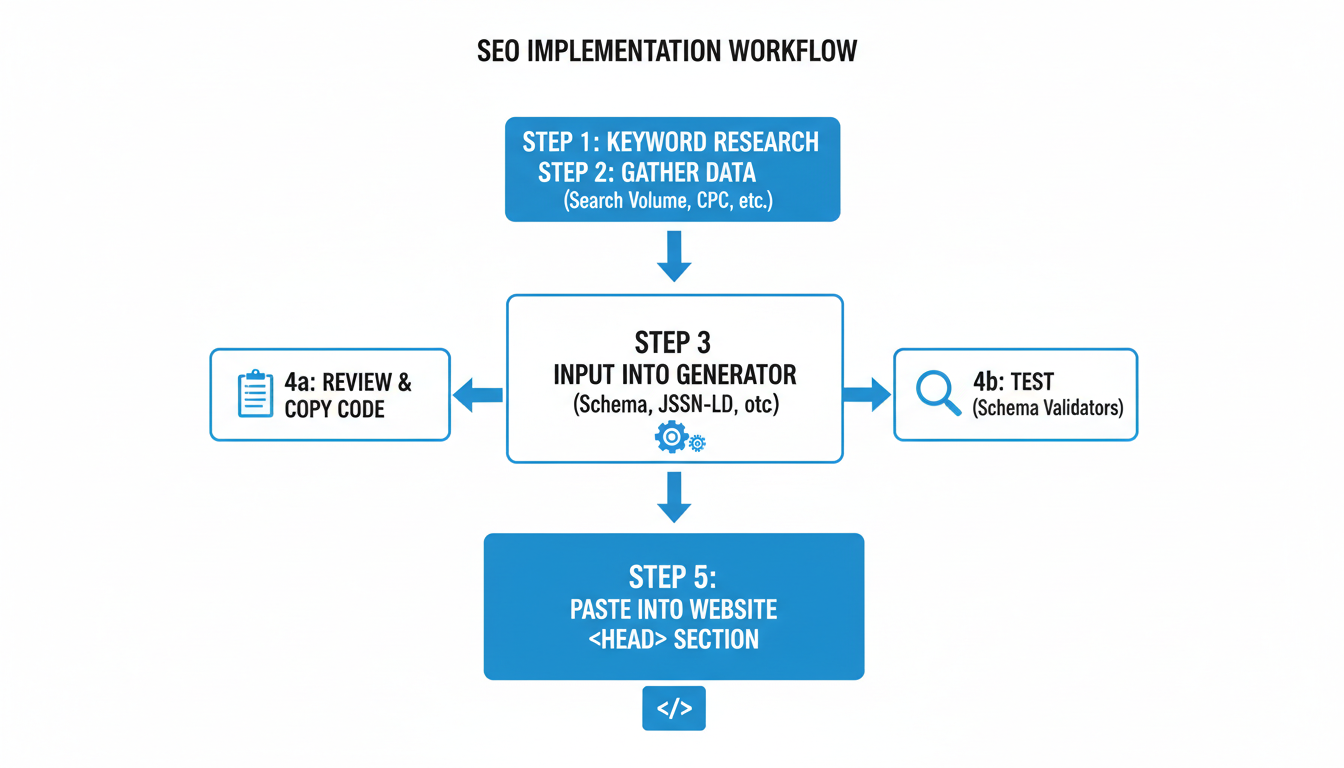
Step 1: Define Your “Money” Keyword
Before you open the tool, know what you are targeting. If you are selling “organic coffee beans,” that phrase needs to be the anchor of your title. Don’t get cute with abstract titles; clarity beats cleverness every time.
Step 2: Draft the Title (Front-Load It)
Input your title into the generator. Watch the pixel/character count. Try to place your focus keyword as close to the beginning of the sentence as possible.
Bad: “The Best Place to Buy Organic Coffee Beans is Here”
Good: “Organic Coffee Beans: Fresh Roasted & Fair Trade | BrandName”
Step 3: Write a Persuasive Description
This is where copywriting skills come in. Use active verbs. Address a pain point. Include a Call to Action (CTA).
Draft: “We sell coffee. It is good and organic. Buy some today.”
Optimized: “Wake up to better taste. Shop our premium organic coffee beans, roasted daily. Free shipping on orders over $50. Order now!”
Step 4: Configure Robots Settings
Most generators have checkboxes for “Index” and “Follow.”
- Index/Follow: Use this for blog posts, product pages, and your homepage.
- NoIndex/Follow: Use this for archive pages or tags if they are causing duplicate content issues.
- NoIndex/NoFollow: Use this for “Thank You” pages or private admin pages.
Step 5: Generate and Implement
Click the button. The tool will spit out clean HTML code. Copy everything between the <meta> tags and paste it into the <head> section of your page. If you are using WordPress, you might paste the text directly into an SEO plugin, but the generator is still vital for drafting and previewing.
⚠️ Watch Out
Avoid “Title Tag Duplication.” A common mistake is copying the generated code for one page and pasting it onto five others. According to Google Search Central, every single page on your site needs a unique title and description to avoid confusing the search algorithms.
Don’t Forget Social: Open Graph Tags
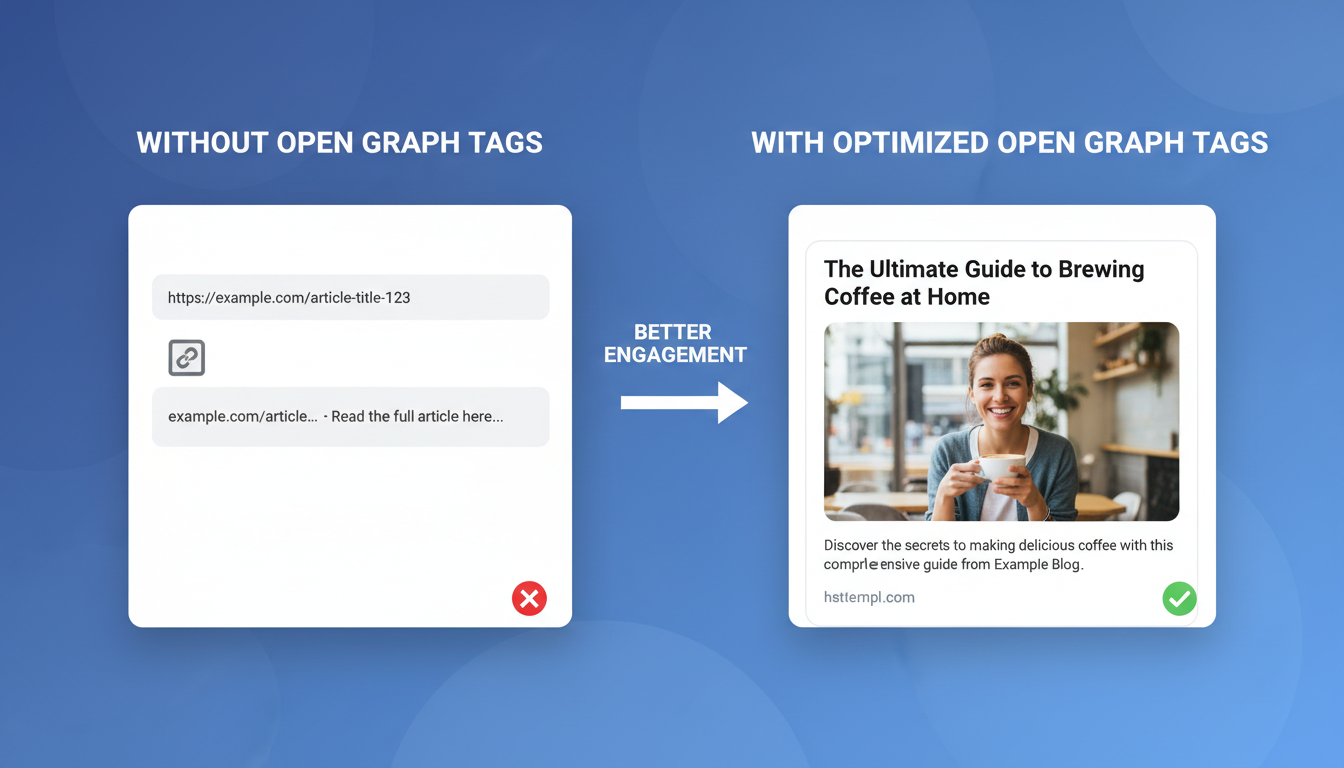
Here is a scenario I see all the time: A business writes a great article, shares the link on Facebook, and… the image is missing, or the title is just “Home.”
This happens because they ignored Open Graph (OG) tags. These are meta tags specifically for social media platforms. A robust meta tag generator will allow you to create these alongside your SEO tags.
Why does this matter? Social engagement feeds into your overall authority. If your link looks professional with a large, high-quality image and a bold title, people share it. If it looks broken, they scroll past. You can even set a different title for Facebook than you do for Google. Maybe your Google title is keyword-heavy, but your Facebook title is click-bait heavy (in a good way). Generators give you that flexibility.
The “Keyword Stuffing” Trap & Other Mistakes
Even with the best tools, you can still mess this up if your strategy is flawed. Let’s talk about the elephant in the room: Meta Keywords.
Back in 2005, you could type “coffee, best coffee, cheap coffee, free coffee” into a meta keyword tag, and Google would rank you. Those days are long gone. In fact, Google hasn’t used the meta keywords tag for ranking for over a decade. Yet, I still see people stuffing dozens of words into this field in their generators.
Stop doing this. At best, it’s a waste of time. At worst, it tells your competitors exactly which keywords you are targeting. Focus your energy on the Title and Description.
Another issue is Keyword Cannibalization. This happens when you optimize two different pages for the exact same keyword using your generator. You end up competing with yourself. Ensure your site hierarchy is clear, and map specific keywords to specific pages before you start generating tags.
💡 Pro Tip
Use “Power Words” in your meta descriptions to trigger emotional responses. Words like “Exclusive,” “Proven,” “Instant,” and “Step-by-Step” have been shown to increase CTR by up to 12% in various A/B tests.
Conclusion: Take Control of Your Search Presence
Mastering your metadata is one of the highest-ROI activities you can do in SEO. It doesn’t require a computer science degree; it just requires the right tool and a bit of strategy. By utilizing a meta tag generator, you ensure that your site speaks the same language as the search engines—fluent, precise, and error-free.
Don’t leave your search appearance to chance. Audit your top 10 pages today. Run them through a generator, tighten up the copy, and watch how a few lines of code can transform your traffic numbers.
❓ Frequently Asked Questions
Do meta keywords still help with SEO in 2026?
No. Google and Bing ignore the meta keywords tag completely for ranking purposes. However, some internal site search engines still use them. For general SEO, your time is better spent optimizing titles and descriptions.
Why is Google rewriting my meta description?
This is common. If Google’s algorithm thinks your hard-coded description doesn’t perfectly answer a user’s specific query, it will pull text from your page content instead. However, writing a great description still increases the odds of Google using yours.
What is the ideal length for a meta description?
Aim for 150-160 characters. Anything longer will likely get cut off with an ellipsis (…) on desktop results. On mobile, the limit is often tighter, around 120 characters, so put your most important info first.
Can I use a meta tag generator for e-commerce sites?
Absolutely. In fact, it’s essential. For e-commerce, you want to ensure product pages have consistent data (like price and availability) in the snippets. Many generators help structure this data correctly.
What are Open Graph tags?
Open Graph (OG) tags are snippets of code that control how URLs are displayed when shared on social media (Facebook, LinkedIn, etc.). They allow you to define the specific image, title, and description used in the social post.
For further reading on technical standards, you can reference the W3C guidelines on Meta Tags or explore user behavior studies regarding search snippets at the Baymard Institute.

