

Here’s a hard truth: You have roughly 0.5 seconds to convince a user to click your link on a search result page. That’s it.
You can write the most profound, life-changing article in the world, but if your “storefront”—your title tag and meta description—looks messy or generic, nobody is coming inside. In 2026, where AI Overviews and rich snippets dominate the SERPs (Search Engine Results Pages), technical precision isn’t just a “nice-to-have.” It’s survival.
This is where a Meta Tag Generator becomes your secret weapon. It’s not just about spitting out code; it’s about crafting the perfect digital handshake between your website and search engine bots.
In my decade of managing SEO campaigns, I’ve seen massive sites tank because of broken meta tags, and I’ve seen small blogs outrank giants simply because their metadata was cleaner, sharper, and more clickable. If you’re tired of guessing what goes into your HTML header, you’re in the right place.
📑 What You’ll Learn
- The “Invisible Salesperson”: Why Meta Tags Still Rule in 2026
- The Big Four: Essential Tags You Must Generate
- Step-by-Step: How to Use a Meta Tag Generator Like a Pro
- Beyond Google: Winning the Social Graph
- Comparison: Manual Coding vs. Generators
- 3 Fatal Mistakes That Kill Rankings
- Frequently Asked Questions
The “Invisible Salesperson”: Why Meta Tags Still Rule in 2026
Let’s clear up a misconception. Some people think AI has made meta tags obsolete. They assume Google just “figures it out.”
They are wrong.
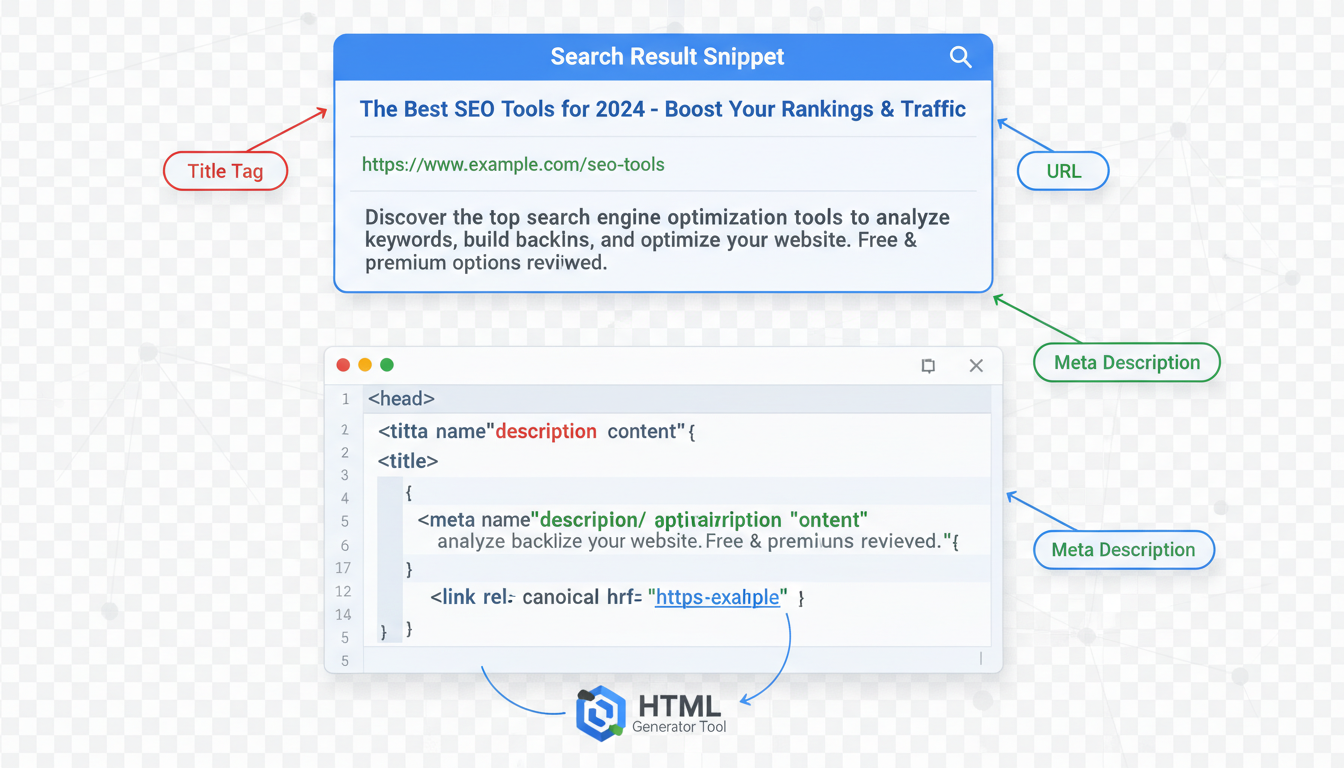
While Google is smarter now, it still craves structure. Meta tags are the specific instructions you give to the crawler. They tell the search engine: “Here is my title, here is what this page is about, and here is how you should display it on a mobile device.”
Think of a Meta Tag Generator as a translator. It takes your human language (your headline, your summary) and converts it into the machine language (HTML) that bots digest instantly. Without this translation, you’re leaving your display appearance up to chance. And in SEO, chance is expensive.
🎯 Key Takeaway
Meta tags are your first point of contact with both search engines and human users. Using a generator ensures your code is syntactically perfect, preventing indexing errors that can make your content invisible.
The Big Four: Essential Tags You Must Generate
Not all tags are created equal. In the early 2000s, we obsessed over the “keywords” tag. Today? It’s useless trash. Google ignores it. Instead, a modern Meta Tag Generator should focus on the “Big Four.”
1. The Title Tag (The Headline)
This is the blue clickable link in search results. It is the single most impactful on-page SEO factor. It needs to include your primary keyword and be under 60 characters to avoid getting cut off (truncated) by Google.
2. The Meta Description (The Pitch)
While not a direct ranking factor, this is your ad copy. A compelling description increases your Click-Through Rate (CTR). Higher CTR signals to Google that your page is valuable, which does improve rankings over time.
3. The Viewport Tag (The Mobile Fix)
If you forget this, your site breaks on mobile. Period. It tells the browser how to scale the content to fit different screen sizes.
4. Robots Tag (The Gatekeeper)
This tells Google, “Index this page” or “Stay away.” One wrong move here—like accidentally setting a ‘noindex’ tag—can de-index your entire site.
💡 Pro Tip
Don’t just copy your H1 header into your Title Tag. They serve different purposes. Your H1 is for the reader already on the page; your Title Tag is for the person searching. Make the Title Tag punchier and keyword-front-loaded.
Step-by-Step: How to Use a Meta Tag Generator Like a Pro
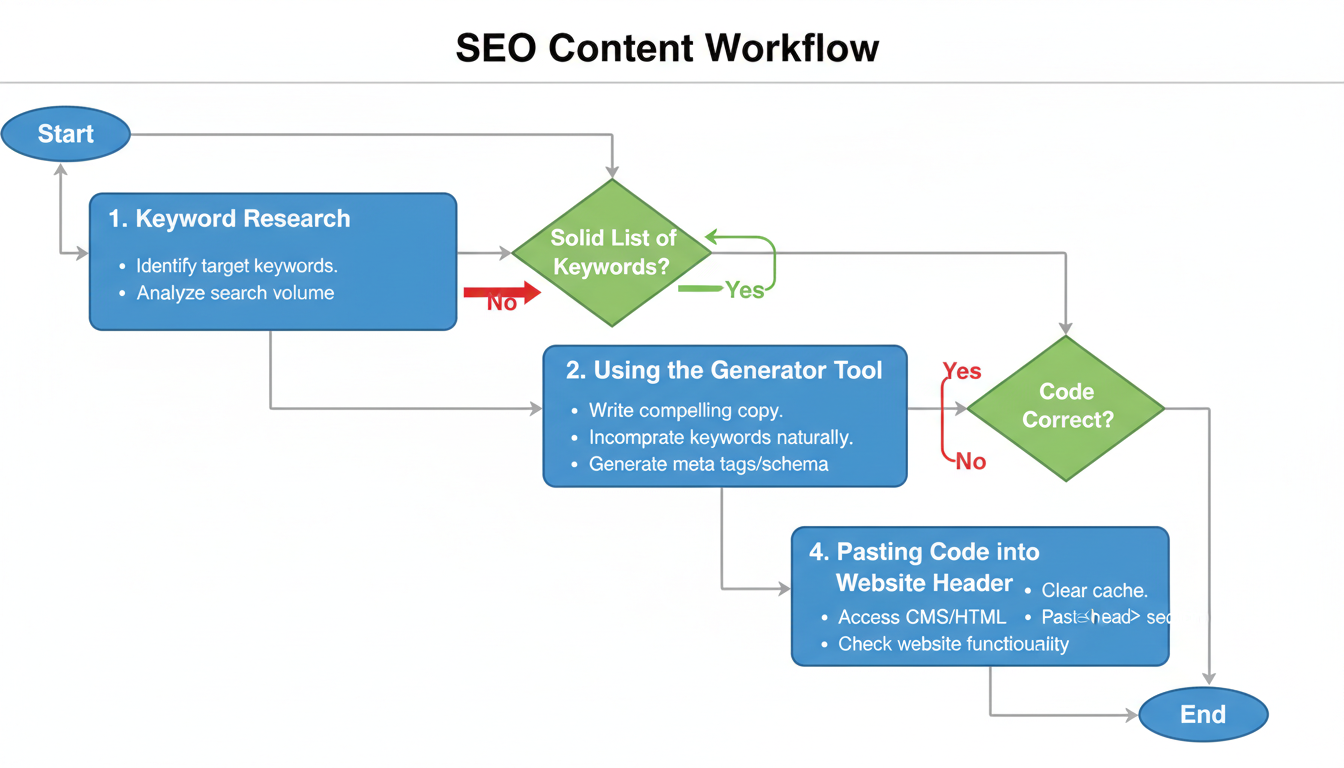
Using a tool is easy. Using it correctly requires a workflow. Here is the exact process I use for high-traffic client sites.
- Audit Your Content: Before opening the generator, identify the primary keyword and the “search intent” of your page. Is the user looking to buy, learn, or go somewhere?
- Draft Your Copy First: Don’t write directly in the tool. Write 3-4 variations of your title and description in a doc. Pick the one that triggers an emotional response.
- Input Data into the Generator:
- Title: Paste your best headline. Watch the pixel width counter.
- Description: Paste your summary. Ensure the keyword appears once naturally.
- Robots: Set to “Index, Follow” for standard blog posts.
- Author: Optional, but good for E-E-A-T.
- Generate and Validate: Click the button to create the HTML. Look at the preview. Does it look professional?
- Copy to Head Section: Paste the code between the
<head>and</head>tags of your site. If you use WordPress, copy the content values into your SEO plugin (like Yoast or RankMath).
Beyond Google: Winning the Social Graph
Here is where most people drop the ball. They optimize for Google but forget about Facebook, LinkedIn, and X (formerly Twitter).
When someone shares your link on social media, the platform looks for Open Graph (OG) tags. If you haven’t generated these, the platform will scrape a random image and text from your page. It usually looks terrible.
A premium Meta Tag Generator will allow you to create specific OG tags. This means you can have a “SEO Title” optimized for keywords, and a separate “Social Title” optimized for viral clicks.
⚠️ Watch Out
Never use the same image dimensions for everything. Google likes square or 4:3 ratios for thumbnails, but Facebook and LinkedIn prefer 1.91:1 (1200×630 pixels). Ensure your generator allows you to define a specific OG:Image URL.
Comparison: Manual Coding vs. Generators
I often get asked by developers, “Why can’t I just write the HTML myself?” You can. But should you? Let’s look at the data.
| Feature | Manual HTML Coding | Using a Meta Tag Generator |
|---|---|---|
| Speed | Slow (3-5 mins per page) | Fast (30 seconds per page) |
| Accuracy | Prone to syntax errors (missing quotes) | 100% Syntax Accuracy |
| Preview Capability | None (requires saving & refreshing) | Instant SERP Preview |
| Character Counting | Guesswork or separate tools | Built-in real-time limits |
| Updates | Static | Updates with 2026 standards |
For a deeper dive into the technical specifications of these tags, the MDN Web Docs provide the industry-standard definitions that every webmaster should respect.
3 Fatal Mistakes That Kill Rankings
Even with the best tools, human error is the variable. In my audits, I see these three issues constantly.
1. The “Duplicate” Disaster
You use a generator, paste the code into your header, but your WordPress theme also adds its own tags. Now you have two title tags. Google gets confused and might ignore both. Always check your page source (Right Click > View Page Source) to ensure tags appear only once.
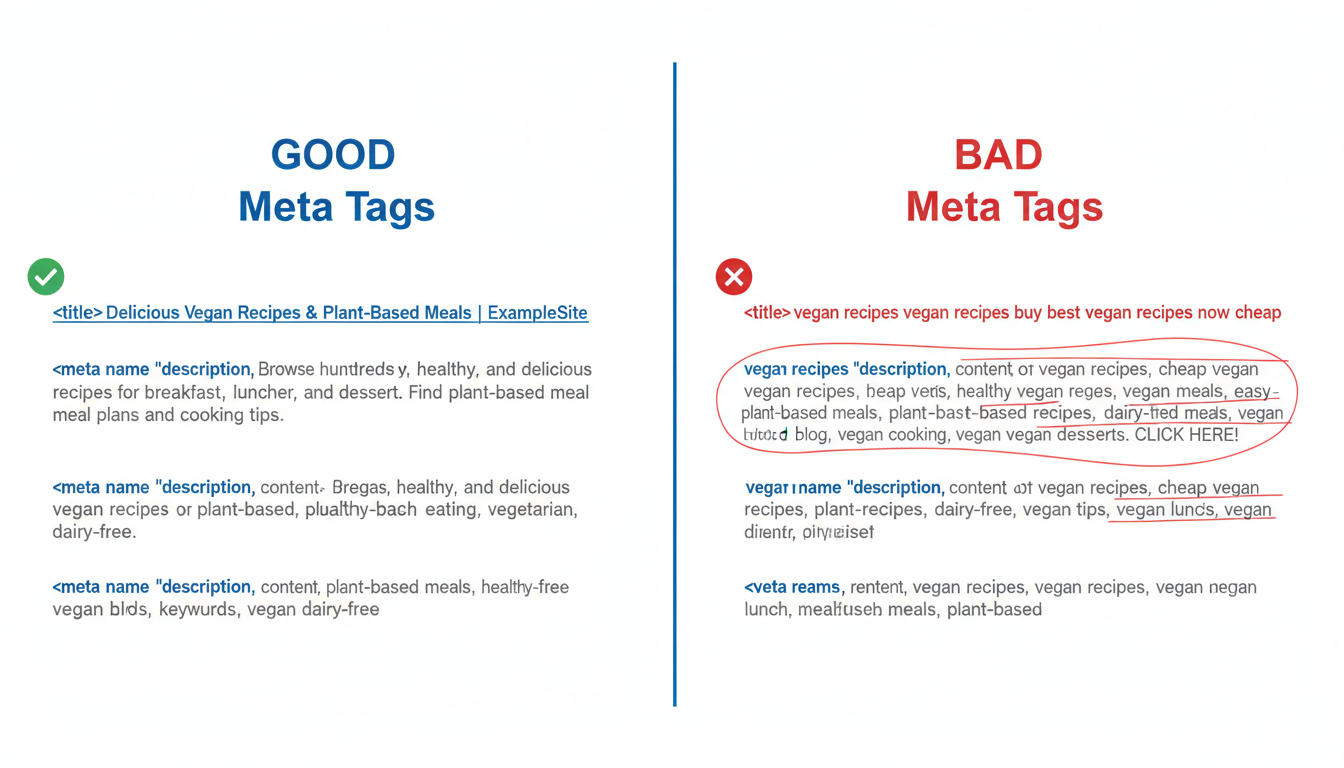
2. Keyword Stuffing the Description
Writing “Best shoes cheap shoes buy shoes online” in your description doesn’t help you rank. It looks spammy. Google’s algorithms are sophisticated enough to understand context. Write for humans; let the Meta Tag Generator handle the code structure.
3. Ignoring the “Canonical” Tag
Advanced generators often include a field for the “Canonical URL.” This tells Google which version of a page is the “master” copy. If you have similar content across multiple URLs (like product pages with different color filters), failing to set a canonical tag causes keyword cannibalization.
According to Google Search Central, properly managing these directives is essential for controlling how your content is indexed and served to users.
💡 Pro Tip
Use “Power Words” in your meta description generated output. Words like “Proven,” “Instant,” “Guide,” and “Updated” tend to increase CTR by up to 20% compared to dry, descriptive text.
Conclusion: Your Next Move
In the end, a Meta Tag Generator is a bridge. It connects your content strategy to the technical reality of the web. By automating the syntax, you free up mental energy to focus on what really matters: creating content that solves problems.
Don’t let a missing bracket or a truncated title tag be the reason your traffic stalls. Audit your top 10 pages today. Run them through a generator, clean up the code, and watch how your search performance tightens up.
For further reading on web standards and accessibility in metadata, the W3C (World Wide Web Consortium) remains the ultimate authority.
❓ Frequently Asked Questions
Do meta tags still help with SEO in 2026?
Yes, absolutely. While they may not be the primary ranking factor they were decades ago, they are crucial for Click-Through Rate (CTR) and helping search engines understand the context of your page. A high CTR is a strong signal to Google that your content is relevant.
What is the ideal length for a meta description?
Aim for 150 to 160 characters. Anything longer risks being cut off (truncated) in the search results, which can make your snippet look unprofessional. Anything shorter might not provide enough context to entice a click.
Can I use the same meta tags for every page?
No! This is a critical error known as “duplicate content.” Every page on your website should have a unique Title Tag and Meta Description that accurately reflects the specific content on that page.
Does a Meta Tag Generator create keywords for me?
Most generators require you to input the data. They are tools for formatting and syntax, not content creation AI. You still need to perform keyword research to know what to put inside the tags.
Where do I paste the code from the generator?
The code must go between the <head> and </head> tags of your HTML document. If you are using a CMS like WordPress, you typically paste the text values into your SEO plugin fields rather than editing the raw HTML code directly.

