Keyword research. Even the name sounds important, doesn’t it? And trust me, it is. If you’re serious about building a thriving online presence, whether it’s through blogging, e-commerce, or offering your services, understanding how to use keyword research tools isn’t just a nice-to-have skill – it’s absolutely essential. I’ve seen countless websites struggle simply because they skipped this crucial step, essentially building a house on sand. In today’s digital arena, simply guessing what your audience is typing into Google is a recipe for invisibility. You need cold, hard data to fuel your content strategy and grab the attention of search engines like Google, Bing, and DuckDuckGo. Think of it as market research for the digital age.

Over the next few minutes, I’m going to walk you through the core principles of keyword discovery and give you a practical, step-by-step guide to using some of the most popular tools in the industry. My goal is simple: to equip you with the knowledge and skills to uncover those hidden gems – high-value, low-competition keywords that can drive a steady stream of organic traffic to your website. But here’s the deal: learning how to use keyword research tools isn’t just about crunching numbers. It’s about understanding the *why* behind the search, the intent of the user, and how you can provide the *best* possible answer to their questions. It’s about solving problems, not just chasing rankings.
And I’m not just going to tell you *what* to do. I’m going to show you *how* to do it, *why* it works, and what mistakes to avoid. Ready to get started? Let’s dive in.
Understanding the Fundamentals of Keyword Research
Before we get our hands dirty with the tools, it’s vital to grasp the underlying concepts. At its core, keyword research is the process of identifying and analyzing the specific words and phrases people use when searching for information online. We then use this data to inform our SEO strategy, content creation, and overall marketing efforts. Think of it as understanding the language your target audience speaks online.
In my experience, there are three fundamental pillars to consider when conducting keyword research:
- Search Volume: This represents the number of times a particular keyword is searched for within a given month. A higher search volume *can* indicate a greater potential for traffic, but it also typically signifies higher competition. Don’t automatically assume that high volume is always better.
- Keyword Difficulty (KD): This is an estimate of how challenging it will be to achieve a first-page ranking on Google for a specific keyword. Different tools use different scales, but the underlying principle is the same: the higher the KD, the more effort (and often, resources) it will take to rank.
- Search Intent: This is arguably the *most* critical factor, and it’s often overlooked by beginners. Search intent refers to the *reason* behind the search. What is the user trying to accomplish? Are they looking to buy something (transactional intent)? Are they seeking information (informational intent)? Are they trying to find a specific website (navigational intent)? Or are they comparing products (commercial intent)?
According to a 2023 study by Search Engine Journal, aligning your content with search intent is the *single most important* ranking factor. If your content doesn’t directly address the user’s needs and expectations, no amount of on-page optimization or link building will save you. You simply won’t rank sustainably. Think of it like this: if someone searches for “best running shoes for marathon training,” they’re likely looking for a comparison of different shoe models, not a history of running shoe technology.
Unlocking Maximum Impact: How to Use Keyword Research Tools Effectively
Alright, let’s get practical. To begin your keyword research journey, you’ll need to familiarize yourself with the interface and features of your chosen tool. While each tool has its unique quirks, the general workflow is usually similar. You start with a “seed keyword” – a broad term related to your niche – and the tool generates a list of related suggestions, complete with relevant metrics. It’s like planting a seed and watching it sprout into a tree of keyword possibilities.
Step 1: Identify Seed Keywords
Think of seed keywords as the foundation of your research. These are broad topics directly related to your business or website. For example, if you sell handmade jewelry, your seed keywords might be “handmade earrings,” “silver necklaces,” or “custom bracelets.” Don’t overthink it – just brainstorm a list of the core topics you cover.
Step 2: Input into the Tool
Now, take those seed keywords and plug them into the search bar of your keyword research tool. The tool will then generate a list of hundreds, or even thousands, of related keywords. This is where the magic happens. You’ll see variations of your seed keywords, long-tail phrases, and completely new keyword ideas you might not have considered.
Step 3: Filter Results
This is where you start to narrow down your options. Use the filters provided by your keyword tool to refine the list based on metrics like search volume, keyword difficulty, and word count. For example, you might set a minimum search volume of 100 searches per month and a maximum keyword difficulty of 30. This will help you identify the most viable opportunities – keywords that have decent traffic potential but aren’t too difficult to rank for.
Mastering How to Use Keyword Research Tools for Local SEO
If you operate a local business, your keyword research strategy needs a specific focus. Most tools allow you to filter results by geographic location, which is absolutely crucial. Search patterns in Los Angeles, for example, can differ significantly from those in Boston. When learning how to use keyword research tools for local growth, prioritize “near me” queries and location-specific modifiers to capture local intent. For instance, instead of targeting “best pizza,” you’d target “best pizza near me” or “best pizza in downtown Chicago.”
I’ve personally seen local businesses double their website traffic simply by optimizing for these local keywords. Don’t underestimate the power of local SEO!
A Deep Dive: Step-by-Step Guide to Popular Keyword Research Tools
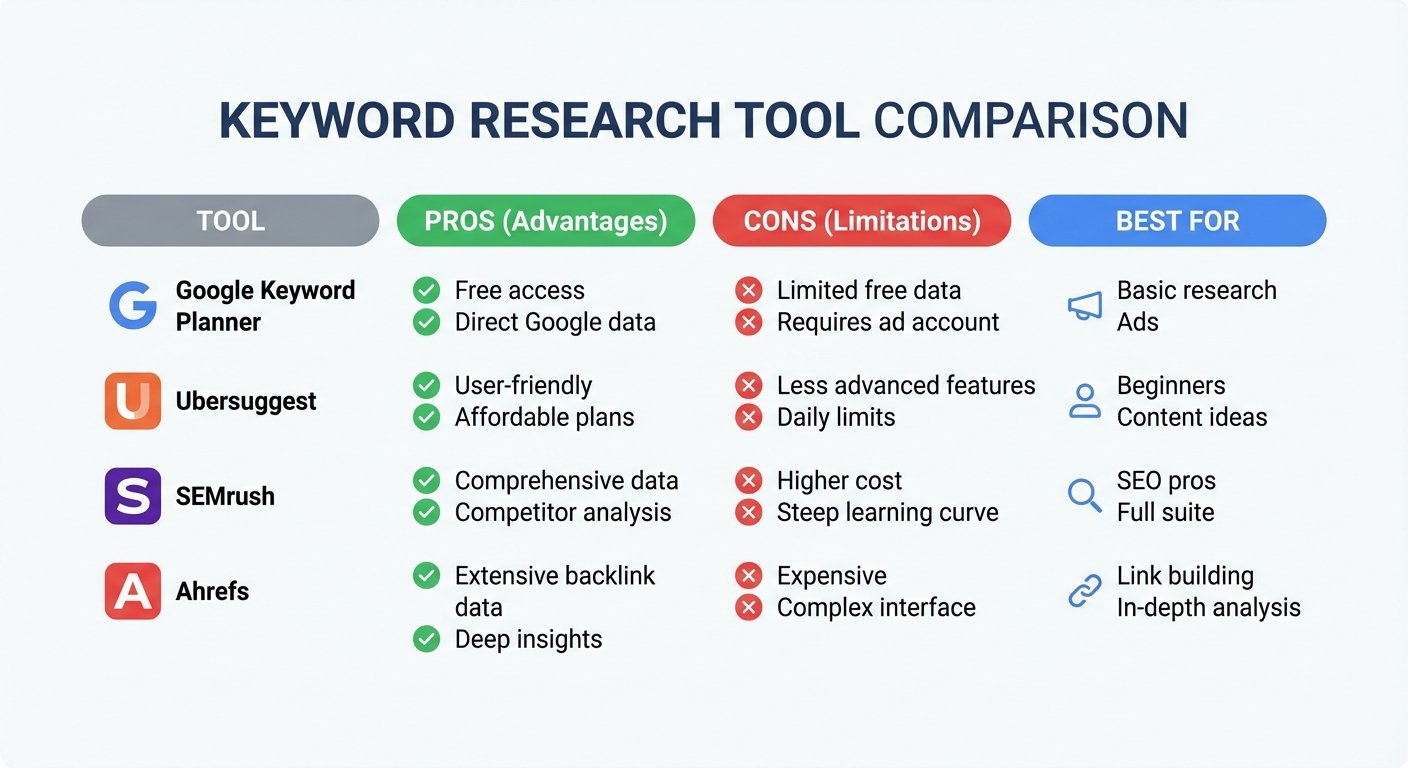
Let’s take a closer look at some of the most popular keyword research tools on the market and how to use their specific features to your advantage. I’ll walk you through each tool, highlighting its strengths and weaknesses, so you can choose the one that best fits your needs and budget.
1. Google Keyword Planner (Free)
Google Keyword Planner is an excellent starting point, especially for beginners, because the data comes directly from Google itself. It’s like getting insider information straight from the source. To use it, you’ll need a Google Ads account (but you don’t have to run any ads). Once you’re logged in, select “Discover new keywords.” Enter your seed phrase, and Google will generate a list of related terms along with their average monthly searches and competition levels. While it’s primarily designed for advertisers, it’s an invaluable *free* resource for organic research.
What I recommend is focusing on the “average monthly searches” column to get a sense of keyword volume. Keep in mind that the competition data in Keyword Planner refers to ad competition, not organic competition, so take it with a grain of salt.
2. Ubersuggest
Ubersuggest, created by Neil Patel, is known for its user-friendly interface and generous free tier. It’s a great option for those who are new to keyword research and want a tool that’s easy to navigate. Simply enter a keyword or a competitor’s URL, and Ubersuggest will provide a wealth of information, including keyword ideas, content ideas, and competitor analysis. The “Keyword Ideas” section is particularly useful for finding long-tail variations, while the “Content Ideas” section shows you what’s already performing well in your niche.
Here’s the thing: While Ubersuggest’s free tier is helpful, it’s limited. You’ll likely need to upgrade to a paid plan to unlock its full potential. But for beginners, it’s a solid starting point.
3. SEMrush
SEMrush is a powerhouse for professional marketers and SEO specialists. It’s a comprehensive suite of tools that goes far beyond just keyword research. Their “Keyword Magic Tool” is arguably the most comprehensive database available, allowing you to group keywords by topic, analyze search intent, and even track your competitors’ keyword rankings. When analyzing how to use keyword research tools like SEMrush, pay close attention to the “Intent” column, which categorizes keywords as Informational, Navigational, Commercial, or Transactional. This is invaluable for crafting content that aligns with user intent.
Now, let me be honest: SEMrush has a steep learning curve, and it’s not cheap. But if you’re serious about SEO and have the budget, it’s an investment that can pay off handsomely. I’ve seen clients achieve significant organic traffic growth by leveraging SEMrush’s advanced features.
4. Ahrefs
Ahrefs is renowned for its backlink data, but its “Keywords Explorer” is equally impressive. One unique feature of Ahrefs is the “Clicks” metric. This tells you how many of the searches for a particular keyword actually result in a click on a search result. This is crucial because Google is increasingly providing “zero-click” results (like featured snippets and knowledge panels) that satisfy the user’s query directly on the search results page. By focusing on keywords with a high “Clicks” metric, you can avoid wasting time on keywords where users aren’t actually clicking through to websites.
Ahrefs also boasts a robust keyword difficulty score and a wealth of competitor analysis features. Like SEMrush, it’s a premium tool with a higher price tag, but it’s worth considering if you need in-depth data and advanced features.
Finding Low-Hanging Fruit: Targeting Low-Competition Keywords
One of the biggest mistakes I see beginners make is immediately targeting high-volume, highly competitive keywords. If you have a new website with limited domain authority, you’re unlikely to rank for broad terms like “weight loss” or “credit cards.” Instead, you need to focus on long-tail keywords. These are longer, more specific phrases that have lower search volume but are *much* easier to rank for. Think of them as the low-hanging fruit of the keyword world.
For example, instead of targeting “running shoes,” you might target “best trail running shoes for wide feet under $100.” The latter has less competition and a much clearer intent. When learning how to use keyword research tools, look for keywords with a Difficulty score of under 30 (or even lower) if your site is relatively new. As your website gains authority, you can gradually start targeting more competitive keywords.
And here’s a pro tip: look for keywords that have a high commercial intent but low competition. These are often product-focused keywords or keywords related to specific services. For example, “affordable web design services for small businesses” is likely to be less competitive than “web design services” but still has strong commercial intent.
Once you have identified your target keywords, you must ensure your technical SEO is on point. For instance, using a text to slug generator can help you create clean, keyword-optimized URLs that are easy for both users and search engines to read. It’s a small detail that can make a big difference.
Mastering the Process: A Step-by-Step Workflow for Using Keyword Research Tools
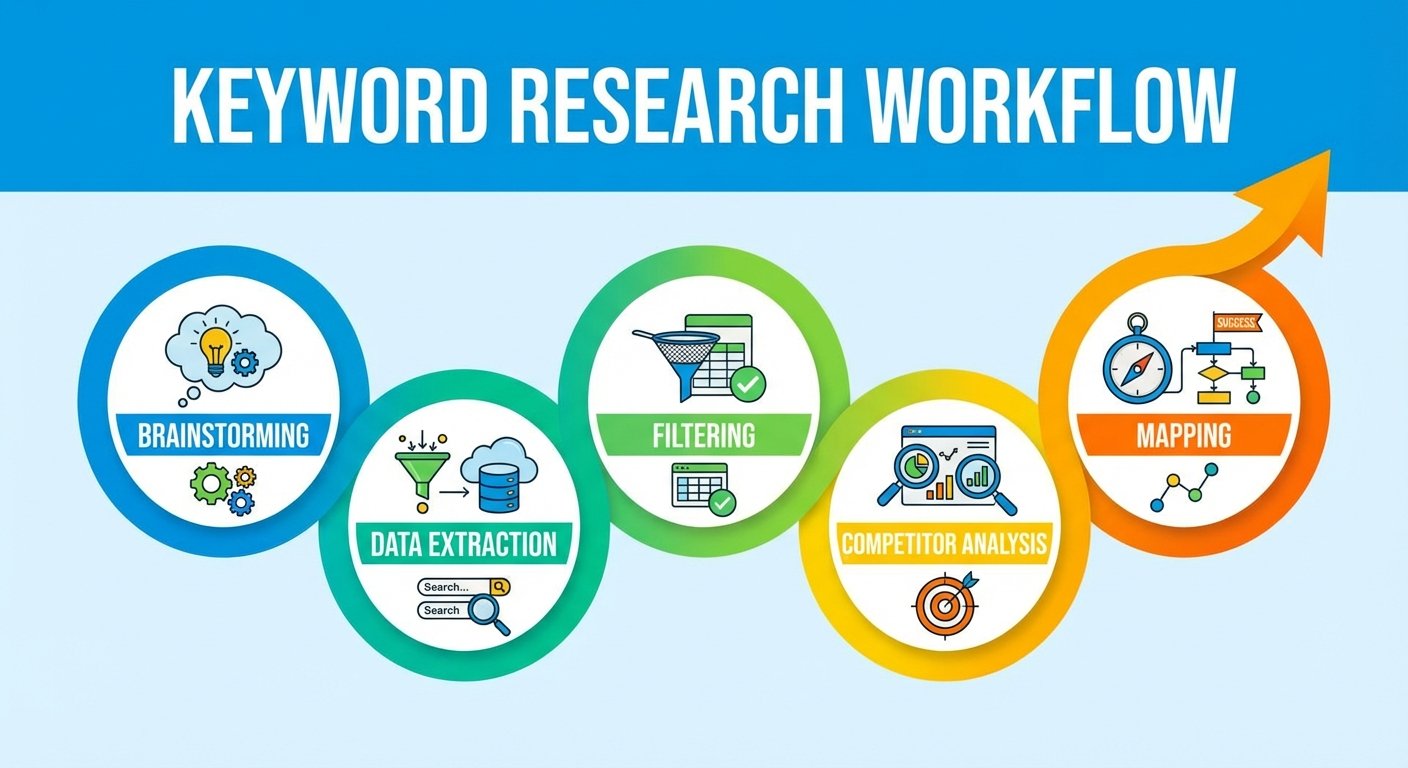
To maximize your efficiency and get the most out of your keyword research efforts, I recommend following this proven workflow every time you plan a new piece of content:
- Brainstorming: Start by listing 5-10 broad topics that are relevant to your niche and your target audience. These will serve as your initial seed keywords.
- Data Extraction: Run these seed keywords through a tool like Ahrefs or SEMrush to generate a list of related keywords and their associated metrics.
- Filtering: Set a minimum search volume (e.g., 100 searches per month) and a maximum keyword difficulty (e.g., 30 KD) to narrow down the list to the most promising opportunities.
- Competitor Analysis: Analyze the top 10 search results for your chosen keyword. What type of content is ranking? What are the strengths and weaknesses of your competitors’ pages? Can you create something better – more comprehensive, more engaging, more useful – than what’s currently out there?
- Mapping: Assign each keyword to a specific page or blog post on your website. Avoid “keyword cannibalization” by ensuring that two or more pages aren’t competing for the same keyword. This can confuse search engines and dilute your ranking potential.
As noted by Backlinko, the “Keyword Golden Ratio” (KGR) is a fantastic technique for finding keywords that you can rank for almost instantly. It involves finding keywords where the number of “allintitle” results (the number of pages that have the keyword in their title tag) is significantly lower than the search volume. The lower the KGR, the easier it will be to rank.
Level Up on a Budget: Free SEO Utilities and Budget-Friendly Options
I get it. Not everyone has the budget for a $100/month subscription to a premium keyword research tool. Fortunately, there are plenty of free SEO utilities available that can help you get the job done, especially when you’re just starting out. You can explore the category of SEO tools on Tools River to find various utilities that simplify technical tasks. These tools can help you refine your metadata, analyze tags, and ensure your content is technically sound without a massive investment.
And don’t forget about Google Trends! This free tool allows you to see how search interest for a particular keyword has changed over time. This can be invaluable for identifying trending topics and avoiding keywords that are losing popularity.
If you’re focusing on video content, remember that YouTube is the world’s second-largest search engine. Many people make mistakes by using irrelevant tags. To avoid this, read about 7 proven YouTube tag mistakes killing views to ensure your video keyword strategy is as robust as your written content strategy.
Steer Clear: Common Mistakes When Learning How to Use Keyword Research Tools
Even with the best tools and the most comprehensive guides, it’s easy to make mistakes when learning how to use keyword research tools. Here are some common pitfalls to avoid:
Ignoring Search Intent
I can’t stress this enough: Don’t just chase volume. If a user is looking to buy a product, but your page is a 5,000-word informational guide, they’re going to bounce immediately, which will hurt your rankings. Always align your content with the user’s intent.
Obsessing Over Exact Match
Modern search engines are sophisticated enough to understand synonyms and related terms. You don’t need to repeat the exact keyword phrase awkwardly throughout your content. Write naturally for the reader, and the search engines will figure it out.
Neglecting Trends
Keyword trends fluctuate constantly. What’s popular today might be irrelevant tomorrow. Use Google Trends alongside your keyword research tools to see if a topic is growing in popularity or dying out. This will help you make informed decisions about which keywords to target.
“The best place to hide a dead body is the second page of Google search results.” This famous industry quote, often attributed to Danny Sullivan, highlights the importance of keyword research. If you’re not on page one, you’re essentially invisible to the vast majority of searchers. Mastering how to use keyword research tools is your ticket to that coveted first page.
Final Thoughts: Mastering How to Use Keyword Research Tools
Learning how to use keyword research tools is an ongoing process of discovery and refinement. It’s not a set-it-and-forget-it task. It requires a combination of technical data analysis and a deep understanding of human psychology. By utilizing tools like Google Keyword Planner for fundamental data, SEMrush for in-depth competitive insights, and free utilities for technical optimization, you can build a content strategy that stands the test of time. Remember to focus on low-competition long-tail keywords in the beginning, always align your content with search intent, and, most importantly, provide genuine value to your readers. With patience, persistence, and a consistent application of these techniques, your organic traffic will inevitably grow. What I recommend is to start with one tool and master it before moving on to others. Don’t get overwhelmed by the options.
Now, it’s your turn. Take what you’ve learned in this guide and put it into practice. Start researching keywords, analyzing your competitors, and creating content that your audience will love. And don’t be afraid to experiment and make mistakes along the way. That’s how you’ll truly master the art of keyword research.
Frequently Asked Questions
Google Keyword Planner and Ubersuggest are excellent choices for beginners due to their intuitive interfaces and free access levels. They offer sufficient data to kickstart a successful SEO campaign without a steep learning curve. I often recommend starting with Keyword Planner to understand the basics.
Keyword research should be an ongoing process, not a one-time event. You should perform it whenever you plan new content, but also revisit your existing keywords every 3-6 months to assess if search trends or competition levels have shifted. I’ve seen significant ranking improvements by simply refreshing content with updated keyword research.
Absolutely! While premium tools offer more advanced features and data, you can still conduct effective keyword research using free resources like Google Keyword Planner, Google Trends, and the “People Also Ask” section on search result pages. Don’t underestimate the power of these free tools.
Keyword Difficulty (KD) is a metric, typically ranging from 0 to 100, that estimates the difficulty of ranking for a specific keyword. A higher score indicates that you’ll need more high-quality backlinks and stronger domain authority to compete effectively. In my experience, focusing on keywords with lower KD scores is a great strategy for new websites.
Long-tail keywords are crucial because they usually exhibit lower competition and higher conversion rates. They enable smaller websites to rank for specific queries that larger competitors might overlook. What I recommend is to build your initial content strategy around long-tail keywords to gain traction and build authority.
There are several tools you can use to track your keyword rankings, including SEMrush, Ahrefs, and Google Search Console. Google Search Console is a free tool that provides valuable data about your website’s performance in Google search results. Regularly monitoring your rankings will help you identify opportunities for improvement and track the effectiveness of your SEO efforts.