

Ever stared at a bug in your code for an hour, only to realize the problem was a single invisible character? Or maybe you’re a security analyst trying to piece together data fragments from a disk image. In these moments, the text you see on your screen is a lie. The real story is written in numbers.
That’s where a Text to Hexadecimal Converter becomes your secret weapon. It’s the tool that peels back the friendly facade of text and shows you the raw, unfiltered data underneath. It’s not just for computer science students; it’s an essential utility for developers, security pros, and data scientists.
In this deep dive, you’re not just going to learn what a text to hex converter is. You’ll discover the “why” behind it—why it’s the language of debuggers, the key to understanding file formats, and a fundamental skill for anyone serious about technology in 2026. Let’s decode it.
📑 What You’ll Learn
What is Hex, Really? (And Why Should You Care?)
At its heart, a computer is a ridiculously fast machine that only understands two things: on and off. 0 and 1. This is binary, and while it’s perfect for machines, it’s a nightmare for humans. A single letter ‘H’ in binary is 01001000. Now imagine trying to read a whole sentence like that.
You’d go insane. That’s why we have hexadecimal.
Hexadecimal (or “hex”) is a base-16 number system. It uses the numbers 0-9 and the letters A-F. The magic is that a single hex digit can represent exactly four binary digits (a “nibble”).
0100in binary becomes4in hex.1000in binary becomes8in hex.
So, our binary string 01001000 for ‘H’ becomes a clean, simple 48 in hex. Much better, right? Hex is the perfect middle ground—a compact, human-readable shorthand for the binary chaos that computers actually speak. It’s not an “encoding” in itself; it’s just a different way of representing the same underlying numbers.
The Conversion Process: A Step-by-Step Breakdown
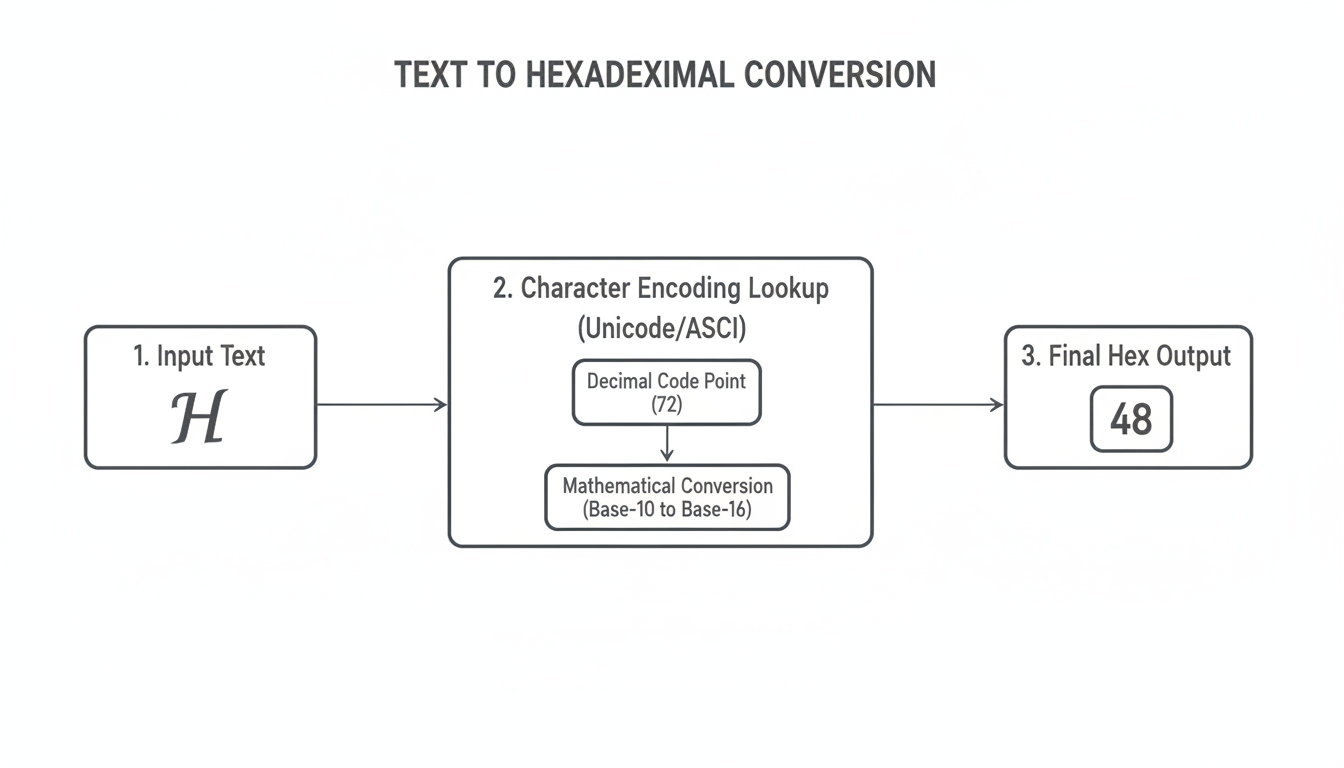
So, how does a tool instantly turn “Hello” into “48 65 6c 6c 6f”? It’s a simple, three-step dance that happens in a blink.
Let’s trace the journey of a single character, the humble letter ‘H’.
- Character to Code Point: First, the converter looks up ‘H’ in a universal character map. The most common standard today is Unicode (UTF-8). According to the Unicode Consortium, the character ‘H’ is assigned the decimal number (or “code point”) 72. This is a universal standard, ensuring ‘H’ means 72 on your laptop, your phone, and every server in between.
- Decimal to Hexadecimal: Next, the tool performs a mathematical conversion. It takes the decimal number 72 and converts it to its base-16 equivalent. The math works like this:
- How many times does 16 go into 72? 4 times (4 * 16 = 64).
- What’s the remainder? 72 – 64 = 8.
- Combine them, and you get 48. So, decimal 72 is
48in hex.
- Concatenate and Repeat: The converter does this for every single character in your input string—’e’, ‘l’, ‘l’, ‘o’, even spaces and punctuation—and strings the resulting hex values together. Voilà!
💡 Pro Tip
The biggest source of error in hex conversion is character encoding. If you convert text with an emoji like ‘😂’ using an old ASCII map, it will fail. A good converter always defaults to UTF-8, the modern standard that can handle virtually any character you throw at it. Always verify your tool is using UTF-8 for accurate results with international text or emojis.
The difference between encoding standards is critical. ASCII is a relic of the past, only covering basic English characters. UTF-8 is the global standard. Look at how they handle a simple string with an emoji:
| Input String | Encoding | Resulting Hexadecimal |
|---|---|---|
| Hi! | ASCII | 48 69 21 |
| Hi! | UTF-8 | 48 69 21 (Identical for basic characters) |
| Hi 😂 | ASCII | 48 69 20 3f (Fails, emoji becomes a ‘?’) |
| Hi 😂 | UTF-8 | 48 69 20 f0 9f 98 82 (Correctly represents the emoji with 4 bytes) |
5 Mission-Critical Uses for Hex Conversion
This isn’t just a theoretical exercise. In our experience, professionals rely on text-to-hex conversion daily for critical tasks. It’s a tool for problem-solvers.
1. Software Debugging & Memory Analysis
This is the big one. When a program crashes, developers often look at a “memory dump”—a raw snapshot of the computer’s memory. This data is almost always displayed in hex. Being able to spot a string like “Error: File Not Found” (45 72 72 6f 72 3a 20 46 69 6c 65 20 4e 6f 74 20 46 6f 75 6e 64) within that sea of numbers can instantly pinpoint the cause of a bug.
2. Digital Forensics and Security
Imagine an investigator analyzing a suspect’s hard drive. They might find fragments of deleted files or network packets. By converting these raw hex values back to text, they can uncover emails, chat logs, or malicious code that someone tried to hide. It’s fundamental to digital evidence recovery.
3. Web Development & URL Encoding
Ever see a URL with a bunch of %20 or %3F in it? That’s hex in action! Special characters in URLs (like a space or a question mark) must be “percent-encoded” to be transmitted safely. A space becomes %20 because the hex value for a space character is 20. This process is governed by standards like IETF’s RFC 3986, and it’s essential for making the web work.
4. Data Obfuscation (Not Encryption!)
Sometimes you want to hide a plain text string in a configuration file or script, just to prevent casual snooping. Converting an API key or an email address to hex makes it unreadable at a glance. It’s not real security—anyone can convert it back—but it’s a simple, effective layer of obfuscation.
Example: Hiding an email in HTML. Instead of
, a developer might writeto deter simple email-scraping bots.
5. Understanding File Formats
Every file—a JPEG, a PDF, a ZIP archive—has a specific structure defined by its bytes. The first few bytes, known as “magic numbers,” identify the file type. For example, a JPEG file always starts with FF D8 FF. A hex editor allows you to see these signatures, helping you verify file integrity or understand how data is structured at the lowest level.

⚠️ Watch Out
Never, ever paste sensitive information like passwords, private keys, or personal data into a public, web-based text to hex converter. You have no idea if that website is logging your input. For anything confidential, always use an offline tool or a trusted code editor plugin.
Choosing Your Tool: Online vs. Offline Converters
You’ve got two main paths for converting text to hex: quick and easy online tools or powerful, secure offline applications. Based on hands-on testing, the right choice depends entirely on your task.
| Feature | Online Converters (Web-based) | Offline Tools (Editors, Scripts) |
|---|---|---|
| Speed & Convenience | ⚡️ Excellent. Instant results, no installation needed. | Good. Requires opening an app or running a command. |
| Security | 🚨 Poor. Assume all input is logged. Never use for sensitive data. | ✅ Excellent. Data never leaves your machine. |
| Accessibility | High. Works on any device with a browser. | Medium. Requires installation (e.g., VS Code, Sublime Text) or command-line knowledge. |
| Best For | Quick conversions of non-sensitive text, learning, URL encoding snippets. | Debugging, security analysis, handling sensitive data, large files, batch processing. |
💡 Pro Tip
For developers who live in the terminal, you already have a powerful hex converter built-in. On Linux or macOS, you can use the xxd command. Just type echo -n "Hello" | xxd -p and it will instantly output 48656c6c6f. It’s the fastest way to get a quick conversion without leaving your workflow.
Pro Features to Look For in a Converter
When you move beyond basic conversions, you’ll want a tool with more firepower. Not all converters are created equal. Here’s what separates a professional-grade tool from a simple one:
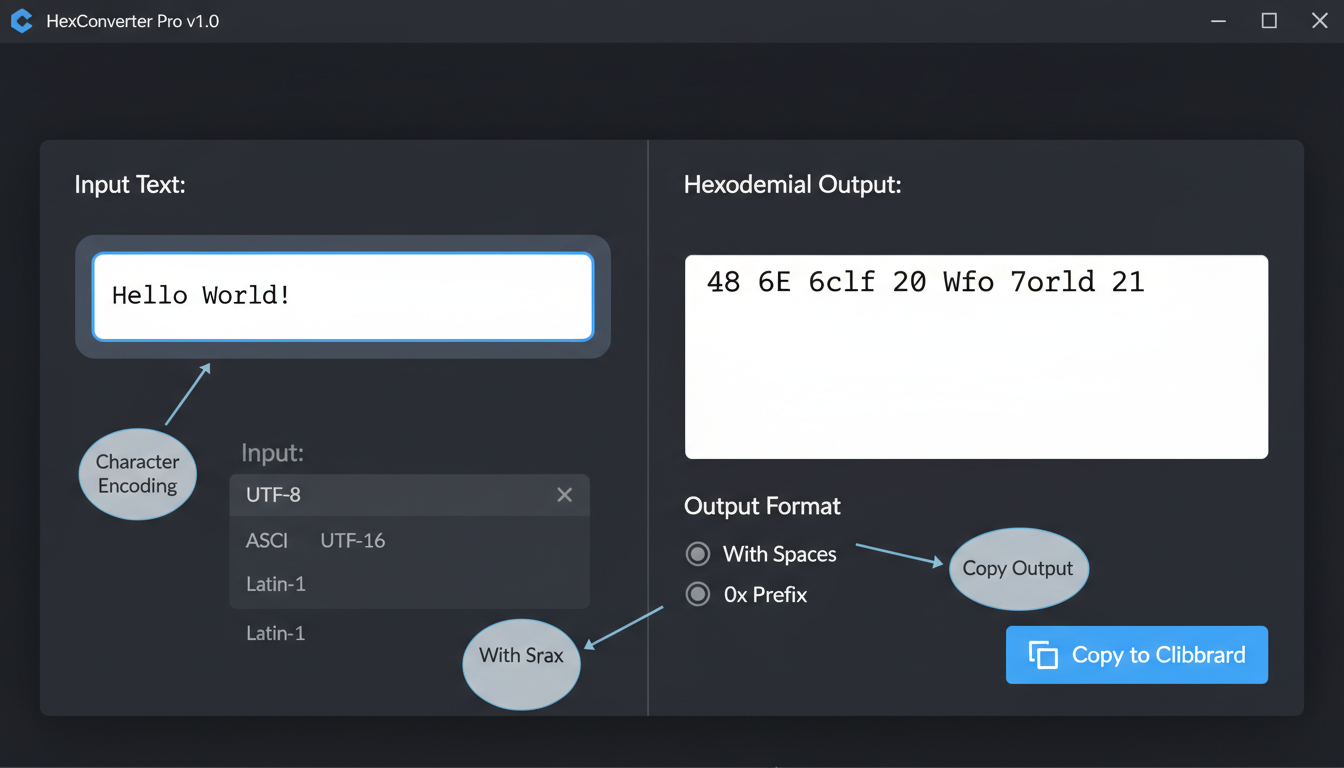
- Two-Way Conversion: The ability to convert from Hex to Text is just as important as Text to Hex. It’s essential for analysis and debugging.
- Output Formatting: Look for options to change the output. Can you add spaces between bytes? Can you add a
0xprefix to each? Can you format it as a C-style array? This flexibility is a huge time-saver. - Character Encoding Selection: A great tool lets you switch between UTF-8, UTF-16, ASCII, and other encodings to see how the output changes. This is invaluable for diagnosing encoding-related bugs.
- Real-Time Conversion: The best tools convert as you type, giving you instant feedback.
⚠️ Watch Out
Context is everything. The hex string 01 00 could mean the number 1 if you’re looking at a 16-bit integer on a little-endian system, or it could mean the number 256 on a big-endian system. Without knowing the data type and byte order (endianness), a hex string is meaningless. A converter only translates characters; it doesn’t interpret the data’s structure.
🎯 Key Takeaway
A Text to Hexadecimal Converter is your bridge from human-readable text to the raw numbers a computer actually uses. Mastering this tool is not just about conversion; it’s about gaining a deeper understanding of data representation, which is a fundamental skill for debugging software, analyzing security threats, and working with digital information at its most basic level.
❓ Frequently Asked Questions
Is text to hex conversion reversible?
Yes, 100%. The conversion is lossless. As long as you know the original character encoding (like UTF-8), you can convert a hexadecimal string back to its exact original text. This is why most professional tools offer both “Text to Hex” and “Hex to Text” functions.
Why is hex used instead of just binary?
It’s all about human readability. A long string of 0s and 1s is incredibly difficult for our brains to process and is prone to transcription errors. Since one hex digit perfectly represents four binary digits, it acts as a compact, error-resistant shorthand for binary data. It’s the best of both worlds.
Is text to hex the same as encryption?
Absolutely not. This is a critical distinction. Hex conversion is a form of encoding, which is a public, reversible process for changing data’s representation. Encryption is a secure process that uses a secret key to make data unreadable to unauthorized parties. Think of hex as a language translation, not a locked safe.
How are spaces and punctuation handled in hex?
They are treated just like any other character. In the Unicode and ASCII tables, every symbol, including spaces, periods, and even non-printing characters like a ‘newline’, has its own unique numeric code. For example, a standard space character is decimal 32, which converts to hexadecimal 20.
What’s the difference between ASCII and UTF-8 in hex conversion?
ASCII is an old, limited character set for 128 English characters. UTF-8 is a modern, universal standard that can represent over a million characters from all languages. For any character in the original ASCII set (A-Z, 0-9, etc.), the hex value will be identical in both. But for anything else—like ‘é’, ‘你好’, or ‘🚀’—UTF-8 will use multiple bytes (resulting in a longer hex string) to represent them, while ASCII can’t represent them at all.
Can a hex code represent a color?
Yes, but it’s a specific application. In web design (CSS, HTML), a six-digit hex code like #FF5733 represents a color by defining the Red, Green, and Blue (RGB) values. FF is the red value, 57 is green, and 33 is blue. This is different from converting the text “#FF5733” to hex, which would result in 23 46 46 35 37 33 33.
Conclusion: Your Window into the Machine
The humble Text to Hexadecimal Converter is far more than a simple utility. It’s a lens that lets you see the digital world as it truly is: a world of numbers. It demystifies how the text we type every day is stored, manipulated, and sent across the globe.
By translating human-friendly characters into the compact language of the machine, you empower yourself. You can debug faster, analyze data more deeply, and understand the technology that powers our lives with greater clarity. The next time you’re stuck on a weird bug or curious about a file’s contents, don’t just look at the text. Convert it to hex.
Your next step? Don’t just read about it. Grab a piece of text—your name, a line of code, an emoji—and run it through a converter. See the patterns. Change one character and watch the hex change. That hands-on experience, as many computer science programs from institutions like Stanford University emphasize, is the fastest way to build true understanding.

