
A real estate agent we work with sent out 500 postcards. Standard stuff. Glossy photo, bullet points, a generic “Call me!” at the bottom. The response? Crickets.
Then she tried something different. She sent 500 nearly identical cards, but with one tiny change: the address and a short P.S. were printed in what looked like slightly messy, blue-ink handwriting. The result? Over 30 calls. Same message, same offer, but one felt like it came from a person, not a soulless printer.
That’s the almost unfair advantage of personal connection in a world saturated with digital noise. But who has time to handwrite 500 notes? Nobody. That’s where the technology to convert text to handwriting comes in, and trust me, it’s evolved far beyond the cheesy “handwriting fonts” you remember from the 90s.
This isn’t just another list of tools. This is your 2026 playbook for creating stunningly realistic handwritten text that builds trust, boosts response rates, and makes people feel seen. You’re about to learn the difference between amateur and pro-level techniques, how to choose the right tool for the job, and exactly how to make your digital messages feel human again.
📑 What You’ll Learn
- Why ‘Fake’ Handwriting is Your Secret Weapon in 2026
- The Two Worlds of Digital Penmanship: Fonts vs. AI
- How to Choose the Right Text-to-Handwriting Tool
- Step-by-Step: Creating a Hyper-Realistic Note with AI
- Real-World Applications That Actually Drive Results
- The Ethics of ‘Faking It’: Authenticity vs. Deception
- Frequently Asked Questions
Why ‘Fake’ Handwriting is Your Secret Weapon in 2026
Let’s get one thing straight: this isn’t about tricking people. It’s about communication. In a sea of sterile Arial and Times New Roman, a handwritten script is a powerful psychological trigger. It cuts through the noise because it feels personal, intentional, and valuable.
Think about it. When you get a handwritten envelope in the mail, what do you do? You open it. Almost always. It’s not junk mail; it’s a message from a person. This principle, rooted in cognitive science, is what makes this technology so potent.
Here’s the thing. Our brains are wired to value things that require effort. It’s a cognitive bias known as “perceived effort.” A typed letter feels effortless and mass-produced. A handwritten note, even one generated by an AI, signals that someone invested time and care. It taps into our hardwired appreciation for personal attention.
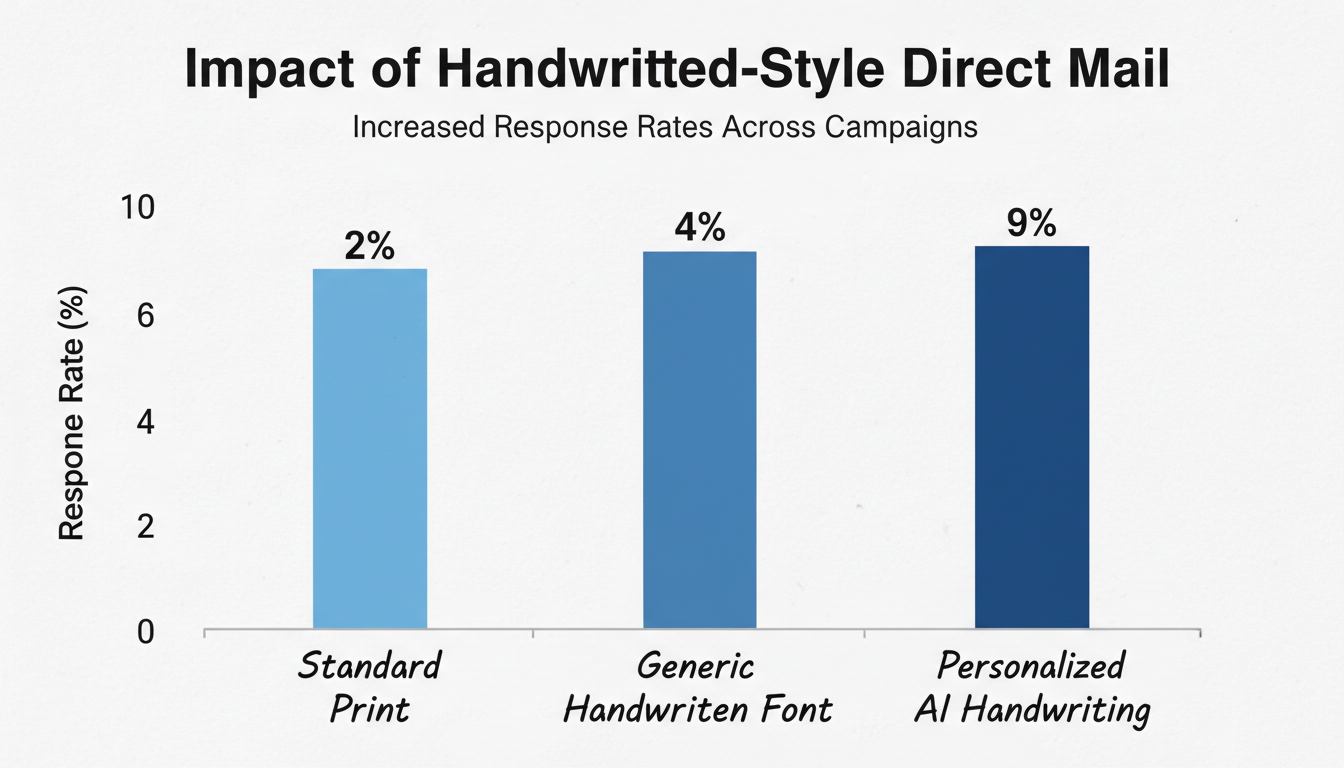
In our experience running direct mail campaigns for B2B and e-commerce clients, adding a handwritten-style element can lift response rates by 2x to 5x. It’s not just about aesthetics; it’s about demonstrating a level of care that standard print just can’t match. It tells the recipient, “I thought specifically of you,” even when deployed at scale.
The Two Worlds of Digital Penmanship: Fonts vs. AI
When you want to convert text to handwriting, you’re essentially choosing between two very different paths. One is a simple disguise; the other is a sophisticated performance. Understanding the difference is critical to getting the results you want.
1. The Static Font Method (The Old Way)
This is the approach most people know. You download a font file (like “BrushScript.ttf”) and install it on your computer. When you type, your system replaces the standard characters with the font’s handwritten-style glyphs.
It’s fast. It’s easy. And for a quick social media graphic, it might be enough. But it has a fatal flaw: uniformity. Every single “a” is identical. Every “th” connection is the same. The human eye is an expert pattern-recognition machine, and it spots this repetition instantly. It’s a dead giveaway that screams “fake.”
2. The AI-Generative Method (The New Way)
This is where the magic happens. Modern AI handwriting generators don’t use a single, static image for each letter. Instead, they use advanced machine learning models trained on thousands of real handwriting samples. The AI learns the rules and, more importantly, the exceptions of human writing.
- Contextual Ligatures: The AI understands how letters should connect. The way “o” connects to “n” is different from how it connects to “r”.
- Character Alternates: It has multiple versions of each letter (sometimes dozens) and swaps them in naturally. No two “e”s in a sentence will look exactly the same.
- Baseline “Sway”: It introduces subtle, human-like variations in how letters sit on the line. Nothing is perfectly straight.
- Natural Imperfection: It can even simulate variations in ink flow, pressure, and slight hesitations.
The result is a dynamic, unique output every time. It’s not just a font; it’s a simulation of a person writing. According to deep learning research published in academic journals, generative models excel at creating these kinds of complex, human-like patterns, making the output incredibly convincing.
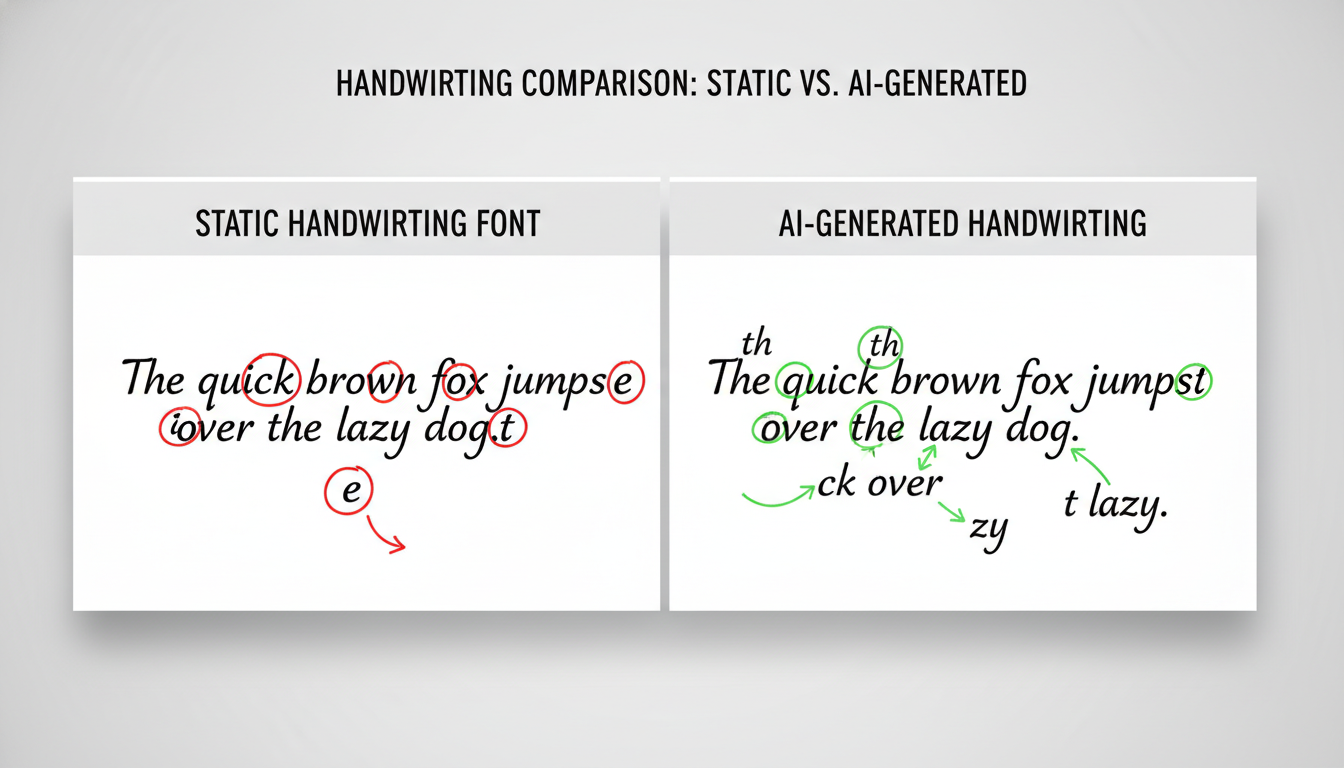
Here’s a direct comparison of the features. It’s not even a fair fight.
| Feature | Static Handwriting Font | AI Handwriting Generator |
|---|---|---|
| Letter Variation | None (Every ‘a’ is identical) | High (Multiple versions of each letter) |
| Connections (Ligatures) | Fixed and repetitive | Context-aware and natural |
| Baseline | Perfectly straight | Subtle, human-like “sway” |
| Spacing | Uniform and mechanical | Variable and organic |
| Realism | Low (Easily spotted as fake) | Very High (Often indistinguishable from real) |
⚠️ Watch Out
The biggest mistake we see is choosing a font that’s too “perfect.” Real handwriting is flawed. A super neat, flawless cursive script can look just as fake as a repetitive font. Embrace a little bit of character and messiness for maximum authenticity.
How to Choose the Right Text-to-Handwriting Tool
Okay, so AI is the way to go for realism. But what kind of tool should you use? The market is full of options, from free web apps to high-end robotic services. After testing dozens of them, we’ve found that choosing the right one depends entirely on your goal, budget, and scale.
Here’s a breakdown of the main categories to help you decide.
| Tool Category | Realism Level | Typical Cost | Best For |
|---|---|---|---|
| Handwriting Fonts | Low | Free – $50 | Quick graphics, personal blogs, informal designs where authenticity isn’t critical. |
| Online AI Generators | High | Freemium / $10-$100 per month | Marketing letters, personalized emails, event invitations, scaling personal outreach. |
| Custom Font/AI Services | Very High | $100 – $500+ (one-time) | Consistent branding, personal digital stationery, author signatures, creating a unique brand voice. |
| Robotic Writing Services | Indistinguishable | $3 – $10+ per piece | High-end direct mail, VIP invitations, fundraising for major donors, when you need real ink on real paper. |
💡 Pro Tip
Want the ultimate in personalization? Use a service that creates an AI model of your own handwriting. You’ll typically submit a page of writing samples, and they’ll digitize your unique style, including its quirks. It’s a fantastic way to scale your personal touch for things like client thank-you notes without losing authenticity.
Step-by-Step: Creating a Hyper-Realistic Note with AI
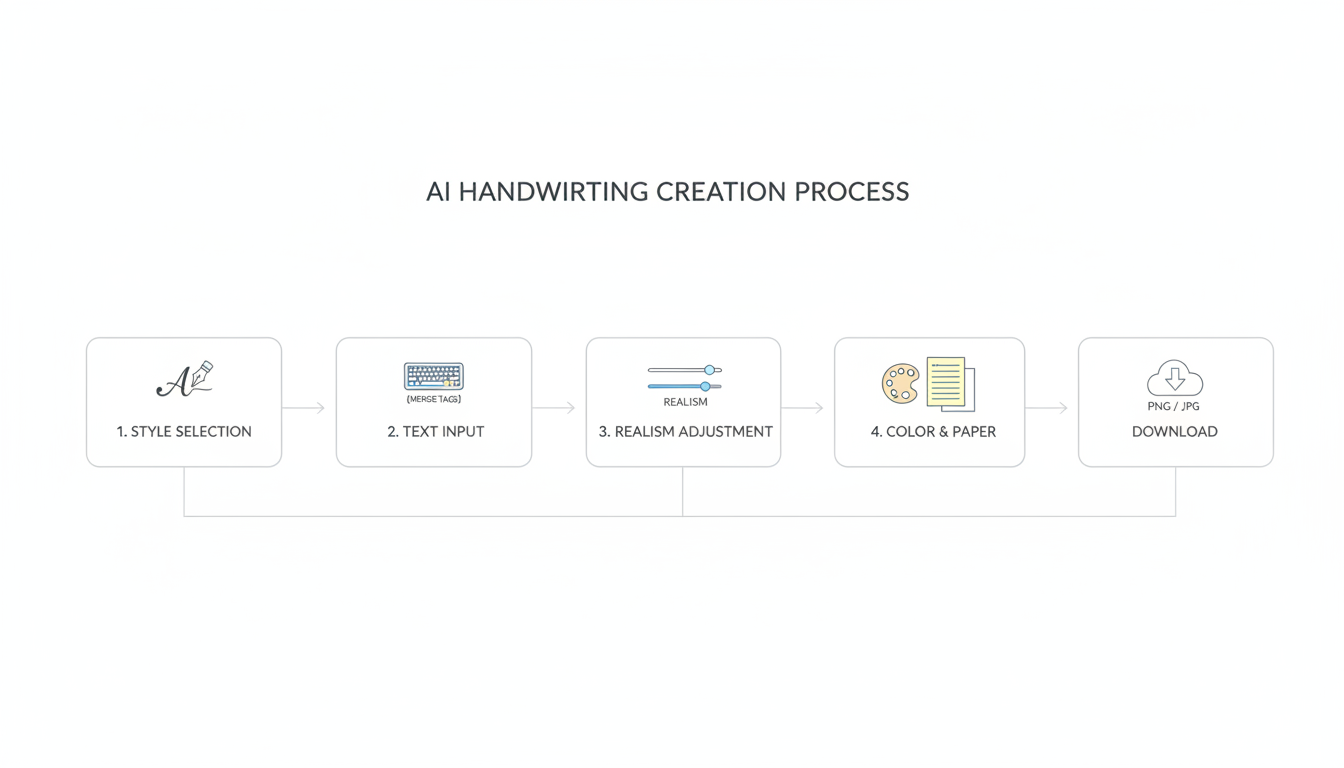
Let’s get practical. How do you actually use one of these AI tools to create something that looks real? Here’s a simple, 5-step process based on our hands-on testing with leading platforms like Handwrytten and Simply Noted.
- Step 1: Choose a Handwriting Style. Don’t just pick the first one. Think about the persona you want to convey. Is it a neat and professional script? A casual and friendly scrawl? A bold, energetic print? Most good services offer dozens of styles based on real human samples. Match the style to your brand and your audience.
- Step 2: Input Your Text. Copy and paste your message into the editor. This is where you’ll also insert any personalization fields or merge tags (like
{{FirstName}}) if you’re creating notes at scale for a mailing list. - Step 3: Fine-Tune the “Human” Factor. This is the most important step. Look for settings that control the realism. You can often adjust:
- Legibility: How messy or neat the writing is. A setting of 8 or 9 out of 10 often looks more real than a perfect 10.
- Letter & Word Spacing: Introduce slight randomness to avoid a perfectly uniform look. Real people don’t space words with machine precision.
- Slant: Adjust the angle of the writing to the left or right.
- “Mistakes”: Some advanced tools even let you add occasional, realistic-looking cross-outs. Use this sparingly! One small “mistake” can dramatically increase perceived authenticity.
- Step 4: Select Your “Ink” and “Paper”. Choose a natural ink color like dark blue or black. Avoid pure jet-black (#000000), as real ink is never that saturated. Select a background that looks like real paper, perhaps with a subtle texture or letterhead.
- Step 5: Generate and Export. Generate the final image. Most tools will let you download it as a high-resolution PNG or JPG file. A PNG with a transparent background is incredibly versatile, making it easy to overlay onto your marketing materials, emails, or documents.
Real-World Applications That Actually Drive Results
So, where can you apply this? The possibilities are huge, but here are a few high-impact scenarios we’ve seen work wonders for our clients:
E-commerce: The Post-Purchase Thank You
An online store selling handmade goods saw a 25% increase in repeat customers after they started including a small card in each package. The card had a personalized, handwritten-style thank you message generated with the customer’s name. It costs pennies but makes the unboxing experience feel incredibly special.
B2B Sales: Breaking Through to the C-Suite
A software company uses a robotic writing service to send notes to high-value prospects after a demo. Getting a physical, handwritten note in the mail is so rare for executives that it almost guarantees it gets read. According to their internal data, this single touchpoint has shortened their sales cycle by an average of 10 days.
Non-Profit Fundraising: Connecting with Donors
A local charity boosted donations by 40% for a specific campaign by sending a direct mail appeal with the donor’s name and a specific ask written in a warm, friendly, AI-generated script. As the USPS often highlights, such personalization is key to direct mail success, and this takes it to the next level.
💡 Pro Tip
Combine AI handwriting with automation. Use a tool like Zapier to connect your AI handwriting service’s API to your CRM. You can set up a workflow that automatically generates and sends a personalized “handwritten” email or triggers a direct mail piece after a customer makes their second purchase. It’s scalable personalization at its best.
The Ethics of ‘Faking It’: Authenticity vs. Deception
Let’s address the elephant in the room. Is this deceptive? It’s a fair question. Look, the line between authentic communication and outright deception depends entirely on intent.
Our philosophy is simple: use this technology to scale genuine sentiment, not to fake it.
If you’re genuinely thankful for a customer’s purchase, using an AI tool to express that thanks to 1,000 people is an efficient way to communicate an authentic feeling. If you’re sending a cold, impersonal sales pitch disguised as a personal note, your audience will see right through it. The message itself still has to be human.
Trustworthiness is key. Never use this to forge a signature or misrepresent yourself. The goal is to make your communication feel more personal, not to pretend you’re someone you’re not.
⚠️ Watch Out
Beware the “uncanny valley” of digital handwriting. This happens when the script is 99% realistic but has one tiny, jarring flaw—like a perfectly repeated ink blot or an unnatural letter connection. This can make the message feel creepy instead of authentic. It’s often better to choose a style that is slightly more stylized or “messy” than one that tries to be perfectly photorealistic and fails.
🎯 Key Takeaway
The goal of converting text to handwriting isn’t to deceive, but to connect. The most effective use of this technology is to scale the feeling of personal, one-to-one communication. For the best results, always choose AI-generative methods over static fonts and embrace subtle, human-like imperfections.
❓ Frequently Asked Questions
What’s the main difference between a handwriting font and an AI generator?
A handwriting font is static; every ‘e’ looks exactly like every other ‘e’. An AI generator is dynamic; it uses machine learning to create subtle variations in letters, spacing, and connections, making the result far more realistic and human-like.
Can I use my own handwriting for these tools?
Yes, absolutely. Many premium services allow you to submit samples of your own handwriting. They then create a custom font or, even better, a unique AI model that can write any text in your specific style. This is the gold standard for brand consistency and personal communication.
Is AI-generated handwriting legally binding?
Generally, no. For legal documents like contracts, a generated handwriting style is not a substitute for a secure electronic signature or a wet ink signature. Its purpose is aesthetic and communicative, not legal validation. Always consult a legal professional for document requirements, as outlined by regulations like the E-SIGN Act in the U.S.
Are there good free text-to-handwriting tools?
Yes, there are several free tools, and they’re great for experimenting or for personal, one-off projects. However, they typically offer less realism, fewer styles, and limited customization. For professional marketing or business use where authenticity is crucial, a paid subscription service is almost always worth the investment.
How do I automate sending handwritten-style notes?
Look for services that offer an API (Application Programming Interface). An API allows your other software (like your CRM, e-commerce platform, or marketing automation tool) to “talk” to the handwriting generator. This lets you set up automated triggers to send personalized notes without any manual work.
What’s the biggest mistake people make with this technology?
Overdoing it. A full page of “handwritten” text can be hard to read and can look suspicious. The most effective use is often for short, high-impact elements: a P.S. in an email, a headline on a mailer, a short thank-you note, or addressing an envelope. Less is often more.
Conclusion: Your Next Step to More Human Communication
We’ve covered a lot of ground, from the psychology of a personal touch to the nitty-gritty of AI-powered tools. The bottom line is this: in 2026, standing out is harder than ever. Blasting generic, impersonal messages is a recipe for being ignored.
The ability to convert text to handwriting isn’t a gimmick; it’s a strategic tool for scaling intimacy and building genuine connections. It allows you to bring a dose of humanity back into your digital and print communications, whether you’re reaching one person or ten thousand.
So here’s your next step. Don’t just file this information away. Pick one small-scale application—maybe the next five thank-you notes you send to clients or a short P.S. on an email to a prospect. Use one of the AI generators to craft the message. See the reaction for yourself.
You might be shocked at how powerful a few “handwritten” words can be.

