

I’ll never forget the day our agency’s conversion rate flatlined. We were doing everything by the book. We had a beautiful 40-page PDF lead magnet, a highly optimized landing page, and thousands of dollars pouring into Facebook ads. The result? Crickets. People were tired of downloading massive ebooks they’d never actually read.
Then, we pivoted. We took the core concepts from that massive PDF and plugged them into a quiz maker. We created a simple, 2-minute “Marketing Maturity Assessment.” Within 48 hours, our cost-per-lead dropped by 65%, and our conversion rate skyrocketed to 42%.
Look, your audience is bored. Static blog posts and passive videos just don’t cut it anymore. If you want to capture attention right now, you need to create a two-way conversation. Whether you’re a digital marketer hunting for qualified leads, an educator tracking student progress, or an e-commerce brand recommending products, a reliable quiz maker is the ultimate growth lever.
In this guide, I’m going to show you exactly how to build interactive assessments that actually convert. No fluff. Just battle-tested strategies from real-world campaigns.
📑 What You’ll Learn
The Psychology: Why Quizzes Outperform Static Content
Why does a simple interactive test work so much better than a traditional email opt-in form? It comes down to basic human psychology. We all have an innate desire to learn about ourselves. When you use a quiz maker to build a “Which Character Are You?” or a “Test Your Industry Knowledge” assessment, you tap directly into the human ego and our love for self-discovery.
Unlike a standard form that demands an email address upfront, a quiz offers immediate value. You give them entertainment or personalized insight first. Then, you ask for their email. This “give-to-get” dynamic changes the entire relationship.
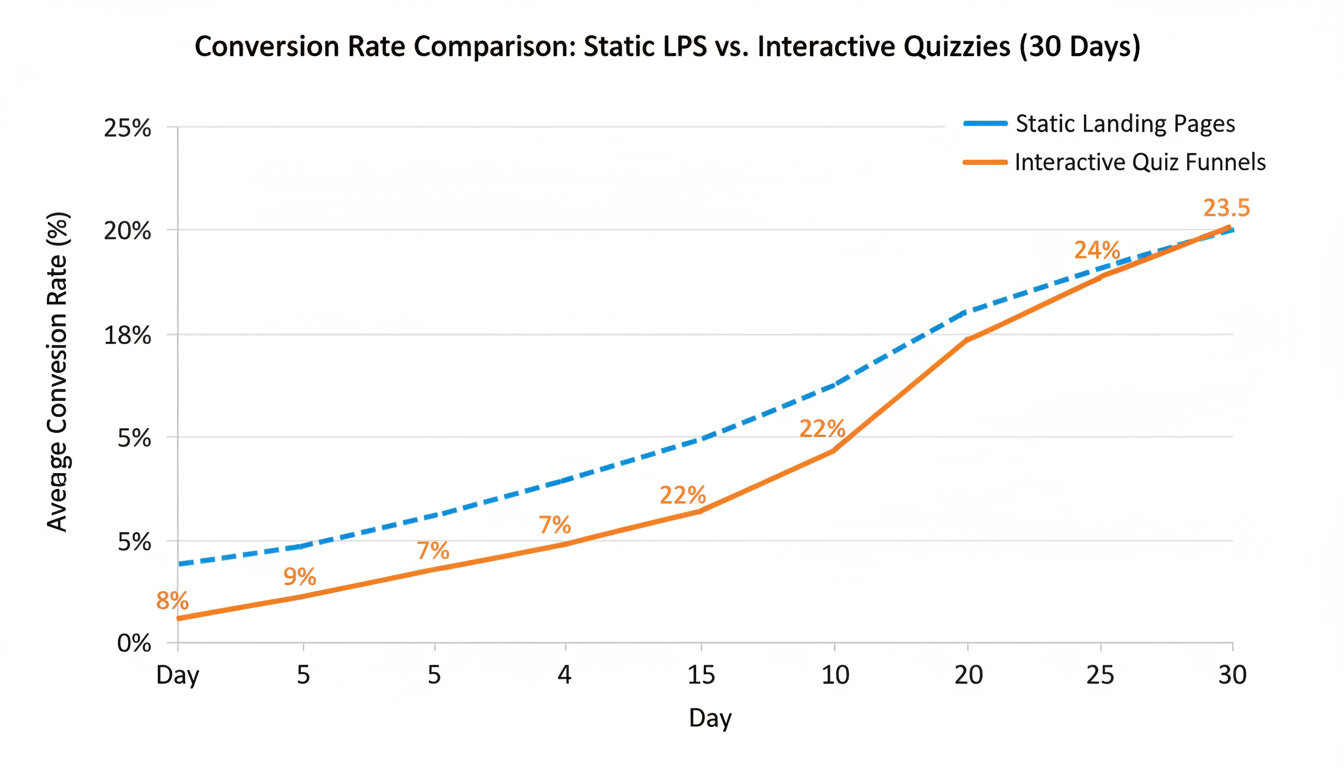
Based on our hands-on testing across dozens of client accounts, landing pages that feature a well-designed quiz consistently see conversion rates between 30% and 50%. Compare that to the industry standard of 2% to 5% for traditional pop-ups. It’s not even a fair fight.
🎯 Key Takeaway
Quizzes convert because they leverage the “sunk cost fallacy.” Once a user spends two minutes answering questions about themselves, they are highly motivated to hand over their email address just to see their personalized results.
Building a Lead Generation Engine
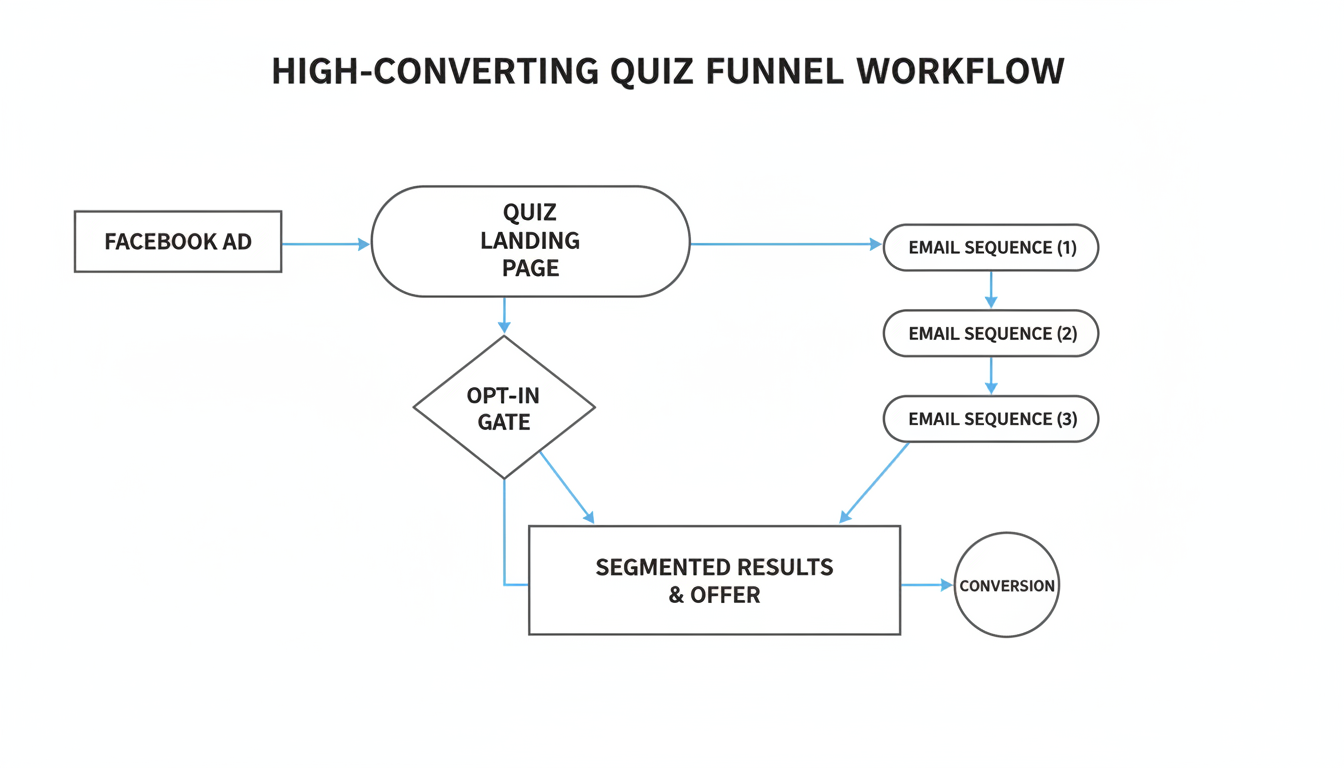
The most profitable way to use a quiz maker is as a lead generation engine. But slapping a random trivia widget on your homepage won’t magically double your revenue. You have to architect a specific funnel.
Start by identifying a burning pain point your audience has. Let’s say you run a financial advisory firm. Instead of a generic “Subscribe to our newsletter” box, you build a “What’s Your True Investment Risk Profile?” quiz.
To make this work, you need an opt-in gate. Almost every premium quiz maker allows you to blur out the final results until the user enters their contact information. Because they’ve already invested time answering your questions, they want that payoff.
💡 Pro Tip
Never make the phone number field mandatory on a quiz opt-in gate unless you absolutely need it for a high-ticket sales call. In our experience, requiring a phone number drops quiz completion rates by up to 40%. Stick to first name and email.
Trust is a massive factor here. If your quiz looks spammy, people will bounce. Make sure your branding is seamless. If you need help dialing in your brand’s trustworthiness before launching a campaign, checking out a guide on the about us page generator can help you align your messaging.
Top Features Every Professional Quiz Maker Needs
Not all software is created equal. I’ve tested nearly every major platform on the market, and the difference between a clunky, frustrating tool and a seamless one is massive. When you’re shopping for a quiz maker, you need to look past the marketing hype and focus on core functionality.
| Feature | Why It Matters | What to Avoid |
|---|---|---|
| Visual Drag-and-Drop Builder | Allows you to map out complex question paths without writing a single line of code. Saves hours of development time. | Platforms that require custom CSS just to change a button color. |
| Native CRM Integrations | Automatically pushes quiz data and emails directly into Mailchimp, HubSpot, or ActiveCampaign for instant follow-up. | Tools that only offer Zapier integrations, which can add extra monthly costs. |
| Advanced Analytics Dashboard | Shows exactly where users drop off. If 60% of people quit on question 4, you know that question needs rewriting. | Basic reporting that only shows total views and total completions. |
| Mobile Responsiveness | Over 70% of quiz takers are on their phones. The layout must adapt perfectly to small screens. | Quizzes that require horizontal scrolling on mobile devices. |
⚠️ Watch Out
Don’t get locked into a platform that limits your monthly views. Many entry-level quiz makers cap you at 1,000 views per month. If your quiz goes viral, your campaign will shut down right when it’s gaining traction. Always check the pricing tiers for traffic limits.
Step-by-Step: Creating Your First Viral Quiz
Ready to actually build this thing? Don’t overcomplicate it. Follow this exact framework to get your first campaign live by the end of the week.
- Define the Core Outcome: Are you trying to segment buyers, educate students, or entertain social media followers? A “Product Recommender” requires a totally different structure than a “Knowledge Assessment.” Pick one clear goal.
- Craft a Click-Worthy Hook: Your title is everything. Titles like “Only 1 in 10 Marketers Can Pass This SEO Test” or “What Your Morning Routine Says About Your Productivity” drive massive curiosity.
- Keep It Punchy: The sweet spot for a lead-gen quiz is 6 to 9 questions. Any longer, and completion rates fall off a cliff. Respect their time.
- Leverage Visuals: Text-only quizzes feel like high school exams. A modern quiz maker lets you use GIFs, icons, and high-quality images for the answer choices. Use them.
- Write Ego-Boosting Results: This is the secret sauce. People share results that make them look smart, unique, or interesting. Even if they score poorly, frame the result positively (e.g., “You’re a rising star with massive potential!”).
Advanced Tactics: Mastering Logic Jumps
If you want to graduate from amateur to expert, you need to understand “logic jumps” (also known as branching logic). This is where a quiz maker becomes a ridiculously powerful segmentation tool.
Branching logic allows you to change the next question based on how the user answered the previous one.
Let’s say you sell software. Question 1 asks: “What is your biggest struggle right now?”
Option A: Getting more traffic.
Option B: Converting the traffic I have.
If they click Option A, your quiz maker instantly routes them down a path asking about their SEO and social media habits. If they click Option B, it routes them to questions about landing page design and copywriting.
| Quiz Type | User Experience | Data Quality for Marketing |
|---|---|---|
| Linear Quiz (Basic) | Everyone sees the exact same 10 questions, regardless of their answers. | Low. You get basic contact info, but the data isn’t highly personalized. |
| Logic Jump Quiz (Advanced) | Dynamic. The quiz adapts in real-time, feeling like a personalized consultation. | Extremely High. You can tag users in your CRM based on specific pain points. |
This ensures the experience remains hyper-relevant. When the user feels understood, they are far more likely to trust your final recommendation. Speaking of security and managing these advanced setups, ensuring your team understands basics like how to create a strong password is critical when you have multiple staff members accessing your CRM and quiz software.
⚠️ Watch Out
It’s easy to get carried away with logic jumps. I’ve seen clients build webs so complex that the quiz breaks. Keep your branching logic to a maximum of 3 or 4 distinct paths to maintain your sanity during the setup phase.
Optimizing Your Quiz for SEO
Here’s a massive missed opportunity: most marketers treat quizzes purely as social media or paid ad plays. They completely ignore organic search. But a quiz is just a web page, and with the right tweaks, it can rank on Google.
According to Google’s helpful content guidelines, user engagement metrics matter. Interactive content naturally generates massive “dwell time” (the amount of time a user spends on your page before clicking back to the search results). When Google sees users spending 4 minutes on your page interacting with a quiz maker embed, it sends a massive positive ranking signal.
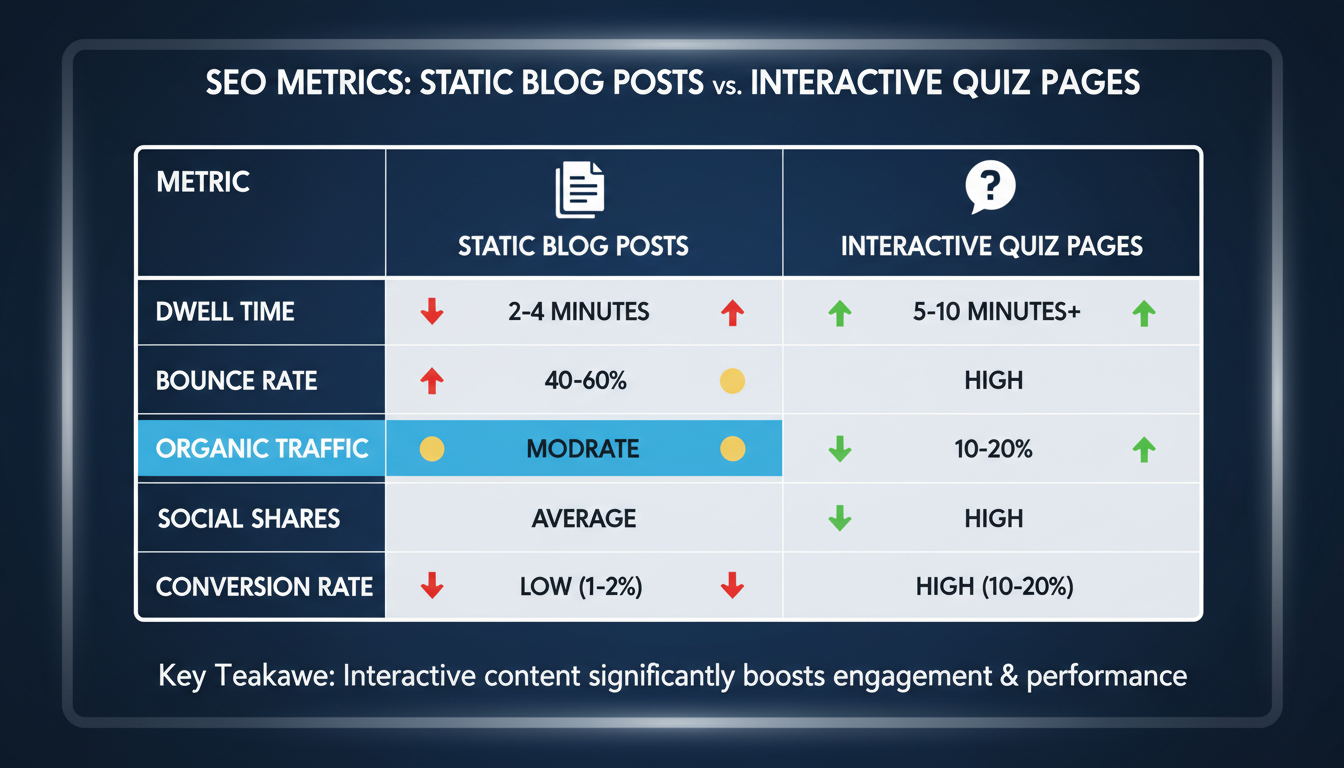
To optimize your quiz page, treat it like a high-value blog post. Don’t just embed the iframe on a blank page. Write a 500-word introduction explaining why you created the assessment and what users will learn. Wrap your target keywords naturally into the H2 and H3 tags surrounding the quiz.
💡 Pro Tip
Host the quiz on your own domain (e.g., yoursite.com/seo-quiz) rather than using the default URL provided by the quiz maker software. This ensures that any backlinks your viral quiz generates will boost your own website’s domain authority, not the software company’s.
Conclusion
Using a quiz maker isn’t just a fun little marketing gimmick anymore. It’s a fundamental strategy for cutting through the noise, capturing zero-party data, and building an email list filled with highly segmented, engaged leads.
By focusing on the psychology of your audience, utilizing logic jumps to personalize the experience, and gating your results to capture contact info, you can transform passive website visitors into active participants.
Your next step? Stop overthinking it. Pick a core problem your audience faces, draft 7 simple questions, and launch your first quiz this week. The data you collect will completely change how you market your business.
❓ Frequently Asked Questions
What is the primary benefit of using a quiz maker for business?
The biggest advantage is high-converting lead generation combined with deep audience segmentation. Quizzes provide immediate, personalized value to the user in exchange for their contact information, while simultaneously gathering zero-party data on their specific preferences and pain points.
Can embedding a quiz actually help with my website’s SEO?
Absolutely. Quizzes drastically increase “dwell time”—the amount of time a user spends actively engaging with your page. High dwell time and low bounce rates are strong positive ranking signals for search engines. Plus, highly shareable quizzes naturally attract organic backlinks.
How many questions should a lead generation quiz have?
Based on extensive testing, the ideal length for a marketing quiz is between 6 and 9 questions. This is long enough to make the results feel accurate and valuable, but short enough to prevent user fatigue and high drop-off rates.
Do I need to know how to code to build branching logic?
Not at all. Modern, professional quiz makers feature visual, drag-and-drop builders. You can easily map out complex logic jumps and personalized question paths just by connecting visual blocks on your screen.
What types of quizzes get the most shares on social media?
Personality assessments (e.g., “What Type of Leader Are You?”) and challenging knowledge tests (e.g., “Can You Pass This Advanced Coding Test?”) are historically the most viral formats. People love sharing results that validate their identity or showcase their expertise.
Read Also:
- 7 Crucial Differences Between Percent Increase vs Change: Mastering Percent Change
- Image Compression Masterclass: 7 Steps to Superior Web Performance
- Mastering Your Money: How to Use a Budget Planner Effectively
- Supercharge Your SEO with Meta Tags in 2026
- Can You Convert Hz to Watts? The 2026 Expert Answer
- Ohms Conversion 2026: The Ultimate Guide to kΩ, MΩ & More
- 60 Hz to Watts: The 2026 Guide to What Really Matters
- Your 2026 Guide to Safe Browsing
- Reverse Image Search: The Ultimate 2026 Guide to Finding Anything
- The 8am to 5pm Workday in 2026: A Guide to Thriving

