7 Proven Ways to Use a Keyword Rank Tracker for SEO Growth
Picture this. It’s Tuesday morning. You pull up your analytics dashboard, coffee in hand, ready to review your weekly traffic. Your stomach drops. Organic traffic is down 28%. Panic sets in. Was it a Google algorithm update? Did a competitor steal your top spot? Or is your tracking code just broken?
If you aren’t actively using a keyword rank tracker, you have absolutely no way to answer those questions quickly. You are essentially flying blind, throwing darts in the dark and hoping one hits the bullseye.
Look, I’ve seen this play out hundreds of times in my career. Business owners and marketers pour thousands of dollars into content creation, only to ignore the very metrics that prove whether that content is actually working. A rank tracker isn’t just a vanity tool to stroke your ego when you hit position number one. It’s the diagnostic engine of your entire SEO strategy.
In this article, I’ll show you exactly how the pros use these tools to reverse-engineer competitor success, diagnose terrifying traffic drops, and find hidden revenue opportunities. Let’s get to work.
Google Analytics tells you what happened after a user clicked your link. A keyword rank tracker tells you why they had the opportunity to click it in the first place.
According to Google’s own Search Central documentation, search results are highly dynamic. They shift based on user location, device type, and personalization. A page sitting comfortably at position #2 today might plummet to #8 tomorrow because a competitor updated their content or Google rolled out a core update.
Without a dedicated tracking tool, you won’t notice this drop until your leads dry up weeks later. Real-time tracking shifts your strategy from reactive panic to proactive optimization.
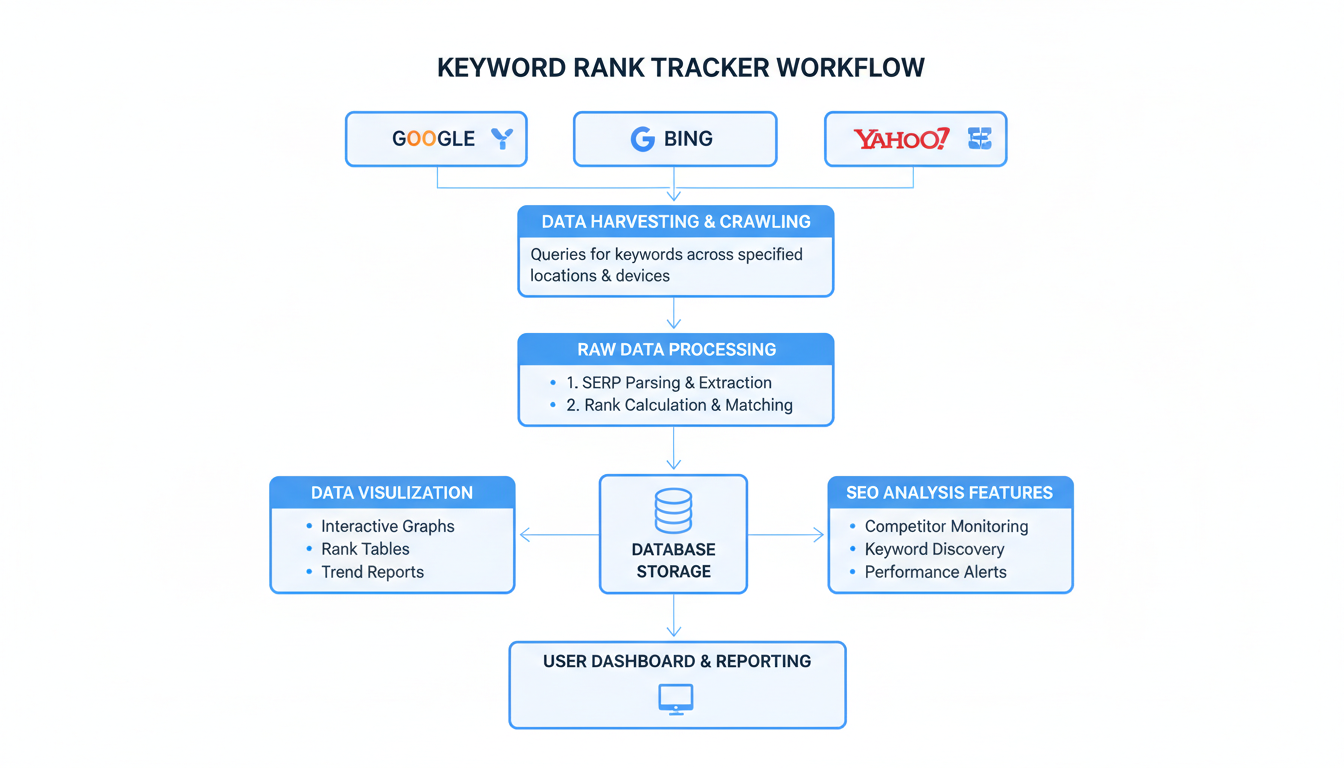
professional minimalist flowchart showing the workflow of how a keyword rank tracker pulls data from…
⚠️ Watch Out
Never rely on manual Google searches to check your rankings. Because of personalized search history and localized IP addresses, the results you see on your own computer are heavily biased. Always use a depersonalized tracking tool for accurate data.
1. Daily Position Monitoring vs. Algorithm Volatility
Search rankings are incredibly volatile. In our experience managing large-scale enterprise campaigns, we see keyword positions fluctuate daily. Sometimes it’s just the “Google Dance” — the search engine testing different results to measure user engagement. Other times, it’s a permanent shift.
By tracking your core keywords every 24 hours, you build a historical baseline. When an official Google Core Update hits, you can immediately see which pages gained visibility and which ones took a hit. This granular data is what separates amateur bloggers from seasoned SEO professionals.
Immediate alerts for drops, highly accurate trend lines
Can cause unnecessary stress over minor fluctuations
Weekly
Long-tail keywords, informational blog posts
Good for high-level reporting, less noise
Too slow to catch critical technical SEO errors
Monthly
Brand awareness terms, low-priority pages
Requires minimal management time
Useless for diagnosing sudden traffic drops
2. Segmenting by Search Intent and Location
Dumping 5,000 keywords into a tracker without organizing them is a rookie mistake. To get actual value out of your data, you must segment.
Accurate data collection starts with location settings. A search for “best business attorney” yields entirely different results in Chicago than it does in Miami. High-quality tracking software lets you specify the geographic location down to the exact zip code. If you run a local business, this feature is non-negotiable.
Beyond location, you need to tag keywords by search intent. Group your transactional keywords (e.g., “buy CRM software”) separately from your informational keywords (e.g., “what is a CRM”). This allows you to see exactly which part of your sales funnel is performing well and which part needs CPR.
💡 Pro Tip
Create a specific tag in your rank tracker called “Striking Distance.” Apply this tag to any high-value keyword currently ranking in positions 11 through 15. These are your lowest-hanging fruits. A few internal links or a minor content refresh can easily push these onto page one.
3. Exploiting Mobile vs. Desktop Discrepancies
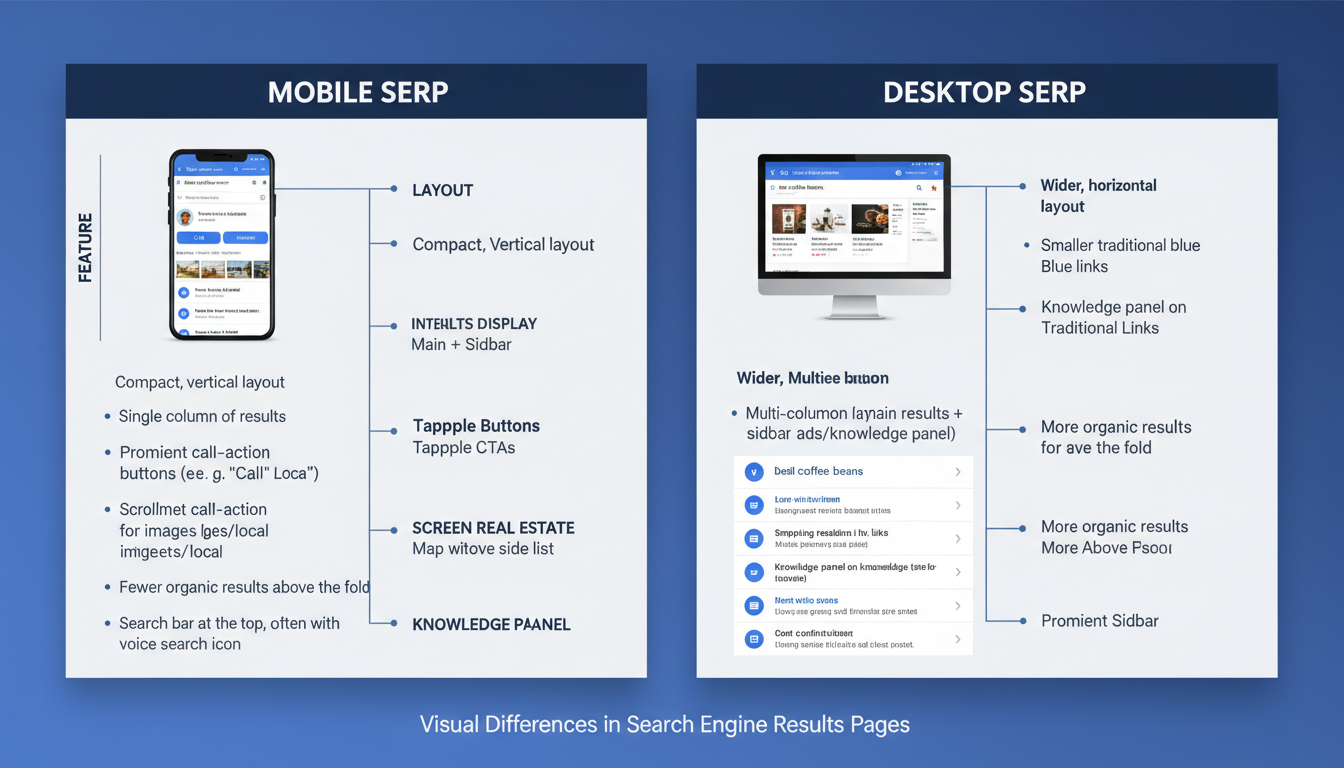
Google uses mobile-first indexing. Period. They evaluate the mobile version of your website to determine how it should rank across all devices. However, the actual search results displayed to users still vary wildly between desktop and mobile devices.
If your keyword rank tracker shows you sitting at position #3 on desktop but position #12 on mobile, you have a massive problem. This discrepancy is a screaming red flag that your site suffers from poor mobile usability, slow cellular load times, or intrusive pop-ups that Google penalizes on smaller screens.
detailed comparison table as a high-quality graphic showing the visual differences between mobile and desktop…
4. Competitor Surveillance and Share of Voice
SEO is a zero-sum game. For you to move up to position one, someone else has to lose it. One of the most powerful ways to use a keyword rank tracker is for ruthless competitor surveillance.
By adding your top three competitors to your tracking project, you can monitor their movements alongside your own. If you see a competitor suddenly jump from position #8 to #2 for a highly lucrative keyword, you can investigate immediately. Did they rewrite their article? Did they build a massive new backlink? Did they add a video?
You should also be monitoring Share of Voice (SoV). This metric calculates the percentage of total clicks your website earns for a specific group of tracked keywords compared to your competitors. It is the ultimate measure of market dominance.
When organic traffic plummets, your rank tracker is your best friend. Based on hands-on testing and years of agency experience, here is the exact process we use to diagnose a traffic drop.
Verify the Drop in Analytics: Confirm the traffic loss is isolated to organic search, not a broken tracking code or a drop in paid ads.
Check the Dates: Pinpoint the exact day the traffic started to decline.
Open Your Rank Tracker: Filter your keyword data to show changes between the day before the drop and the day after.
Identify the Culprit: Did your entire site drop across the board? (Likely an algorithm penalty or severe technical issue). Or did just one high-volume keyword drop from position #1 to #5? (Likely a competitor outranking you).
Analyze the SERP: Look at who replaced you. Analyze their page to see what search intent they are satisfying better than you are.
⚠️ Watch Out
Don’t make drastic changes to your website the moment you see a ranking drop. Google frequently tests new layouts. Wait at least 7 to 14 days to see if the drop is permanent before you start rewriting content or changing URLs.
6. Sniping SERP Features and Position Zero
Sometimes, the best way to increase traffic isn’t by moving from position #4 to position #3. It’s by stealing the Featured Snippet (often called Position Zero).
Modern search results are packed with SERP features: Local Packs, Video Carousels, People Also Ask boxes, and Featured Snippets. A premium keyword rank tracker will show you exactly which of your keywords trigger these features, and more importantly, whether you own them.
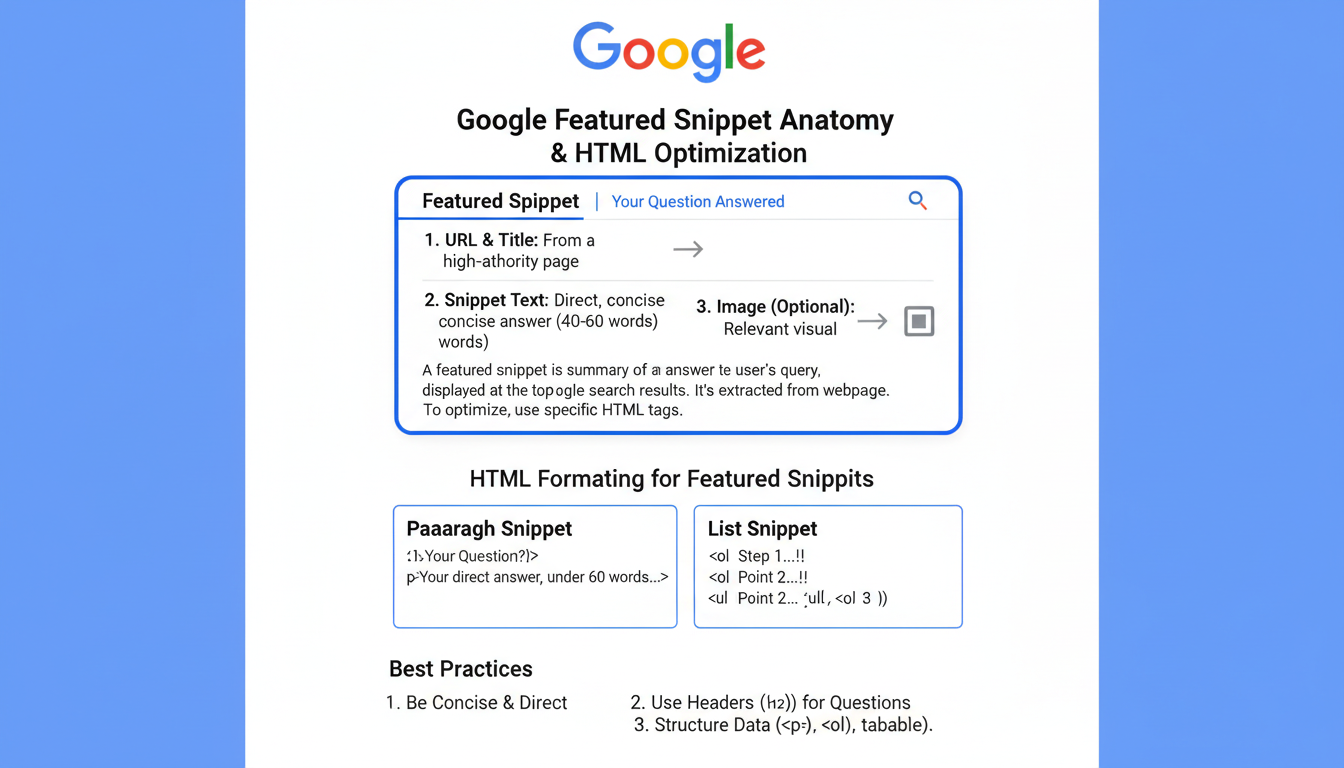
If you rank on page one for a query that has a Featured Snippet, you are a prime candidate to steal it. Restructure your content. Add a concise, 40-50 word paragraph that directly answers the search query. Use clear `
` and `
` tags. We’ve seen pages jump from position #6 straight to the top of the page just by formatting their answers better than the current snippet holder.educational infographic showing the anatomy of a Google Featured Snippet and how to format HTML…
7. Spotting and Fixing Keyword Cannibalization
Keyword cannibalization happens when two or more pages on your own website compete for the exact same search query. This confuses search engines. Instead of ranking one page highly, Google splits the ranking power between both pages, pushing them both down to page two or three.
Your rank tracker makes spotting this incredibly easy. Look for keywords where the ranking URL constantly flips back and forth between two different pages. The graph will look erratic, like a heart monitor.
Once you identify cannibalization, the fix is usually straightforward. You either need to merge the two competing pages into one ultimate resource (using a 301 redirect), or you need to de-optimize one page so it targets a completely different long-tail variation.
💡 Pro Tip
If you have large data exports from your tracking software and need to clean them up for client reporting, don’t waste hours doing it manually. Use a JSON to CSV converter to quickly format complex data exports into readable spreadsheets.
🎯 Key Takeaway
A keyword rank tracker is far more than a position-checking tool. By leveraging daily monitoring, competitor surveillance, and SERP feature analysis, you can transform raw ranking data into a highly actionable roadmap for dominating your industry’s search results.
Conclusion: Stop Guessing, Start Tracking
In the fiercely competitive arena of search engine optimization, data is your only real advantage. Relying on gut feelings or outdated analytics is a guaranteed way to lose market share to competitors who are paying closer attention.
By implementing the seven strategies outlined above—from segmenting your intent to hunting down keyword cannibalization—you turn your keyword rank tracker from a passive reporting tool into an active weapon for growth. Your next step? Open your tracking software right now, filter for keywords ranking in positions 11-15, and optimize those pages today. The results will speak for themselves.
❓ Frequently Asked Questions
How often should I check my keyword rank tracker?
For most active websites, checking your rankings once a day is ideal. This allows you to spot major trends and algorithm shifts without obsessing over minor hourly fluctuations. If you run a high-traffic news site, real-time tracking might be necessary.
Why does my rank tracker show different results than what I see on Google?
Search results are highly personalized based on your browsing history, physical location, and device type. A professional rank tracker uses clean, depersonalized proxies to show you how a typical user in a specific location actually sees the results.
Can a rank tracker guarantee #1 rankings?
Absolutely not. No tool can guarantee rankings. A rank tracker simply monitors your performance and provides the diagnostic data you need to make informed SEO decisions. You still have to do the hard work of creating great content and building authority.
Is it worth paying for a premium rank tracker?
Yes. Free tools usually limit the number of keywords you can track and lack crucial historical data. Premium trackers offer daily updates, deep competitor analysis, and mobile/local tracking, which are absolutely essential if you want to take SEO seriously.
What is the difference between desktop and mobile rank tracking?
Desktop tracking monitors the search results displayed on computers, while mobile tracking monitors results on smartphones. Because Google uses mobile-first indexing, tracking your mobile rankings is generally considered more critical for modern SEO success.