
You found it. The perfect image. It’s for a critical client presentation, and it captures the exact emotion you need. But there’s a problem—a faint, diagonal watermark is plastered right across the middle. Or maybe you’re restoring a priceless family photo, but a bright orange date stamp from 1998 is ruining the nostalgia. We’ve all been there.
In a world dominated by visual content, a clean, professional image isn’t just a nice-to-have; it’s the standard. While watermarks are essential for protecting creators, there are countless legitimate reasons you might need to remove one. But using a watermark remover effectively is an art, a science, and an ethical tightrope walk.
This isn’t just another list of tools. This is a deep dive. You’re about to learn how these AI-powered tools actually work, the pro-level workflow for getting flawless results, and—most importantly—how to operate ethically and legally. Forget blurry smudges and artifact-ridden edits. It’s time to master this powerful technology.
📑 What You’ll Learn
- Why Watermarks Exist (And When It’s Okay to Remove Them)
- The Tech Unveiled: How AI Watermark Removers *Actually* Work
- Choosing Your Weapon: Online Tools vs. Desktop Software
- The Pro’s Workflow: A Step-by-Step Guide to Perfect Removal
- Beyond the Basics: Advanced Techniques for Tricky Watermarks
- The Unspoken Rules: Navigating the Legal and Ethical Minefield
Why Watermarks Exist (And When It’s Okay to Remove Them)
First, let’s address the elephant in the room. Watermarks are not the enemy. They are a crucial tool for photographers, artists, and stock photo agencies to protect their intellectual property from theft. According to the U.S. Copyright Office, a creator automatically owns the copyright to their work the moment it’s created. A watermark is their digital signature.
So, when is it acceptable to remove one? The answer hinges on one word: rights. In our experience helping thousands of creators manage their digital assets, legitimate use cases fall into three main categories:
- Content You Own: You’re a social media manager who lost the original design file for a company graphic. All you have is the JPEG from Instagram with a promotional sticker on it. Removing that sticker to repurpose the graphic is a perfectly valid use case.
- Personal Restoration: You’ve scanned old family photos. The scanner or camera automatically added a date stamp, or the physical photo has a pen mark on it. Using a remover tool here is about preserving memories, not infringing on copyright.
- Licensed Content Issues: You’ve legally purchased a stock photo, but the download link is broken or delivered the watermarked preview version by mistake. While waiting for customer support, you might use a remover as a temporary fix for a time-sensitive project.
The core principle is simple: if you have the legal right to the un-watermarked version of the image, you’re generally in the clear.
⚠️ Watch Out
Never use a watermark remover to steal an image you don’t have the rights to. Using a copyrighted photo for commercial purposes (like on your business blog or in an ad) without a license is illegal and can lead to significant financial penalties. It’s not worth the risk.
The Tech Unveiled: How AI Watermark Removers *Actually* Work
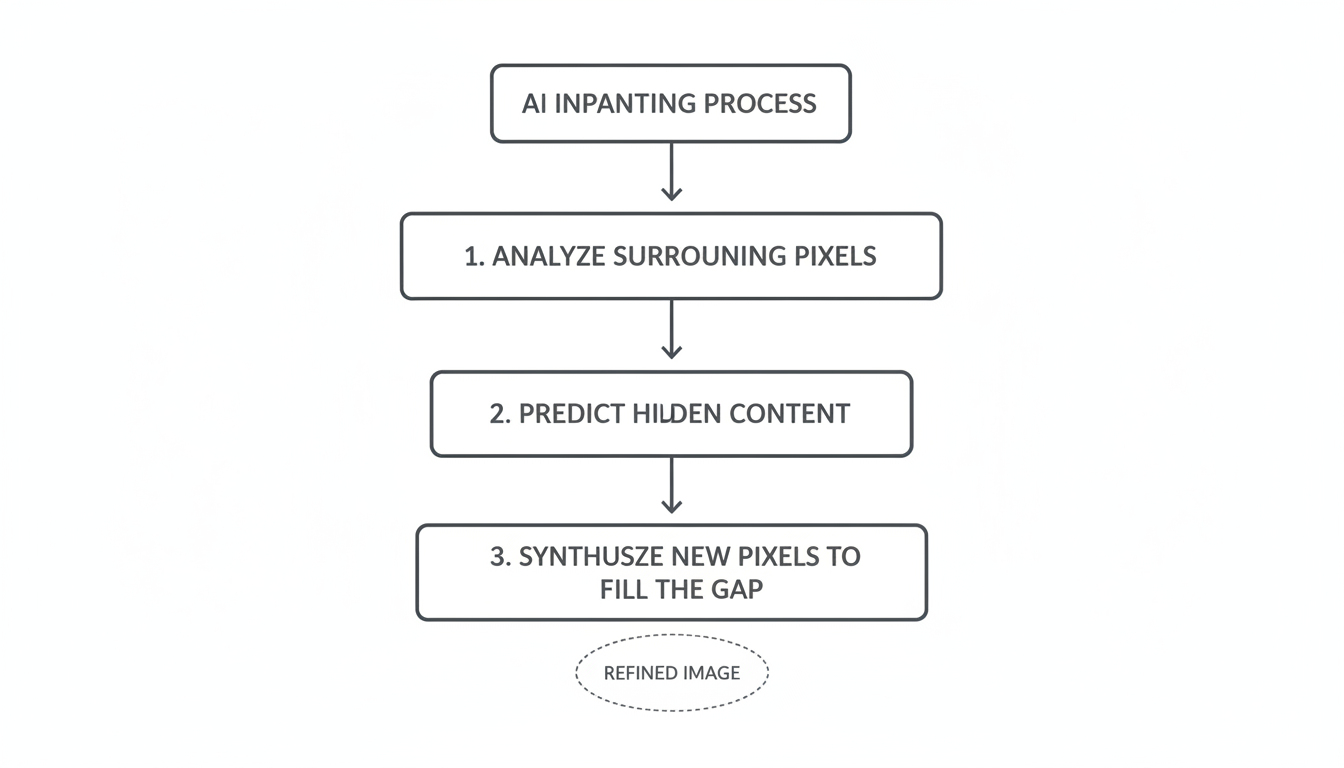
To get professional results, you need to understand what’s happening under the hood. Modern watermark removers aren’t just a fancy “clone stamp” tool. They rely on a sophisticated AI process called inpainting, often powered by machine learning models like Generative Adversarial Networks (GANs) or newer diffusion models.
Here’s a simplified breakdown of the process:
- Analysis: The AI analyzes the pixels around the watermark you’ve selected. It identifies patterns, textures, colors, and lighting gradients in the surrounding area.
- Prediction: Based on its training on millions of images, the model predicts what the pixels *underneath* the watermark should look like. It’s essentially making a highly educated guess.
- Synthesis: The AI then generates, or “synthesizes,” brand new pixels to fill in the gap. It doesn’t just copy and paste from nearby; it creates a new, seamless patch that blends with the background.
Think of it like a master art restorer who can perfectly replicate the brushstrokes of a Renaissance painter to fix a damaged canvas. The AI does this digitally, in seconds.
🎯 Key Takeaway
Effective watermark removal isn’t about erasing; it’s about intelligent reconstruction. The quality of the final image depends entirely on the AI’s ability to understand the context of the surrounding area and generate a believable replacement.
Choosing Your Weapon: Online Tools vs. Desktop Software
The market is flooded with options, but they generally fall into two camps: quick-and-easy online tools or powerful desktop software. Choosing the right one depends on your specific needs for privacy, power, and volume.
Based on hands-on testing of over a dozen platforms, we’ve found that neither is universally “better.” They serve different purposes. An online tool is great for a one-off fix, while a desktop application is a must-have for professionals handling sensitive or high-volume work.
| Feature | Online Watermark Removers (SaaS) | Desktop Software (e.g., Photoshop Plugins) |
|---|---|---|
| Ease of Use | ✅ Extremely High (Drag, drop, click) | ⚠️ Moderate (Requires software knowledge) |
| Processing Speed | ✅ Very Fast (for single images) | ⚡️ Fastest (for batch processing) |
| Cost | Freemium or Subscription-based | One-time purchase or part of a larger suite |
| Privacy & Security | ⚠️ Potential Concern (You’re uploading your files) | ✅ Maximum Security (Files stay on your machine) |
| Control & Precision | Limited (Mostly automated) | ✅ Pixel-Perfect Control (Manual refinement) |
| Best For | Quick fixes, personal photos, non-sensitive content | Professionals, batch work, complex images, client files |
💡 Pro Tip
For the best of both worlds, use a hybrid approach. Start with a high-quality online AI tool to do the heavy lifting in seconds. Then, download the result and open it in a desktop editor like Photoshop or Affinity Photo to manually touch up any minor imperfections the AI might have left behind.
The Pro’s Workflow: A Step-by-Step Guide to Perfect Removal
Getting a clean result goes beyond just clicking “remove.” A professional workflow ensures you maintain the highest possible image quality. Let’s walk through it.
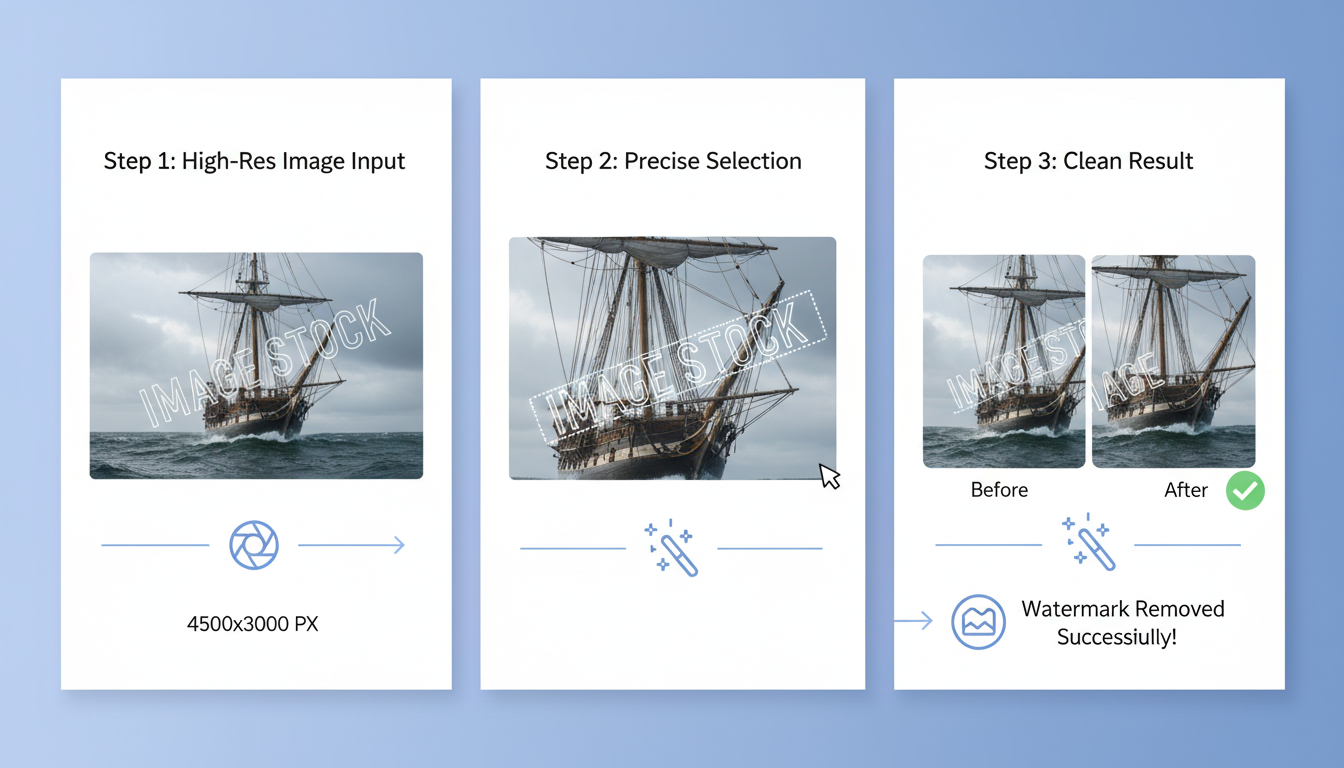
Step 1: Start with the Highest Quality Source
Garbage in, garbage out. The AI needs as much data as possible to make accurate predictions. Always start with the highest resolution version of the image you have. A 3000×2000 pixel JPG will yield a far better result than a 300×200 pixel screenshot.
Step 2: Make a Precise Selection
This is the most critical manual step. Don’t just draw a giant, sloppy box around the watermark.
- Use a brush tool and “paint” over the watermark.
- Zoom in! Get as close as you can to see the edges.
- Select slightly outside the edges of the watermark. This gives the AI a small buffer of clean pixels to analyze for a better blend.
Step 3: Process and Evaluate
Run the removal process. Once it’s done, don’t just download it immediately. Zoom in to 100% or 200% and scrutinize the area. Look for:
- Blurriness: Is the edited area noticeably softer than the rest of the image?
- Pattern Repetition: Does the AI-generated patch look unnaturally repetitive, like a bad copy-paste job?
- Color Bleeding: Are the colors in the patch perfectly matched to the surrounding area?
Step 4: Iterate if Necessary
Did the first pass leave a small artifact or a blurry spot? Don’t give up. Select just that tiny imperfect area and run the process again. This iterative refinement can often solve minor issues and produce a perfect final image.
Beyond the Basics: Advanced Techniques for Tricky Watermarks
Sometimes, you’ll face a real challenge: a semi-transparent watermark over a person’s face, or a tiled pattern across the entire image. This is where basic tools fail and expert techniques shine.
Handling Watermarks on Complex Textures
Removing a logo from a clear blue sky is easy. Removing it from a brick wall, a patterned shirt, or someone’s hair is incredibly difficult. The AI can get confused by the inconsistent texture.
The Solution: In these cases, manual editing is often required. After the AI does its best, use the “Clone Stamp” or “Healing Brush” tool in a program like Photoshop. Set the tool to a low opacity (15-20%) and slowly build up the texture by sampling from multiple nearby source points. It’s time-consuming, but it’s how the pros achieve invisible results.
Tackling Tiled or Full-Screen Watermarks
A repeating, tiled watermark is the ultimate challenge because it obscures so much of the original image data. An AI tool will struggle and often produce a “ghosting” effect.
💡 Pro Tip
For tiled watermarks, some advanced tools offer a “pattern detection” feature. Instead of removing each instance one by one, you can help the tool identify the repeating pattern. It then uses this information to subtract the pattern from the entire image more intelligently. This is a game-changer for stock photo previews.
| Scenario | Before (The Problem) | After (The Pro Solution) |
|---|---|---|
| Logo in Corner | A small, opaque logo over a simple background like a sky or wall. | A single pass with a quality AI tool is usually sufficient for a perfect result. |
| Text over Face/Hair | Semi-transparent text covering detailed, non-uniform features. | Use AI for the initial removal, then manually refine with a healing brush in desktop software. |
| Tiled Pattern | A repeating, faint logo covering the entire image. | Use a specialized tool with pattern detection or accept that some texture loss is inevitable. |
⚠️ Watch Out
AI isn’t magic. If a watermark completely obscures a key detail (like an eye or a specific letter in a sign), the AI cannot magically know what was underneath. It will have to guess, and the result may be inaccurate. Always manage your expectations for heavily obscured images.
The Unspoken Rules: Navigating the Legal and Ethical Minefield
We must end on the most important topic. The existence of a tool does not grant you the right to use it indiscriminately. Using a watermark remover is a question of intent and ownership.
Industry best practice, and indeed the law, is clear. Do not remove a watermark from any image you do not own or have a license to use.
Think of it this way: A crowbar can be used by a firefighter to save a life, or by a burglar to commit a crime. The tool itself is neutral; the user’s intent defines the act. A watermark remover is your digital crowbar. Use it for good: to restore your own photos, recover your own assets, and fix legitimate file errors. Respect the work of creators. If you love a photo enough to want to use it, the artist who made it deserves to be compensated.
When in doubt, always seek out the original creator or purchase a license from a legitimate stock photo website. It’s the right thing to do, and it protects you from legal trouble.
❓ Frequently Asked Questions
Is it illegal to use a watermark remover?
The tool itself is not illegal. However, using it to remove a watermark from a copyrighted image you don’t own and then using that image for commercial (or even public) purposes is copyright infringement and is illegal in most countries.
Can a watermark remover handle video watermarks?
Yes, specialized video watermark removers exist. They are more complex because the AI must maintain consistency across thousands of frames with changing backgrounds. This requires significantly more processing power and time compared to a static image.
Will removing a watermark reduce my image quality?
A high-quality AI tool is designed to preserve the original resolution and quality. However, the reconstructed area can sometimes appear slightly less sharp than the original if the watermark covered a highly detailed texture. This is why starting with a high-res source is crucial.
What’s the best file format for watermark removal?
Lossless formats like PNG or TIFF are technically the best as they provide the AI with the most uncompressed data to work with. That said, for most web and social media use cases, a high-quality JPG is more than sufficient for excellent results.
Can AI remove a watermark that says “Copyright”?
Yes, the AI doesn’t read the text; it sees the letters as a shape to be removed and replaced. It can remove any text, logo, or stamp, regardless of what it says. The legal implications, however, remain the same.
Are online watermark removers safe to use for private photos?
It depends on the service. Reputable tools have clear privacy policies stating they don’t store or share your images. However, for highly sensitive or confidential photos (like client work or personal identification), we strongly recommend using offline desktop software to ensure 100% privacy.
Conclusion: The Power and Responsibility of a Clean Edit
A watermark remover is an incredibly powerful tool in any modern creative’s arsenal. It can save a project, restore a memory, and clean up digital assets in a fraction of the time it would take manually. By understanding the AI technology behind it, you can move beyond simple “erasing” and start thinking like a digital restorer, intelligently reconstructing images for a flawless finish.
But this power comes with a profound responsibility. Your next step isn’t just to find a tool; it’s to commit to using it ethically. Always prioritize the rights of the original creator. Use these techniques to enhance your own work and restore your own property. When you do, you’ll not only achieve stunning visual results but also operate as a responsible and respected member of the digital creative community.

