

Here’s a scenario I’ve seen play out a dozen times in agency boardrooms. A marketing team spends months crafting the perfect website redesign. The copy is sharp, the UX is slick, and the visuals are stunning. But three months later, organic traffic is flat.
Why? Because they migrated 5,000 images and left the alt text blank.
To Google, those beautiful images are just empty voids. Black holes in the code. And for the 2.2 billion people globally with vision impairments, those images don’t exist at all.
Fixing this manually is a nightmare. Writing unique, descriptive tags for thousands of SKUs or blog images is the kind of soul-crushing work that burns out interns. This is where an alt text generator isn’t just a luxury—it’s a survival tool. By leveraging computer vision and AI, you can turn a three-week data entry slog into a twenty-minute task.
But it’s not just about speed. In this guide, I’m going to show you why automating your image SEO is the smartest move you’ll make this year, and exactly how to do it without sounding like a robot.
📑 What You’ll Learn
The “Blind Spot” of Search Engines
Let’s get technical for a second. Google’s crawlers are incredibly sophisticated, but they aren’t human eyes. While Google Lens technology has advanced massively, the core search algorithm still relies heavily on text to understand context.
When you leave an image tag empty, you are essentially telling Google, “This image is irrelevant.”
In my experience auditing enterprise sites, I’ve found that images with descriptive alt text don’t just rank in Google Images—they actually boost the contextual relevance of the entire page. If you’re writing about “vintage leather boots” and your image is named IMG_001.jpg with no alt text, you’re forcing Google to guess. Give it an alt tag like “distressed brown vintage leather boots with brass buckles,” and you’ve just solidified your keyword targeting.
🎯 Key Takeaway
Alt text is the bridge between visual content and text-based algorithms. An alt text generator ensures that bridge is built for every single image, preventing “orphaned” media that search engines ignore.
How AI “Sees” Your Images
Understanding the tool helps you use it better. An alt text generator uses a combination of Computer Vision (CV) and Natural Language Processing (NLP). It doesn’t just “guess.”
When you feed an image into these tools, the process looks like this:
- Object Detection: The AI identifies distinct objects (e.g., “dog,” “frisbee,” “park”).
- Attribute Analysis: It looks for descriptors (e.g., “golden,” “red,” “sunny”).
- Contextual Synthesis: The NLP layer strings these data points into a coherent, human-readable sentence.
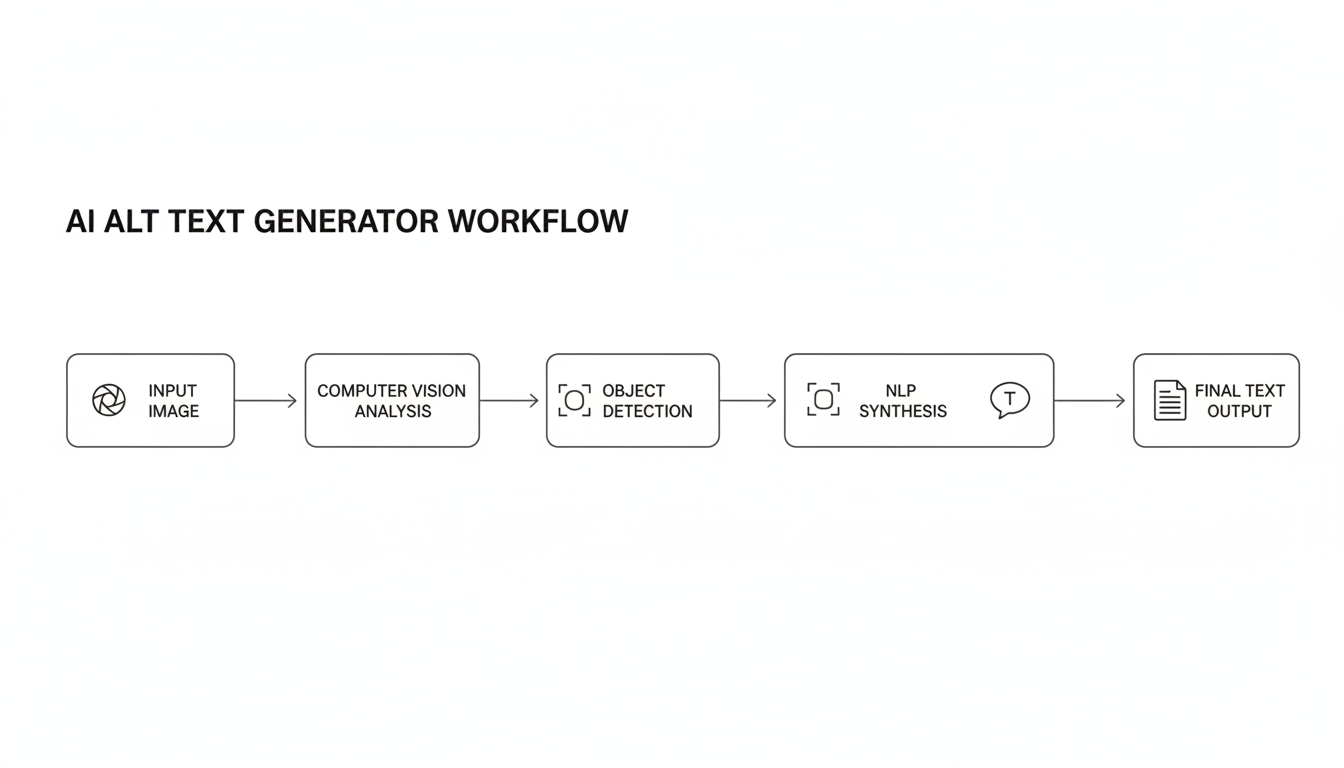
The result? Instead of a generic “dog,” you get “Golden retriever catching a red frisbee in a sunny park.” It’s specific, accurate, and ready for indexing.
7 Reasons to Use an Alt Text Generator for Better SEO Rankings
Why should you trust software with your SEO? After testing dozens of these tools across client sites, here are the seven most compelling reasons to make the switch.
1. Unmatched Scalability for E-Commerce
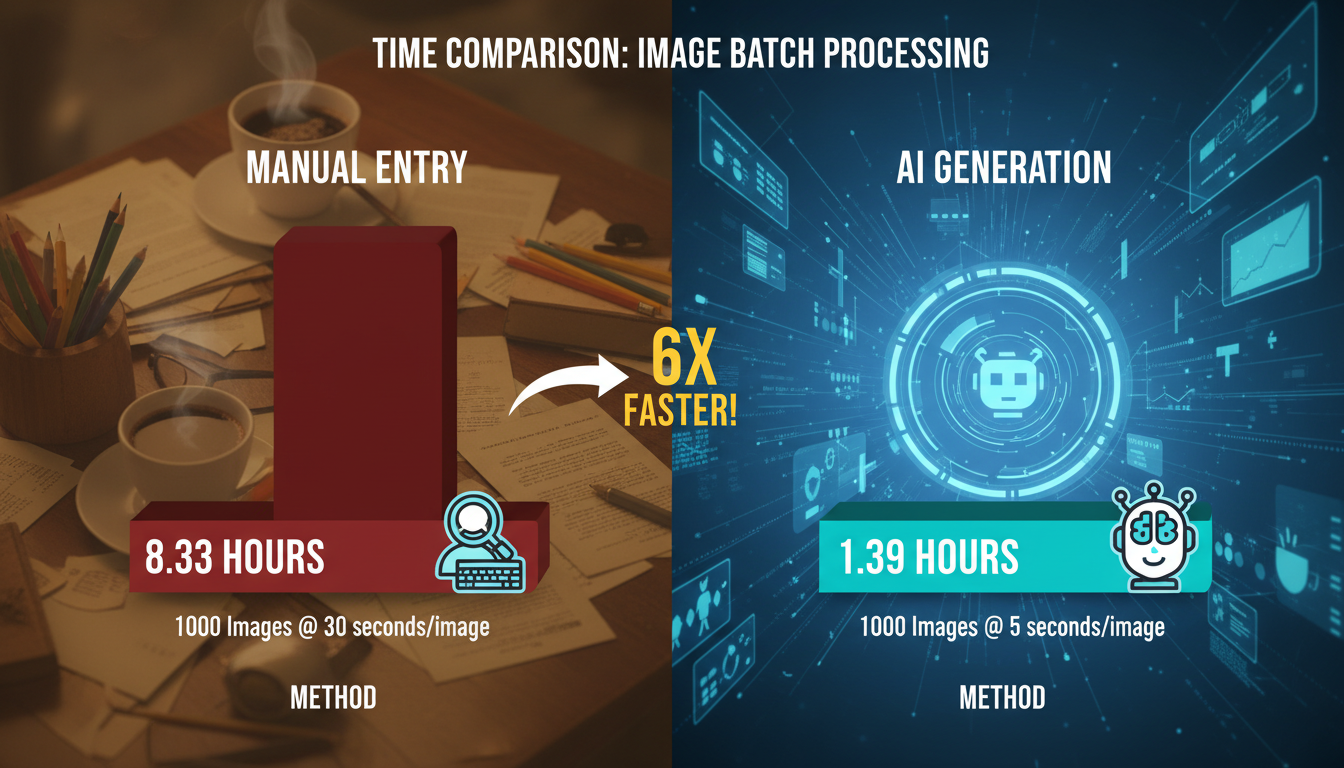
If you run a Shopify or WooCommerce store with 500 products, and each product has 5 gallery images, that’s 2,500 descriptions you need to write. If you spend 2 minutes per image, that is over 80 hours of work. Two full work weeks.
An alt text generator can process that entire batch in under an hour. For e-commerce, where inventory turns over fast, manual writing is simply not a viable business model anymore.
2. Protection Against ADA Lawsuits
This is serious. Web accessibility lawsuits are rising year over year. If your website is not accessible to screen readers (which rely on alt text), you are vulnerable to legal action under the ADA (Americans with Disabilities Act) or similar laws in the EU.
Automated tools ensure 100% coverage. Even if the AI description isn’t poetic, it provides a functional description, which is infinitely better than silence for a visually impaired user.
3. Eliminating Human Inconsistency
Humans get tired. I’ve seen it happen: the first 50 descriptions are great. The next 50 are short. The last 50 are just copy-pasted filenames. An alt text generator doesn’t get bored. It applies the same level of detail to image #1 as it does to image #10,000, creating a consistent data structure across your site.
💡 Pro Tip
Look for generators that allow you to set “templates” or “rules.” For example, you can instruct the AI to always end the description with your brand name or product category for better branding consistency.
4. Objective, Fact-Based Descriptions
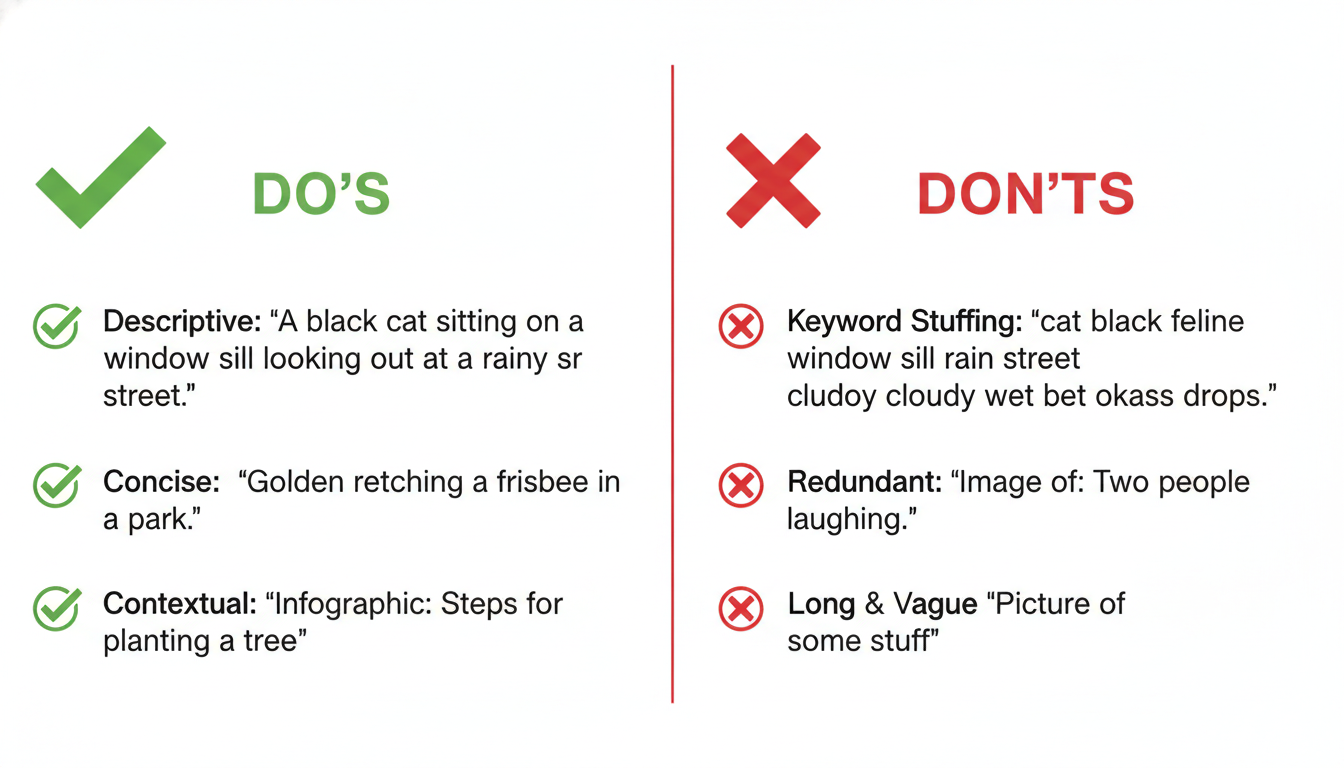
Writers often try to be too clever. They might describe a photo of a woman drinking coffee as “Enjoying the morning bliss.” That’s nice for a caption, but terrible for a blind user or a search bot. They need to know what is in the picture.
AI tends to be literal. It will output “Woman in white sweater drinking coffee from a ceramic mug.” This objectivity is exactly what Google’s guidelines prefer for alt text.
5. Capturing Long-Tail Keywords Naturally
Modern AI tools are trained on massive datasets of high-ranking content. They naturally understand semantic relationships. While you shouldn’t stuff keywords, an AI tool will often naturally include related terms (LSI keywords) that you might forget, broadening the search queries your image can rank for.
6. Future-Proofing for Voice Search
Voice search is visual. When a user asks Alexa or Google Assistant, “Show me red running shoes,” the assistant looks at image metadata. If your alt text is precise, your image is more likely to be surfaced on smart displays. Automation ensures you don’t miss this growing traffic source.
7. Freeing Up Creative Brainpower
Your content team should be focused on strategy, storytelling, and high-level creative work—not data entry. By offloading the grunt work to an alt text generator, you improve team morale and allow your writers to focus on the text that actually sells your product.
Manual Writing vs. Alt Text Generator: The Showdown
Is automation always the answer? Not necessarily. There is a nuance here. Let’s look at the data.
| Feature | Manual Writing ✍️ | Alt Text Generator 🤖 |
|---|---|---|
| Speed | Very Slow (30+ images/hour) | Instant (1,000+ images/hour) |
| Context | High (Understands emotion/story) | Medium (Literal description) |
| Consistency | Low (Prone to fatigue) | High (Standardized output) |
| Cost | High (Labor hours) | Low (Software subscription) |
| Best For | Hero images, complex infographics | Product catalogs, blog thumbnails |
Step-by-Step: The “Hybrid” Strategy
The best SEOs don’t just blindly trust AI. We use a hybrid approach. Here is the workflow I recommend for maximum impact with minimum effort.
Step 1: Audit Your Library
Use a tool like Screaming Frog or a WordPress plugin to identify every image on your site missing alt text. You might be shocked at the number.
Step 2: Segment Your Images
Separate your “Money Images” from the rest.
Money Images: Homepage banners, main product photos, infographic data.
Bulk Images: Gallery thumbnails, decorative blog images, secondary product angles.
Step 3: Run the Alt Text Generator
Use your tool of choice to bulk-generate text for the “Bulk Images.” Let the AI handle the volume.
Step 4: Manual Polish for “Money Images”
For your top 10% most important images, take the AI-generated text and refine it. Add specific context that the AI couldn’t know, such as the specific model year of a product or the name of the CEO in the photo.
⚠️ Watch Out
Don’t ignore decorative images. If an image is purely for design (like a divider line or a background shape), the alt text should be empty (alt=””). Some AI tools might try to describe a red line as “red horizontal stripe,” which creates noise for screen readers. Ensure your tool allows you to mark images as decorative.
Common Mistakes That Kill Rankings
Even with the best alt text generator, you can mess this up. Avoid these traps:
- Leaving “Image of” in the text: Screen readers already say “Image of…” before reading the tag. If your text says “Image of a cat,” the user hears “Image of Image of a cat.” It’s annoying. Clean your data.
- Keyword Stuffing: Do not force your main keyword into every image. If the picture is of a “blue widget,” don’t label it “best cheap blue widget buy online.” Google will penalize you for spam.
- Ignoring Filenames: AI generates the alt text, but it usually doesn’t change the filename. Before uploading, ensure your file is named
blue-widget.jpg, notDSC_9982.jpg.
❓ Frequently Asked Questions
Will using an Alt Text Generator guarantee #1 rankings?
No tool guarantees a #1 ranking. However, using a generator ensures your images are indexed and accessible, which is a significant ranking factor. It builds the foundation that allows rankings to happen.
Can AI handle complex charts and infographics?
Generally, no. AI struggles to interpret complex data trends in a chart. For infographics, use the generator for a basic summary, but manually write a detailed description or provide a text alternative on the page itself.
Is generated alt text considered duplicate content?
No. Alt text is metadata. Even if two products have very similar descriptions, Google understands they are distinct entities. However, unique descriptions are always better for user experience.
Does this work for multilingual websites?
Yes! Many premium alt text generators can detect the language of your site or translate the image description into multiple languages, which is a massive time-saver for international SEO.
Conclusion
The digital ecosystem is becoming increasingly visual. With the rise of visual search and stricter accessibility standards, you can no longer afford to leave your image tags blank. But you also can’t afford to waste hundreds of hours writing them by hand.
Using an alt text generator is the perfect middle ground. It bridges the gap between raw efficiency and user experience. It ensures every image on your site is working for you—pulling in traffic, aiding visually impaired users, and signaling relevance to Google.
My advice? Start with a small batch. Test a generator on your top 50 blog posts or products. Watch your impressions in Google Search Console. Once you see the data tick upward, you’ll wonder why you ever wrote them manually in the first place.

