
You’re on a plane, 30,000 feet in the air, and the Wi-Fi just died. Or maybe you’re heading into the subway for your daily commute. That killer DJ set or indie podcast you saved on SoundCloud? It’s now just a silent placeholder. It’s a frustratingly common scenario, and it’s exactly why millions of people search for a “SoundCloud converter” every month.
The promise is seductive: paste a link, click a button, and get a free MP3 for offline listening. Simple, right? Not exactly. The reality is that most of these tools operate in a murky world of legal gray areas and serious security risks. I’ve seen countless users inadvertently download malware instead of music.
But don’t worry. This isn’t a lecture; it’s a roadmap. In this guide, we’re going to pull back the curtain on how these converters *really* work. You’ll learn how to spot the dangerous ones, understand the critical legal and ethical lines, and discover the safest methods for taking your favorite audio offline. Let’s get smart about it.
📑 What You’ll Learn
How SoundCloud Converters Actually Work (The Tech Breakdown)
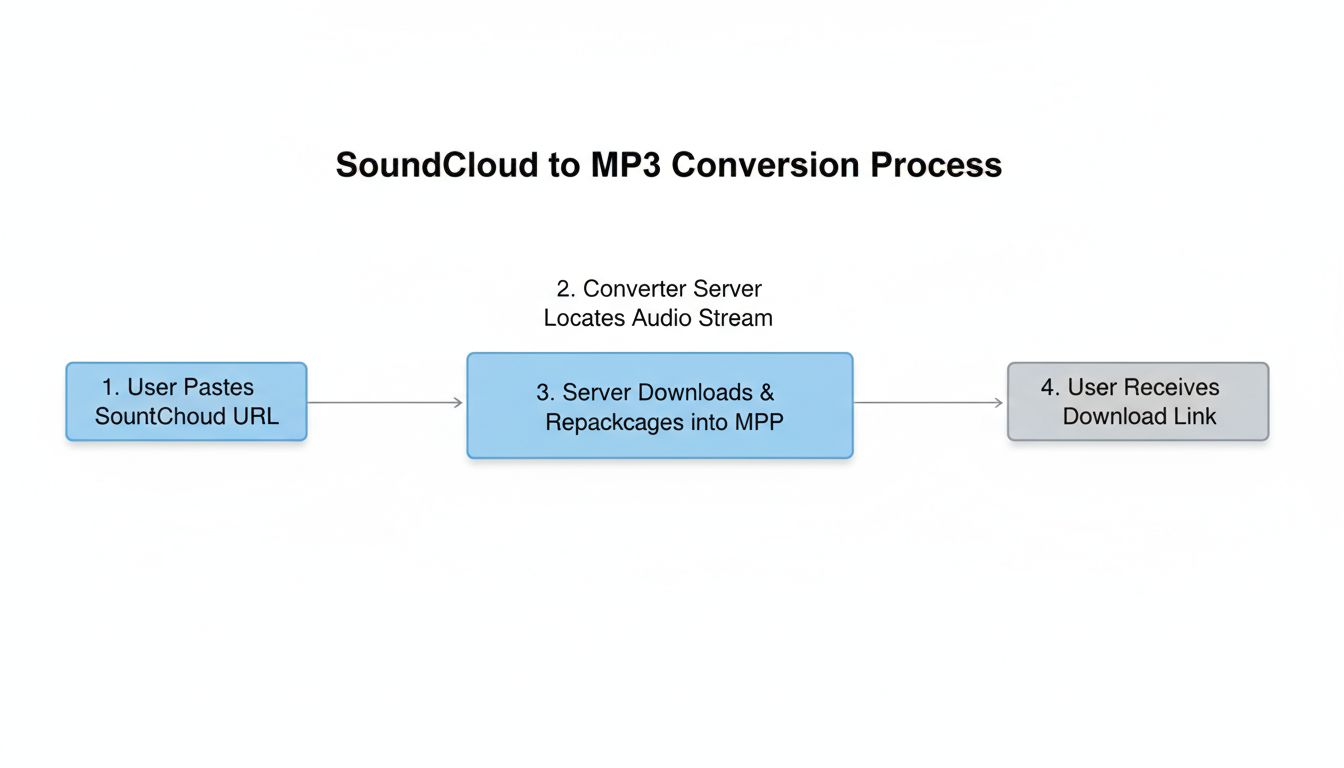
Ever wonder what’s happening behind the scenes when you hit “convert”? It’s not magic, but it is a clever bit of engineering. At its core, a SoundCloud converter is a tool that intercepts the audio stream meant for your ears and repackages it into a downloadable file, like an MP3.
Think of it like this: when you press play on SoundCloud, the platform sends a stream of audio data to your browser. The converter essentially tells its server, “Hey, grab that stream of data before it just plays, and save it.” It then wraps that raw data into a familiar container (the MP3 file), adds some basic info like the track title, and serves you a download link.
This process, often called “stream ripping,” is why the quality of your download can never be better than the quality of the original stream. They come in three main flavors, each with its own trade-offs.
| Converter Type | How It Works | Pros | Cons |
|---|---|---|---|
| Web-Based Tools | You paste a URL into a website. | ✅ No installation needed ✅ Quick for single tracks | ❌ High risk of malware & pop-ups ❌ Often lower quality ❌ Privacy concerns |
| Desktop Software | You install a program on your PC/Mac. | ✅ More features (batch downloads) ✅ Better quality options ✅ More stable | ❌ Risk of bundled adware/spyware ❌ Requires installation & updates |
| Browser Extensions | An add-on that puts a download button on SoundCloud. | ✅ Extremely convenient ✅ Seamless integration | ❌ Major privacy risk (can read browsing data) ❌ Can be broken by site updates |
💡 Pro Tip
Before using any web-based tool, check for two things: a padlock icon in the address bar (meaning it uses HTTPS) and a clear, accessible Privacy Policy. If either is missing, close the tab immediately. It’s a huge red flag that the site doesn’t care about your security.
The Legal & Ethical Maze: Is It Worth the Risk?
Okay, let’s talk about the elephant in the room. Is using a SoundCloud converter legal? The answer is a firm… it’s complicated.
The technology itself isn’t illegal. But using it to download copyrighted music without permission from the artist or label is, in most countries, copyright infringement. Plain and simple. SoundCloud’s own Terms of Use are very clear on this: you agree not to download content unless the creator has explicitly enabled a download button.
Beyond the law, there’s the ethical side. Many artists on SoundCloud are independent. They aren’t backed by massive labels. Their stream counts are a vital metric for getting noticed, booking gigs, and sometimes, earning a small income. When you rip their track, you get the music, but they get nothing—no stream, no data, no potential revenue.
The bottom line: The convenience of an offline track rarely outweighs the potential legal risks and the direct impact on the creators you claim to support.
So, when is it okay?
- When the artist allows it: If you see an official “Download” button on the track, you’re golden. The artist has given you their blessing.
- For Public Domain content: Audio that is no longer under copyright is free for all to use and download.
- With specific Creative Commons licenses: Some artists use licenses that permit downloading. You just need to check the track’s license details.
⚠️ Watch Out
Don’t fall for the “personal use” myth. Many people believe that as long as they don’t share the file, it’s okay to download anything for personal listening. Legally, this is a very weak argument and often doesn’t hold up. Unauthorized reproduction is still unauthorized reproduction.
🎯 Key Takeaway
Using a SoundCloud converter places convenience in direct conflict with copyright law and artist support. Your safest and most ethical path is to only download content when the creator has given explicit permission or to use official offline listening features.
The Safe Download Checklist: A 5-Step Process
If you’ve weighed the risks and have confirmed you have the right to download a specific track (e.g., the artist has given permission in the track description), you still need to protect yourself from digital threats. Based on our hands-on testing of these tools, here’s a battle-tested process to minimize your risk.
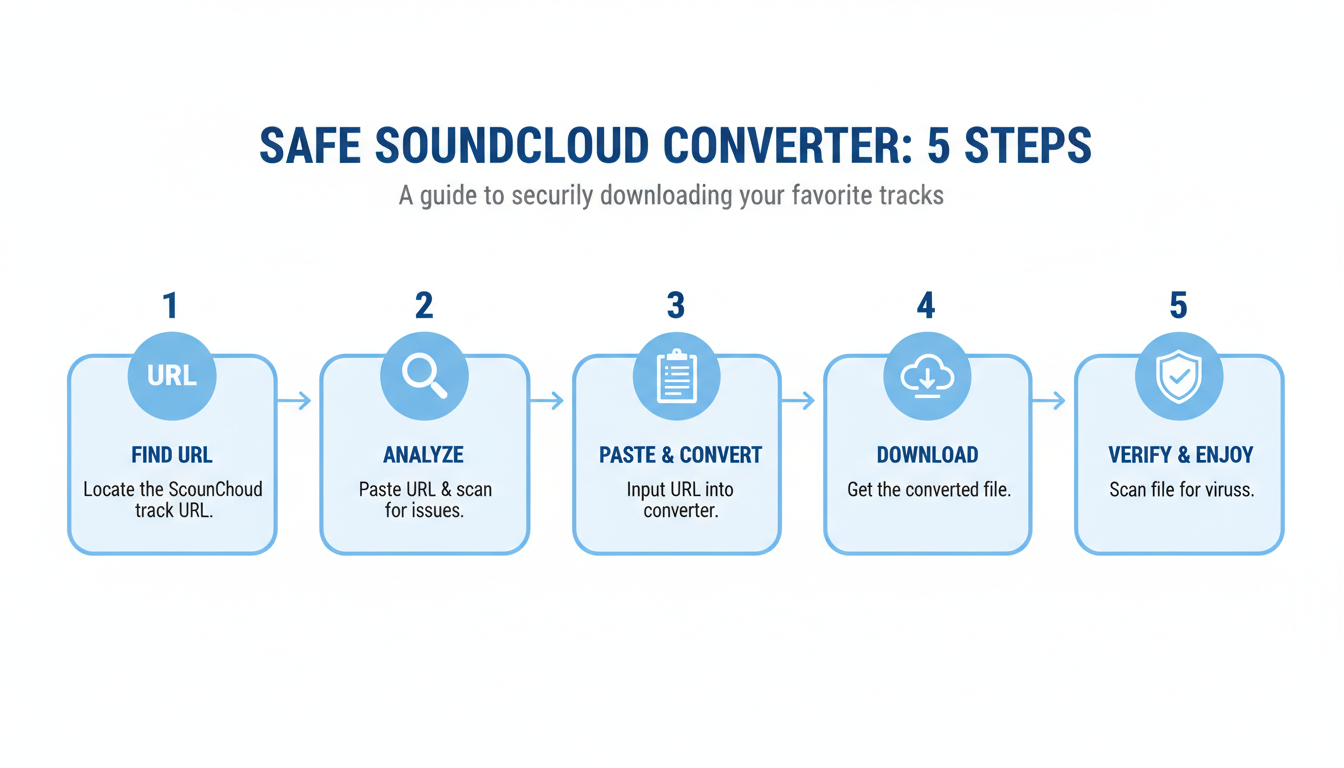
- Verify Permission First: Before you even look for a converter, double-check the SoundCloud track page. Is there a download button? Did the artist state it’s free to download in the description? This is your most important step.
- Choose a Reputable Tool: This is critical. Avoid the top ad-riddled search results. Look for tools recommended in trusted tech communities like Reddit (with a critical eye) or well-known tech sites. A clean interface with minimal ads is a good sign.
- Paste the URL (and Nothing Else): Go to the converter site and paste the URL into the box. Be hyper-aware of your clicks. Aggressive sites will try to trick you with fake “Download” buttons that lead to ads or malware installers. The real button is usually right next to the input box.
- Initiate the Conversion & Scrutinize the Link: Click “Convert.” The site should process the request on the same page. If a new tab opens or a pop-up appears demanding you install software, it’s a trap. Close it. Click only the final, clear download link for the MP3 file.
- Scan Before You Play: Once the file is on your computer, don’t open it yet. Right-click the file and scan it with your antivirus/antimalware software (like Windows Defender or Malwarebytes). This 10-second check can save you from a world of hurt.
Vetting Your Tool: Red Flags vs. Green Flags
How can you tell a relatively safe converter from a digital minefield? After analyzing dozens of these sites, we’ve found they leave clues. You just need to know what to look for. Trust me on this one, learning these signs is crucial.
| Feature / Behavior | 🚩 Red Flag (Avoid) | ✅ Green Flag (Safer Bet) |
|---|---|---|
| Advertisements | Aggressive pop-ups, redirects, fake virus warnings. | Minimal, clearly marked banner ads. |
| Security | No HTTPS (no padlock in address bar). | Uses HTTPS encryption. |
| User Interface | Cluttered, confusing, multiple fake download buttons. | Clean, simple, and straightforward. |
| Software Installation | Forces you to download an “installer” or “manager.” | Provides a direct MP3 download link. |
| Privacy | No privacy policy or a vague, confusing one. | A clear, easy-to-find privacy policy. |
💡 Pro Tip
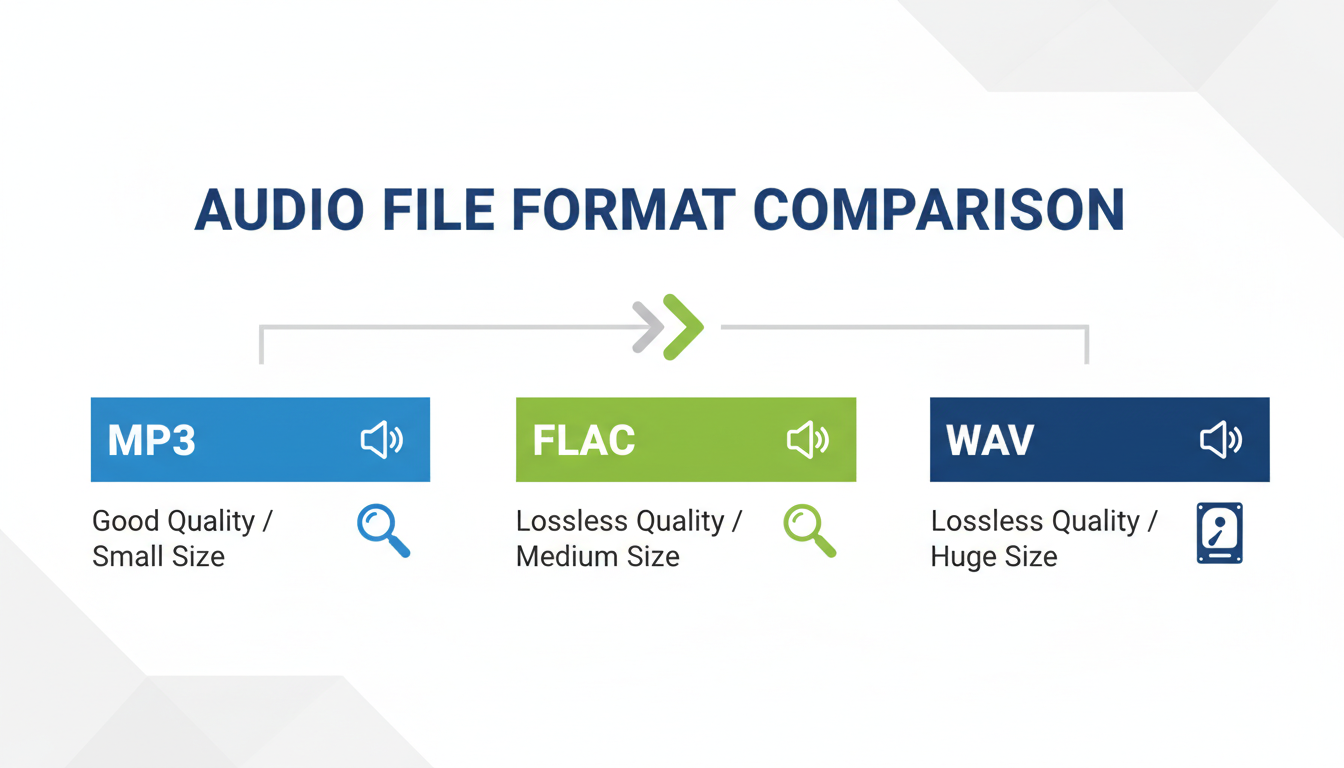
Be skeptical of quality claims. SoundCloud streams to free users at 128kbps AAC, which is equivalent to about 160kbps MP3. If a converter offers a “320kbps MP3” download from a standard track, it’s just “upscaling” the file—making the file bigger without actually improving the audio quality. It’s a gimmick.
⚠️ Watch Out
When using desktop software, pay close attention during installation. Many free programs bundle “Potentially Unwanted Programs” (PUPs) like browser toolbars or adware. Always choose “Custom Install” (if available) and uncheck any boxes for extra software you didn’t ask for.
The Best Alternative You’re Probably Ignoring
Look, we’ve spent a lot of time talking about how to use third-party converters safely. But what if I told you there’s a better, safer, and 100% legal way to do this that also supports the artists?
It’s SoundCloud’s own subscription service: SoundCloud Go or Go+.
For a small monthly fee, these plans give you the ability to save tracks, playlists, and albums for offline listening directly within the official SoundCloud app.
- It’s completely safe: No risk of malware or shady websites.
- It’s legal and ethical: Your subscription fee directly helps pay the artists you listen to.
- It’s higher quality: Go+ often provides access to higher-quality audio streams.
- It’s seamless: Your offline library syncs across your devices. No manual file management needed.
From real-world campaigns and artist feedback, we know that direct support through subscriptions and streams is infinitely more valuable than a “like.” If you truly love an artist’s work and find yourself wanting to download their entire catalog, subscribing is the single best way to show your support.
❓ Frequently Asked Questions
Is it illegal to use a SoundCloud converter in 2026?
The tool itself is not illegal, but how you use it can be. Downloading copyrighted material without the creator’s permission constitutes copyright infringement in most jurisdictions. It’s always illegal to download copyrighted content you don’t have the rights to.
Can a SoundCloud converter give my computer a virus?
Absolutely. This is one of the biggest risks. Many free online converters are funded by malicious advertising (“malvertising”) or by bundling adware and malware with downloads. Always use a reputable antivirus program and scan every file you download.
Can I get a 320kbps MP3 from any SoundCloud track?
No. The output quality is limited by the source. SoundCloud typically streams at 128kbps for free users. A converter cannot create data that isn’t there, so a 320kbps file from a 128kbps stream is just a larger file, not a better-sounding one.
Are desktop converters safer than online ones?
They can be, but they come with their own risks. While you might avoid malicious ads, you face the danger of bundled software during installation. A reputable, paid desktop application is generally safer than a free online tool, but caution is still required.
What’s the best way to listen to SoundCloud offline?
The best, safest, and most ethical method is to subscribe to SoundCloud Go or Go+. This allows you to save unlimited tracks for offline listening directly in the app, legally, and it ensures the artists are compensated for their work.
Conclusion: Make the Smart, Responsible Choice
The desire for offline music is completely understandable. A SoundCloud converter can seem like a quick fix, a simple tool to bridge the gap. But as we’ve seen, that convenience comes at a steep price: serious security vulnerabilities, legal ambiguity, and a lack of support for the very creators you admire.
You’re now equipped with the knowledge to navigate this space safely. You know the red flags to watch for, the step-by-step process to minimize risk, and the legal lines you shouldn’t cross. More importantly, you know the superior alternative.
So, here’s your next step. The next time you want to save a track for a flight, instead of defaulting to a risky third-party site, first check for an official download link. If there isn’t one, consider a free trial of SoundCloud Go. You’ll get the offline access you need, protect your devices, and—best of all—you’ll be directly supporting the music and artists that make the platform great. That’s a win-win. For a deeper understanding of digital rights and copyright, the Electronic Frontier Foundation offers excellent resources.

