

You just pulled data from an API. It hits your console as a giant, unreadable wall of text, a chaotic mess of brackets and quotes. Your first thought? “What on earth am I supposed to do with this?”
Relax. You’re not alone. Every developer has been there. That jumbled text is likely JSON, and learning to tame it is one of the most crucial skills you can build. It’s the universal language of the modern web, the backbone of APIs, and the silent workhorse behind countless applications.
This isn’t just another dry, technical doc. This is your practical, no-nonsense guide. By the end of this article, you won’t just know how to read a JSON file; you’ll understand how to parse it, access its data with confidence, and sidestep the common traps that trip up even experienced coders. Let’s get this done.
📑 What You’ll Learn
Why JSON Still Dominates in 2026 (And Why You Must Master It)
First, let’s get one thing straight. JSON (JavaScript Object Notation) isn’t just some passing trend. It’s the undisputed champion of data interchange for a reason. It’s lightweight, text-based, and incredibly easy for both humans and machines to understand. Think of it as the digital equivalent of a perfectly organized spreadsheet.
Why does it matter so much? Because it’s everywhere:
- APIs: When you fetch weather data, stock prices, or user profiles from a service, you’re almost certainly getting it as JSON.
- Configuration Files: Many modern applications, from your code editor to complex server setups, use
.jsonfiles for settings (thinkpackage.jsonortsconfig.json). - Data Storage: NoSQL databases like MongoDB use a JSON-like document structure to store data.
In short, if you’re building anything for the web, you can’t escape JSON. Mastering it isn’t optional; it’s fundamental. According to the official JSON.org website, its structure is based on just two simple concepts, which makes it powerful yet accessible.
Decoding the Matrix: The Anatomy of a JSON File
Before you can read a JSON file, you need to speak its language. At its core, JSON is built from a few simple components that can be nested to create incredibly complex data structures. Let’s break it down with a simple example.
Imagine a file named user.json:
{
  "id": 101,
  "name": "Jane Smith",
  "isActive": true,
  "email": null,
  "roles": ["admin", "editor"],
  "profile": {
    "company": "Tech Solutions Inc.",
    "department": "Engineering"
  }
}
This single block of text contains all the core building blocks of JSON. It’s an Object (wrapped in {}) that holds a collection of Key-Value Pairs.
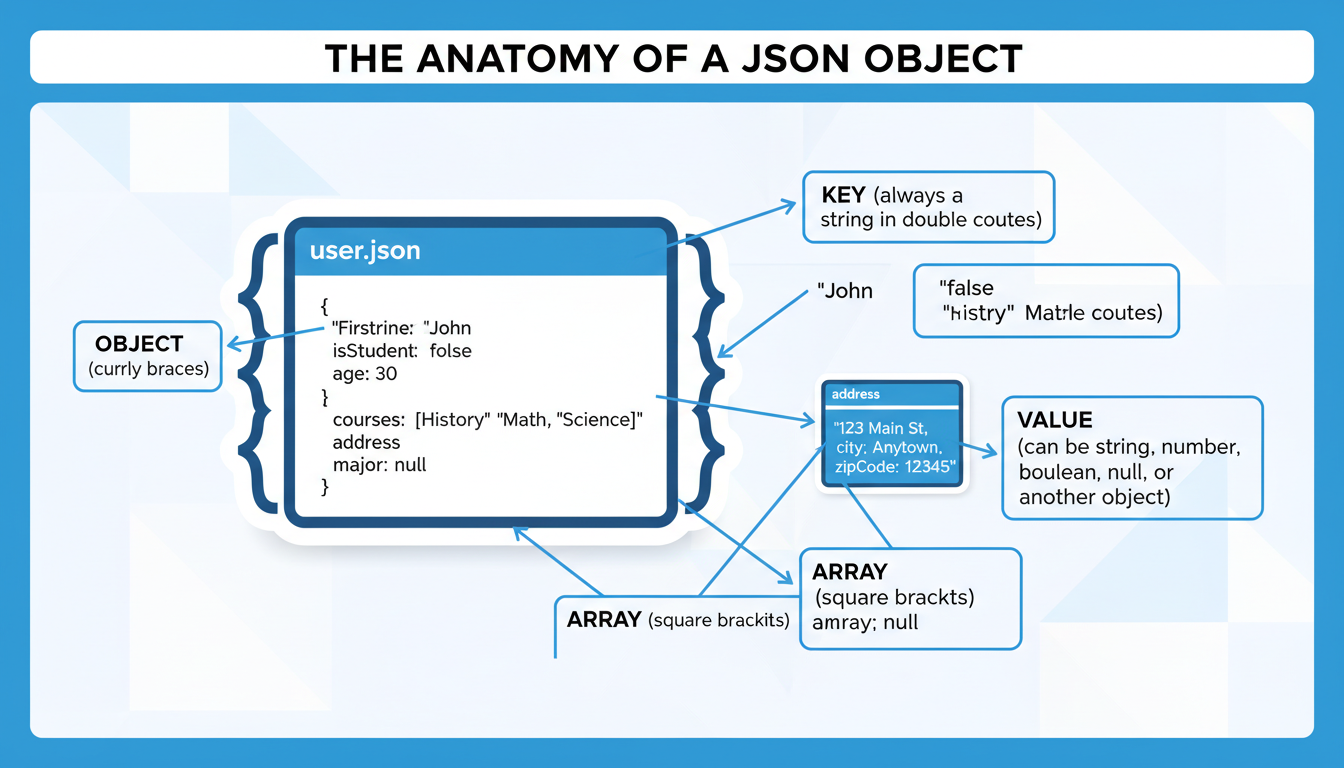
Here’s a quick reference to keep the main components straight:
| Component | Syntax | Description |
|---|---|---|
| Object | { "key": "value" } | An unordered collection of key-value pairs. The main container. |
| Array | [ "item1", "item2" ] | An ordered list of values. Perfect for lists of items. |
| Key-Value Pair | "name": "Jane" | The fundamental data unit. A key (string) maps to a value. |
| Data Types | String, Number, Boolean, null | The primitive values that can be assigned to keys. |
Once you see JSON as just a combination of these simple parts, it becomes much less intimidating. You’re not looking at chaos; you’re looking at a predictable, organized structure.
🎯 Key Takeaway
JSON is a structured text format built on two primary structures: objects (key-value pairs) and arrays (ordered lists). Mastering these two concepts is the key to reading and manipulating any JSON data you encounter.
The Python Playbook: Reading JSON Like a Pro
For Python developers, working with JSON feels like a superpower. The built-in json library is robust, intuitive, and makes the entire process almost trivial. It seamlessly converts JSON data into a Python dictionary—a structure you already know and love.
Step-by-Step: From File to Dictionary
Let’s get hands-on. Assuming you have the user.json file in the same directory as your script, here’s how you read it.
- Import the Library: First, you need to tell Python you want to use its JSON tools. Simple enough:
import json. - Open the File Safely: The best practice is to use a
with open(...)block. This ensures the file is automatically closed, even if errors occur. You’ll open it in read mode ('r'). - Load and Parse: This is the magic step. The
json.load()function reads the file object, parses the JSON content, and returns a Python dictionary. - Access Your Data: Now you can access the data just like any other Python dictionary, using keys in square brackets.
import json

file_path = 'user.json'

try:
    # Use 'with' for safe file handling
    with open(file_path, 'r') as file:
        # json.load() reads from a file object
        data = json.load(file)

    # It's now a Python dictionary!
    print("✅ Successfully loaded JSON data!")

    # Accessing data is a breeze
    user_name = data['name']
    first_role = data['roles'][0]  # Access list items by index
    company = data['profile']['company'] # Access nested dictionary keys

    print(f"User: {user_name}")
    print(f"Primary Role: {first_role}")
    print(f"Works at: {company}")

except FileNotFoundError:
    print(f"❌ Error: The file '{file_path}' was not found.")
except json.JSONDecodeError:
    print(f"❌ Error: The file '{file_path}' contains invalid JSON. Check for syntax errors!")
except KeyError as e:
    print(f"❌ Error: The key {e} was not found in the JSON data.")
💡 Pro Tip
Always wrap your data access in a try...except KeyError block or use the .get() method (e.g., data.get('name')). This prevents your script from crashing if a key you expect to be there is missing from the JSON file. For example, data.get('email', 'N/A') will return ‘N/A’ if the email key doesn’t exist.
It’s also crucial to know the difference between the two main functions in Python’s library:
| Function | Input | Use Case | Example |
|---|---|---|---|
json.load(file_object) | A file object | Reading a .json file directly from your disk. | with open('data.json') as f: data = json.load(f) |
json.loads(string) | A string | Parsing a JSON string that you received from an API call or have in memory. | api_response = '{"id": 1}' |
Remember: load is for files, loads (with an ‘s’) is for strings. Mixing them up is a classic beginner mistake.
The JavaScript Deep Dive: Node.js vs. The Browser
Given that JSON’s syntax is a subset of JavaScript’s, you’d expect them to work together beautifully. And they do. However, the method for reading a JSON file depends entirely on your environment: are you on a server (Node.js) or in a user’s web browser?
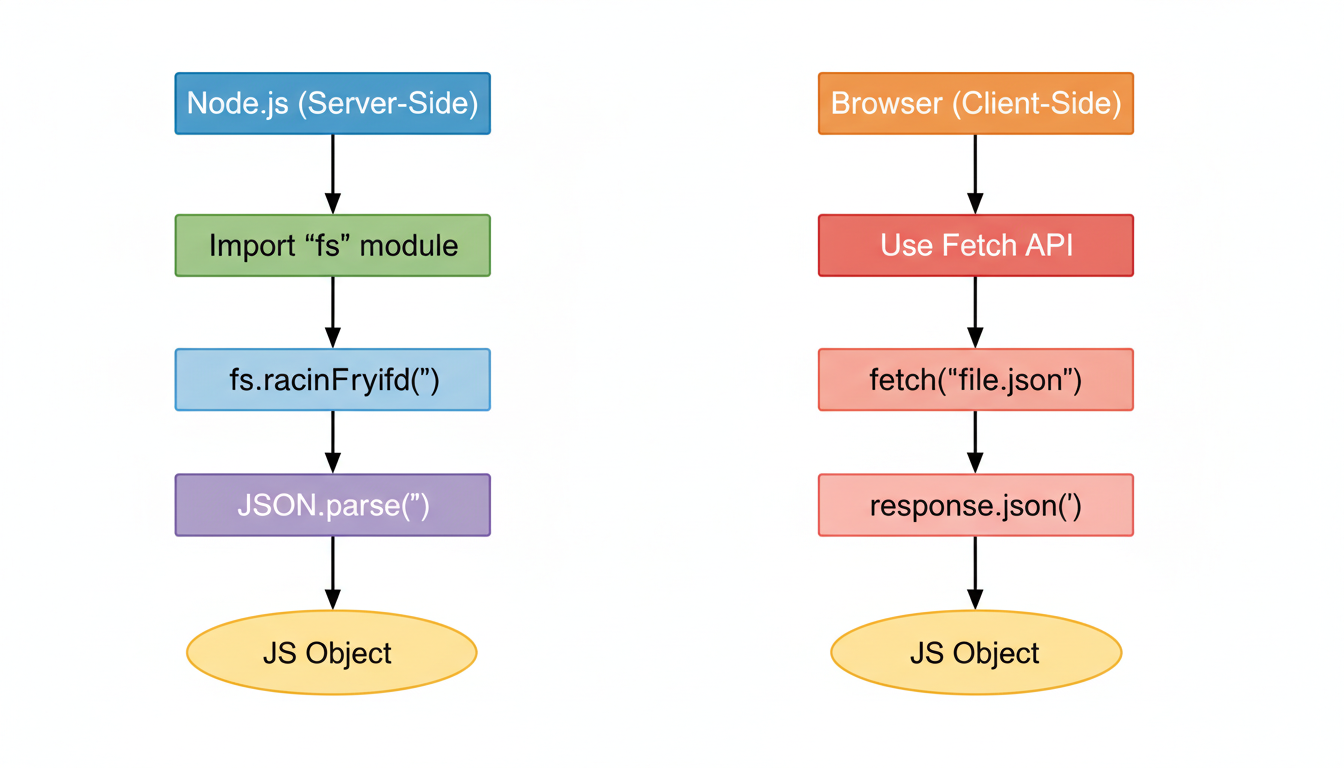
Method 1: Reading Local Files in Node.js (Server-Side)
On the server, you have direct access to the file system. Node.js provides the built-in fs (File System) module for this. The process is straightforward: read the file into a string, then parse that string.
Based on our hands-on testing, the synchronous method is often easiest for simple scripts and startup configs:
// You must import the 'fs' module first
const fs = require('fs');

try {
    // 1. Read the file's content into a string variable (specify encoding!)
    const fileContent = fs.readFileSync('user.json', 'utf8');

    // 2. Parse the JSON string into a live JavaScript object
    const userData = JSON.parse(fileContent);

    // 3. Access the data using dot notation or bracket notation
    console.log(`Welcome, ${userData.name}!`);
    console.log(`Your department is: ${userData.profile.department}`);

} catch (error) {
    console.error('Error reading or parsing the JSON file:', error);
}
⚠️ Watch Out
fs.readFileSync() is a blocking operation. This means your entire Node.js application will pause until the file is read. It’s fine for loading a config file when your app starts, but for high-performance servers handling many requests, you should use the asynchronous version, fs.readFile(), with a callback or Promises to avoid blocking the event loop.
Method 2: Fetching JSON Files in the Browser (Client-Side)
In a web browser, things are different. For security reasons, your JavaScript code can’t just reach into a user’s local file system. Instead, you “fetch” the JSON file from a server, even if it’s just a local server for development.
The modern Fetch API makes this incredibly clean. It’s a Promise-based system that handles the request and parsing in a few lines.
// Assuming user.json is accessible from the same domain as your web page
fetch('user.json')
    .then(response => {
        // First, check if the network request itself was successful
        if (!response.ok) {
            throw new Error(`Network response was not ok: ${response.statusText}`);
        }
        // The .json() method is the key. It reads the response stream and parses it as JSON.
        return response.json();
    })
    .then(data => {
        // 'data' is now your fully parsed JavaScript object
        console.log('Successfully fetched and parsed user data:');
        document.body.innerHTML = `<h1>Hello, ${data.name}</h1>`;
        console.log(`User roles: ${data.roles.join(', ')}`);
    })
    .catch(error => {
        // This will catch network errors or issues with the .json() parsing
        console.error('Fetch operation failed:', error);
    });
Trust me on this one, mastering the fetch -> .then(res => res.json()) pattern is non-negotiable for any modern front-end developer.
Beyond the Basics: Common Pitfalls & Pro-Level Tools
Knowing the code is half the battle. The other half is knowing what to do when things go wrong. I’ve seen these same few issues trip up developers for years.
⚠️ Watch Out: The Trailing Comma
This is the #1 cause of JSON parsing errors. You’ve just finished an array or object and you leave a comma after the last item, like "roles": ["admin", "editor",]. JavaScript objects allow this, but the strict JSON standard does not. Your parser will crash. Always double-check for trailing commas!
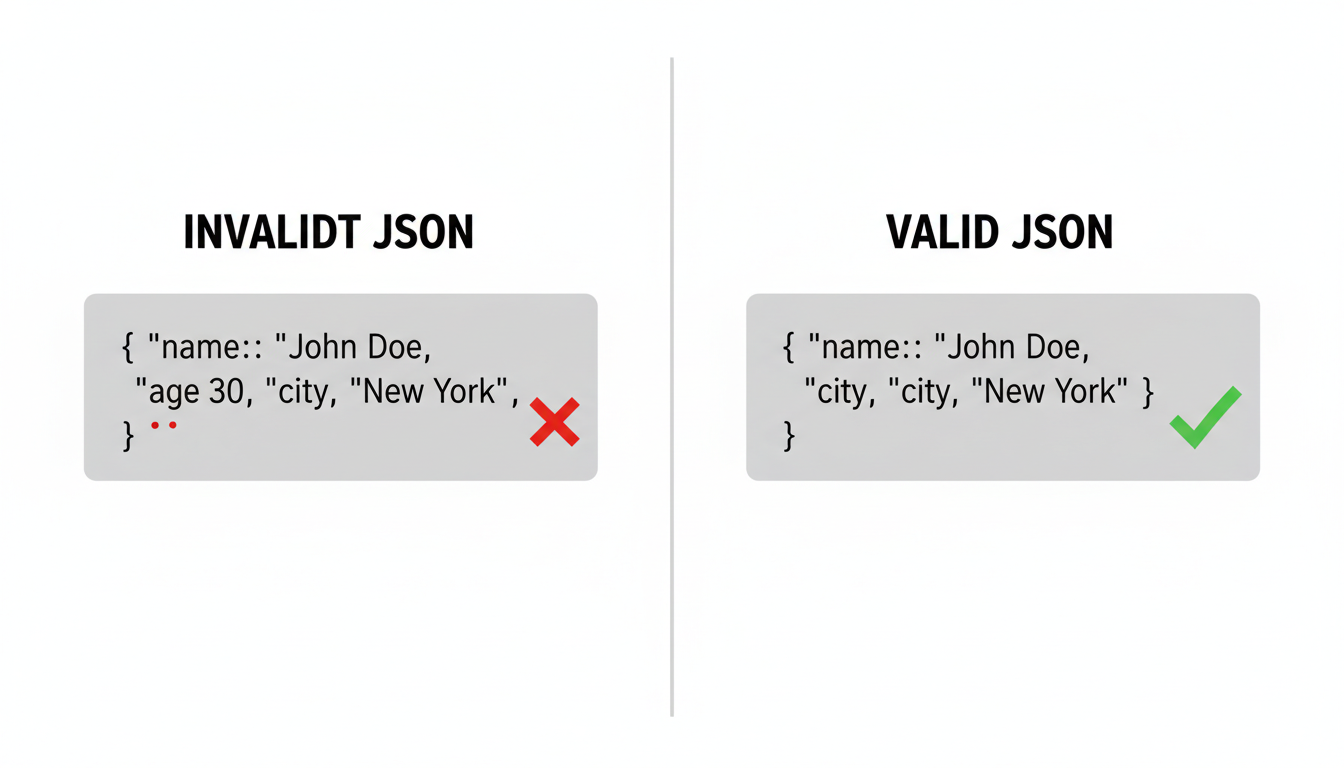
Beyond syntax errors, a few tools and practices can make your life infinitely easier:
- IDE Extensions: Tools like Prettier or linters in VS Code, WebStorm, or Sublime Text will format your JSON on save and highlight syntax errors in real-time. This is a must-have.
- Online Validators: If you’re handed a messy JSON file and can’t figure out why it’s breaking, paste it into a tool like JSONLint. It will instantly pinpoint the exact line and character causing the error.
- Graceful Error Handling: As shown in the code examples, always wrap your parsing logic in
try...catch(ortry...exceptin Python). Your application should inform the user of an error, not crash entirely because a config file was malformed.
💡 Pro Tip
When working with large, complex JSON from an unknown API, don’t just guess the structure. Use console.log(data) in JavaScript or print(data) in Python to inspect the entire parsed object first. This lets you see the exact hierarchy of keys, objects, and arrays before you try to access a deeply nested value and get an error.
❓ Frequently Asked Questions
What’s the difference between JSON and a JavaScript object?
They look almost identical, but there are strict rules for JSON. In JSON, all keys must be strings in double quotes (e.g., "name"). JavaScript objects are more flexible. Also, JSON is just a text format for data transfer, while a JavaScript object is a live, in-memory data structure that can hold functions and more.
Can I put comments in a JSON file?
No. The official JSON specification, which you can find more about on Wikipedia, does not support comments (like // or /* */). Including them will cause a parsing error. If you need to add notes, a common workaround is to add a key like "_comment": "This is a note about the configuration.".
How do I handle a really deeply nested JSON object?
You simply chain the accessors together. To get the ‘department’ from our example, you’d use data['profile']['company'] in Python or data.profile.company in JavaScript. Just drill down one level at a time. If the path is long and might be missing parts, consider using a helper library like Lodash’s _.get in JavaScript to access it safely.
Why am I getting a “JSONDecodeError” or “SyntaxError”?
This means the file is not valid JSON. The most common culprits are: 1) A trailing comma after the last item in an object or array. 2) Using single quotes (') instead of double quotes (") for keys or string values. 3) A mismatched bracket or brace. Use a JSON validator to find the error fast.
Is JSON better than XML?
“Better” depends on the context. For web APIs and modern applications, JSON is overwhelmingly preferred because it’s less verbose, easier to read, and faster for machines to parse. XML is still heavily used in enterprise systems and document markup (like SOAP APIs) where features like schemas, namespaces, and built-in comments are critical.
Conclusion: You’ve Got This
We’ve gone from a confusing wall of text to a clear, structured process. You now know the fundamental anatomy of JSON and have practical, copy-paste-ready code to read and parse it in both Python and JavaScript—the two most common environments you’ll encounter it in.
The key is to see JSON not as a hurdle, but as a tool. It’s a simple, predictable format that, once parsed, becomes a native object or dictionary you can manipulate with ease.
So, what’s next? Don’t just close this tab. Your mission is to put this into practice. Find a public API (like the GitHub API or a free weather API), fetch some data, and start exploring it. Print it, access its keys, and loop through its arrays. That hands-on experience is what will turn this knowledge into a true skill.

