
You spent 20 hours crafting the perfect blog post. You hit publish, and it starts getting traction. A week later, you find it—word-for-word—on a dozen other websites, all outranking you. Your traffic plummets. Your hard work, stolen.
Sound like a nightmare? It’s a daily reality for creators online. Content theft isn’t just frustrating; it’s a direct attack on your brand, your SEO, and your bottom line. But what if you had a digital watchdog, tirelessly scanning the web for you? That’s the power of a modern copyright checker.
Forget what you think you know. This isn’t just about catching cheaters. It’s about taking strategic control of your intellectual property in 2026. In this guide, we’ll break down exactly how to use these tools to protect your assets, avoid devastating penalties, and turn theft into an opportunity.
📑 What You’ll Learn
- The Real Cost of Content Theft (It’s Not Just Annoying)
- What a Copyright Checker Actually Is (And Isn’t)
- Under the Hood: How These Tools Find Stolen Content
- How to Choose the Right Copyright Checker for Your Needs
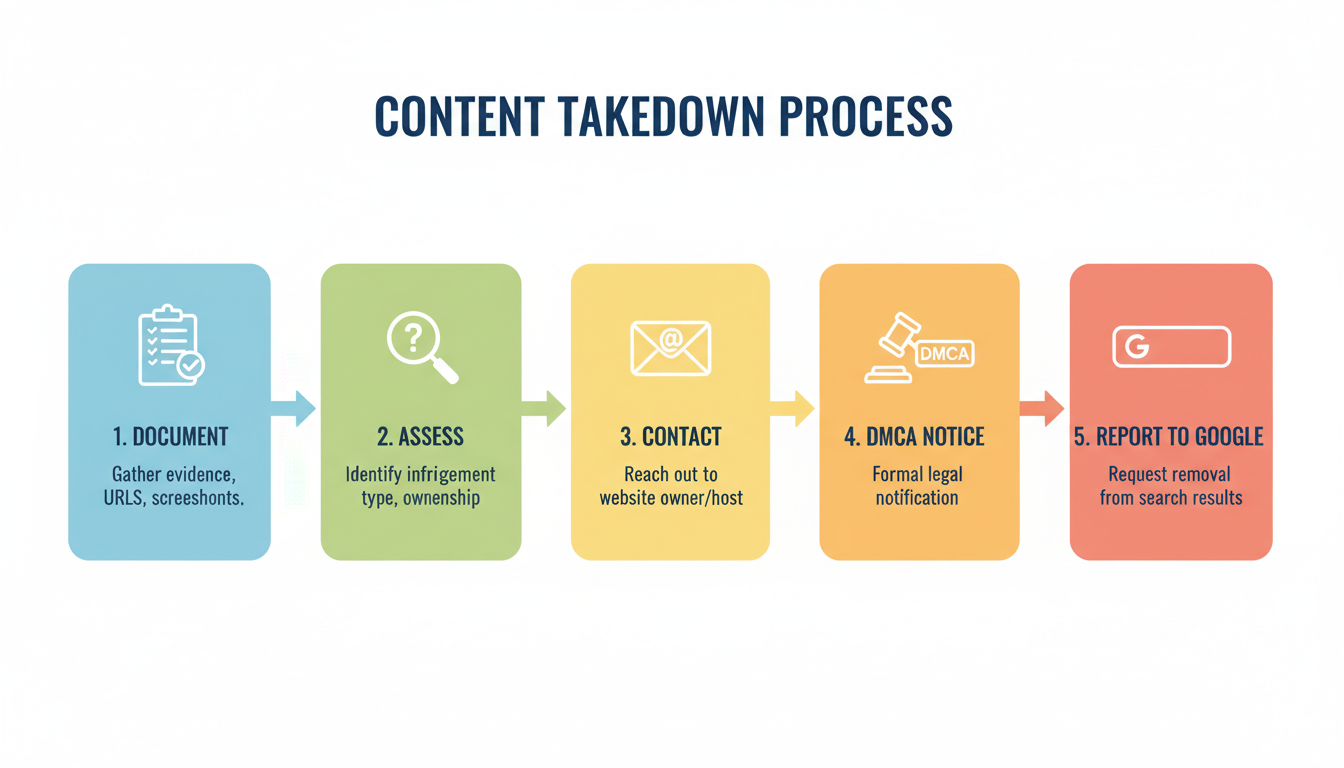
- Found a Copy? Your 5-Step Takedown Action Plan
- Beyond Checkers: Building a Fortress Around Your Content
The Real Cost of Content Theft (It’s Not Just Annoying)
Let’s be honest. Most people think of content theft as a minor irritation. A nuisance. But from our experience managing digital brands, the damage runs much, much deeper. It’s a silent killer of growth.
The most immediate threat? Your SEO rankings. When someone scrapes your content, search engines like Google get confused. They see multiple versions of the same text and struggle to identify the original author. This is the dreaded “duplicate content” issue. Suddenly, the scraper site might outrank you for your own work, siphoning away your hard-earned traffic. I’ve seen this play out time and again: a client’s rankings mysteriously drop, and a quick check reveals their top articles have been duplicated across a network of spammy blogs.
But the damage doesn’t stop there:
- Brand Dilution: Your carefully crafted content appearing on a low-quality, ad-riddled site damages your brand’s authority and credibility. It’s like finding a luxury handbag sold at a flea market.
- Lost Revenue: If your content drives leads or affiliate sales, every visitor diverted to a scraper site is a lost opportunity.
- Legal Headaches: On the flip side, accidentally using someone else’s copyrighted material—even a single image—can land you in hot water, facing legal threats and expensive settlement demands.
A copyright checker isn’t just a tool; it’s your insurance policy against these digital disasters.
⚠️ Watch Out
Don’t assume you’re safe just because you’re small. Content scrapers use automated bots that target new content indiscriminately. In fact, smaller blogs with less authority are often the most vulnerable to being outranked by their own stolen work.
What a Copyright Checker Actually Is (And Isn’t)
The terms “copyright checker” and “plagiarism checker” are often used interchangeably, but they serve two distinct, yet related, purposes. Understanding the difference is key to using them effectively.
- Plagiarism Checkers (Inbound Protection): These are for you, the creator, before you publish. You run your draft through the tool to ensure you haven’t accidentally paraphrased too closely or forgotten to cite a source. It’s about ensuring your own work is original. Think of it as quality control.
- Copyright Checkers (Outbound Protection): These are for monitoring your work after you publish. You feed your published URL or text into the tool, and it scours the web to see if anyone else has copied it. This is about protecting your intellectual property from theft. Think of it as a security system.
Many modern tools, of course, do both. But knowing your primary goal—checking for originality or hunting for theft—helps you pick the right one.
| Tool Type | Primary Goal | Who Uses It? | Typical Workflow |
|---|---|---|---|
| Plagiarism Checker | Ensure originality of your own draft | Students, Academics, Writers, SEOs | Scan a document before publishing |
| Copyright Checker / Monitor | Find unauthorized copies of your published work | Bloggers, Photographers, Businesses, Artists | Continuously monitor the web after publishing |
Under the Hood: How These Tools Find Stolen Content
It seems like magic, but the technology is a fascinating blend of data crawling and sophisticated algorithms. It’s not just doing a simple Google search for your sentences. It’s far more advanced.
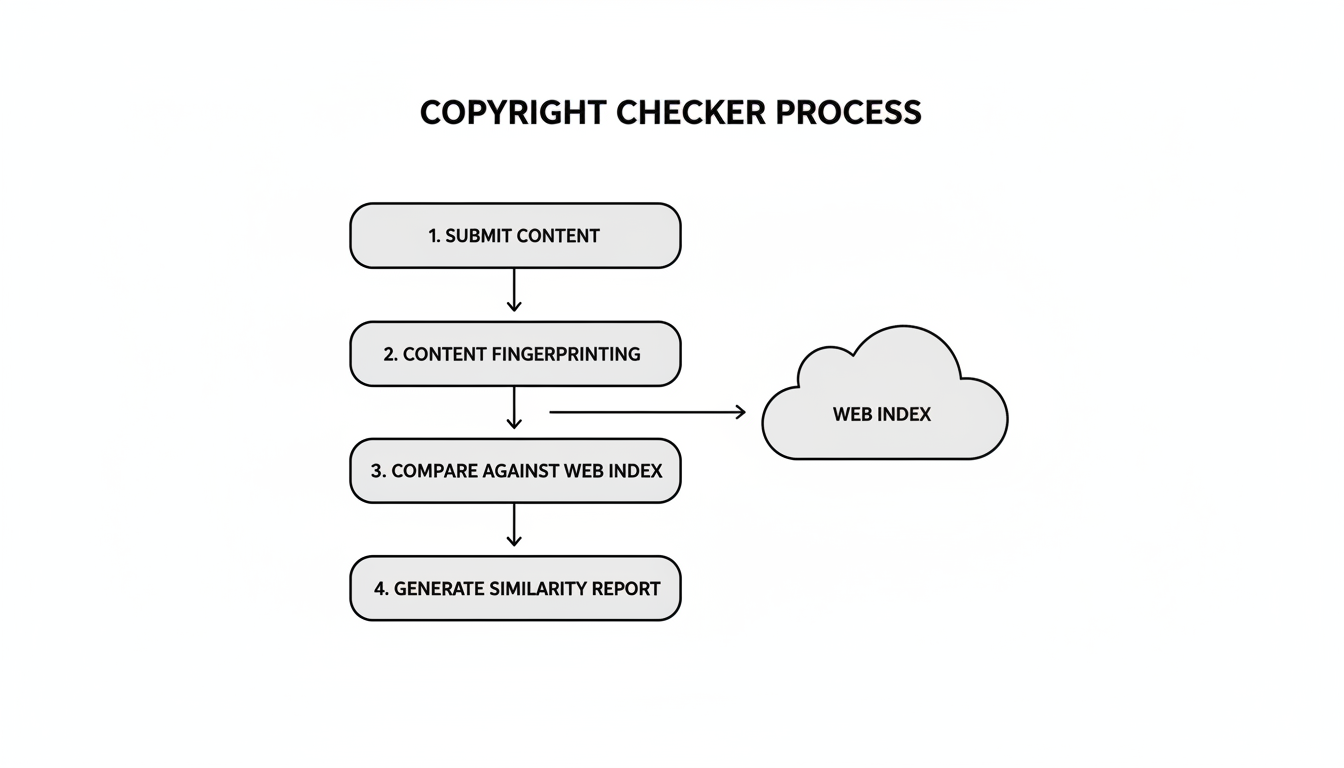
For text-based content, the process generally follows these steps:
- Content Fingerprinting: The tool breaks your text down into small, unique chunks of code and semantic phrases. It then creates a unique digital “fingerprint” for each of these segments.
- Massive Index Comparison: This fingerprint is then compared against a colossal database containing billions of web pages, academic journals, and digital books. This index is constantly updated by the tool’s own web crawlers.
- Advanced Match Detection: Here’s the secret sauce. The best algorithms don’t just look for exact matches. They’re smart enough to detect paraphrasing, reordered sentences, and other subtle forms of copying that would fool a basic search.
- Actionable Reporting: The tool compiles the results into a report, usually with a similarity score and direct links to the matching sources, often with the copied text highlighted side-by-side.
For images, the technology is different but equally powerful. It’s called reverse image search or perceptual hashing. Instead of text, it analyzes the image’s unique data—colors, shapes, textures—to create a visual fingerprint. It then scours the web for images that share that same fingerprint, even if they’ve been resized, cropped, or had filters applied.
💡 Pro Tip
When testing a copyright checker, run a piece of your own content that you know has been syndicated or quoted elsewhere. This gives you a real-world baseline for the tool’s accuracy and how well it distinguishes between legitimate use (with attribution) and outright theft.
How to Choose the Right Copyright Checker for Your Needs
Not all tools are created equal. The best copyright checker for a university student is wildly different from what a professional photography studio needs. Based on hands-on testing, here’s what you should look for.
Key Features to Evaluate
- Database Scope: How big is its playground? Does it only scan public web pages, or does it also have access to academic databases and paywalled archives? The wider the scope, the better.
- Content Type: Does it specialize in text, or can it handle images, videos, and even source code? Match the tool to what you create.
- Reporting Clarity: A good report doesn’t just dump data on you. It should be easy to read, provide side-by-side comparisons, and allow you to exclude legitimate sources (like your own guest posts or cited quotes).
- Monitoring vs. One-Off Scans: Do you need a one-time check or an ongoing monitoring service that alerts you automatically when new copies appear? For active creators, automated monitoring is a must.
| User Profile | Primary Need | Key Feature to Prioritize | Example Scenario |
|---|---|---|---|
| Student / Academic | Avoid accidental plagiarism | Deep academic database integration | Checking a research paper against journals |
| Blogger / SEO | Protect from content scrapers & SEO damage | Automated web monitoring & alerts | Getting an email when a new blog post is copied |
| Photographer / Artist | Find unlicensed image use | Advanced reverse image search | Discovering a portfolio photo on a commercial site |
⚠️ Watch Out
Be wary of “100% free” copyright checker tools with no paid option. They often have tiny databases, strict limits, or may even be harvesting your content. For any serious work, a reputable freemium or premium tool is a worthwhile investment in your intellectual property.
Found a Copy? Your 5-Step Takedown Action Plan
Okay, the checker flagged a direct copy of your work on another site. Don’t panic. Don’t fire off an angry email. Follow a calm, methodical process. This is the exact sequence we use for our clients.
- Document Everything. Before you do anything else, take screenshots. Get full-page captures of the infringing page, including the URL. Save the page as a PDF. This is your evidence.
- Assess the Situation. Is it possible this falls under Fair Use? (e.g., a short quote for commentary). Is it a legitimate syndication partner you forgot about? If it’s clearly theft, proceed.
- The “Polite” Contact. Find the website’s contact information. Send a brief, professional email. State who you are, link to your original work, link to their copy, and politely request they remove it. You’d be surprised how often this works.
- File a DMCA Takedown Notice. If they don’t respond or refuse, it’s time to escalate. Find the website’s hosting provider using a tool like WhoIsHostingThis.com. The host is legally obligated to have a DMCA agent. Follow their specific instructions to file a formal takedown notice. This is a legal request, so be truthful and accurate.
- Report to Google. Finally, you can report the infringing URL to Google directly through their Copyright Removal dashboard. This can get the page de-indexed from search results, cutting off its traffic.
🎯 Key Takeaway
A copyright checker is your first alert system. It gives you the evidence you need to take action. By following a structured takedown process, you can efficiently remove stolen content and protect your SEO and brand authority from further damage.
Beyond Checkers: Building a Fortress Around Your Content
A copyright checker is a fantastic reactive tool, but the best defense is a good offense. You can take steps to make your content a less appealing target from the start.
“The moment an original work is ‘fixed’ in a tangible medium… it is protected by copyright. However, to enforce that copyright in a court of law, registration is essential.”
Here are some proactive measures leading experts recommend:
- Use a Copyright Notice: It’s simple, but effective. Place a notice like “© 2026 Your Brand Name. All Rights Reserved.” in your website’s footer. It acts as a clear, visible deterrent.
- Watermark Your Images: For photographers and artists, a subtle, well-placed watermark makes it much harder for your work to be passed off as someone else’s.
- Register Your Most Valuable Work: For cornerstone content, commercial photographs, or anything that is a core business asset, consider formally registering it with your country’s copyright office, such as the U.S. Copyright Office. This is a prerequisite for filing a lawsuit for infringement and provides maximum legal leverage.
💡 Pro Tip
Disable right-click and text selection on your website. While not foolproof (tech-savvy users can bypass it), it stops casual, low-effort content thieves in their tracks. Many WordPress plugins can do this with a single click.
Conclusion: Your Content is Your Currency
In the digital economy, your content isn’t just words and pictures—it’s your currency. It builds your reputation, drives your traffic, and generates your revenue. Leaving it unprotected is like leaving cash on the table.
A copyright checker is no longer a niche tool for lawyers; it’s an essential part of the modern creator’s toolkit. It empowers you to move from being a potential victim to a proactive guardian of your digital assets. By integrating these checks into your workflow, you ensure your hard work gets the credit and authority it deserves.
Your next step? If you’ve never used one, try a reputable checker on your most important piece of content right now. See what’s out there. The peace of mind you’ll gain is invaluable.
❓ Frequently Asked Questions
Is a plagiarism checker the same as a copyright checker?
They’re closely related but have different primary goals. A plagiarism checker is used before publishing to ensure your own work is original. A copyright checker is used after publishing to find unauthorized copies of your work across the internet. Many modern tools offer both functions.
Can I trust a free copyright checker?
For a quick, informal scan, a free tool can be okay. However, for professional or academic use, they have serious limitations. Free tools often have smaller databases, less sophisticated detection algorithms, and usage caps. A premium service is almost always more reliable for protecting valuable content.
What percentage of similarity is acceptable?
There’s no single magic number; context is everything. For academic work, under 15% (excluding citations) is a common benchmark. For web content, you want to be as close to 0% un-cited similarity as possible to avoid Google’s duplicate content filters. Any match should be reviewed manually to see if it’s a quote, a common phrase, or actual theft.
What’s the first thing I should do if I find my content stolen?
Document everything immediately. Take dated screenshots of the infringing page. Then, your first move should be a polite but firm email to the site owner requesting removal. Only escalate to a formal DMCA takedown notice with the web host if they fail to comply.
Does a copyright checker prove I own the content?
No. A checker is a detection tool, not a legal document. It helps you find infringement. In most countries, your copyright is established the moment you create the work. However, to have the strongest possible legal case in court, you must formally register the copyright with your government’s official body.

