

Here’s a statistic that keeps most small business owners up at night: nearly 49% of invoices issued by small businesses in the US go past their due date. That is half your revenue sitting in limbo.
If you are still manually typing out bills in Microsoft Word or wrestling with Excel formulas that break every time you add a row, you aren’t just wasting time—you are actively hurting your cash flow. In our experience working with hundreds of freelancers and agency owners, the transition from manual billing to an automated system is the single biggest operational shift a solopreneur can make.
It’s not just about looking fancy. It’s about survival. A dedicated invoice generator doesn’t just make a PDF; it acts as your accounts receivable department, ensuring accuracy, chasing payments, and keeping the IRS happy.
In this deep dive, we’re going to break down exactly why this tool is non-negotiable for modern businesses and how it puts money back in your pocket faster.
📑 What You’ll Learn
What is an Invoice Generator (Really)?
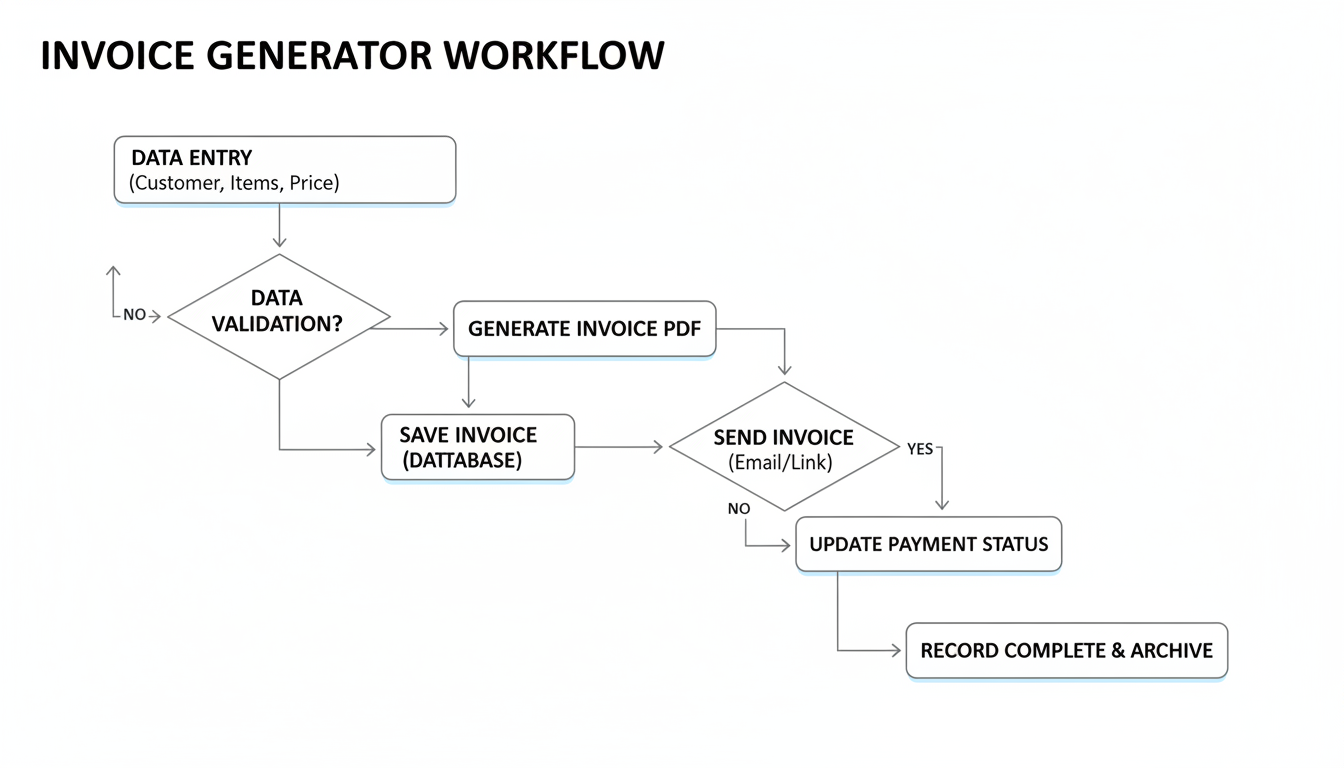
At its simplest level, an invoice generator is software that automates the creation of billing documents. But let’s look deeper. Think of it as a smart layer between your work and your bank account.
Unlike a static Word template, a modern invoice generator is dynamic. It stores your client data, remembers your service rates, calculates taxes based on your location, and formats everything into a legally binding document that looks like it came from a Fortune 500 company.
We’ve seen countless freelancers try to “wing it” with DIY templates. The result? Missing tax IDs, incorrect totals, and emails that get ignored by client accounting departments. An automated tool removes the friction. You input the hours or the project fee, and the software handles the math, the layout, and the delivery.
7 Game-Changing Benefits of Using an Invoice Generator
Why should you ditch the spreadsheet? Based on industry standards and real-world testing, here are the seven most impactful benefits.
1. Instant Professionalism and Trust
Perception is reality. If you send a client a plain text email saying, “You owe me $500,” or a messy Excel sheet that prints on two pages, you look like an amateur. A structured, branded invoice signals that you are an established entity.
With a generator, you can add your logo, brand colors, and standardized formatting. This psychological trigger makes clients prioritize your bill over the messy one from the other guy.
2. Drastically Reduced Errors
Human error is the enemy of getting paid. If you miscalculate a tax percentage or mistype a total, the client’s finance team will reject the invoice. You then have to correct it and resend it, resetting the “Net 30” clock. An invoice generator handles all calculations automatically. It doesn’t make math mistakes.
⚠️ Watch Out
Even with automation, double-check your “Quantity” and “Rate” fields. The software calculates the math perfectly, but it can’t know if you actually worked 10 hours or 100. Garbage in, garbage out.
3. Faster Payments (Cash Flow Velocity)
This is the big one. Modern invoice generators often integrate with payment gateways like Stripe or PayPal. This means your invoice isn’t just a piece of paper; it’s a checkout page. You can include a “Pay Now” button directly on the digital invoice.
Data shows that digital invoices with integrated payment links are paid up to 3x faster than paper checks or bank transfers. You are removing the friction of the client having to log into their bank and set up a transfer.
4. Automation of Recurring Billing
If you are on a retainer model—say, providing SEO services or maintenance for $1,000 a month—manually creating that invoice every 30 days is a waste of life. Good generators allow you to set it and forget it. The system generates and emails the invoice on the 1st of every month without you lifting a finger.
5. effortless Tax Compliance
Tax season is usually a nightmare of shoeboxes and searching through email “Sent” folders. If you use a specialized tool, like an online GST invoice generator, the system tracks every cent of sales tax or VAT you’ve collected.
Come tax time, you simply export a report. You have a clear paper trail that protects you in case of an audit.
💡 Pro Tip
Look for a generator that allows you to export data in CSV format. This makes it incredibly easy to import your financial data directly into accounting software like QuickBooks or Xero at the end of the year.
6. Client Management & History
Ever forget what you charged a client for a similar project last year? An invoice generator acts as a mini-CRM (Customer Relationship Management) tool. You can pull up a client’s history in seconds to see what they’ve paid, what’s overdue, and what your average rate has been.
7. Multi-Currency & Global Reach
The digital economy is global. If you land a client in London but you’re in New York, calculating exchange rates manually is risky. Top-tier generators handle multi-currency billing automatically, updating exchange rates in real-time so you get paid the right amount.
Manual Invoicing vs. Invoice Generator: The Showdown
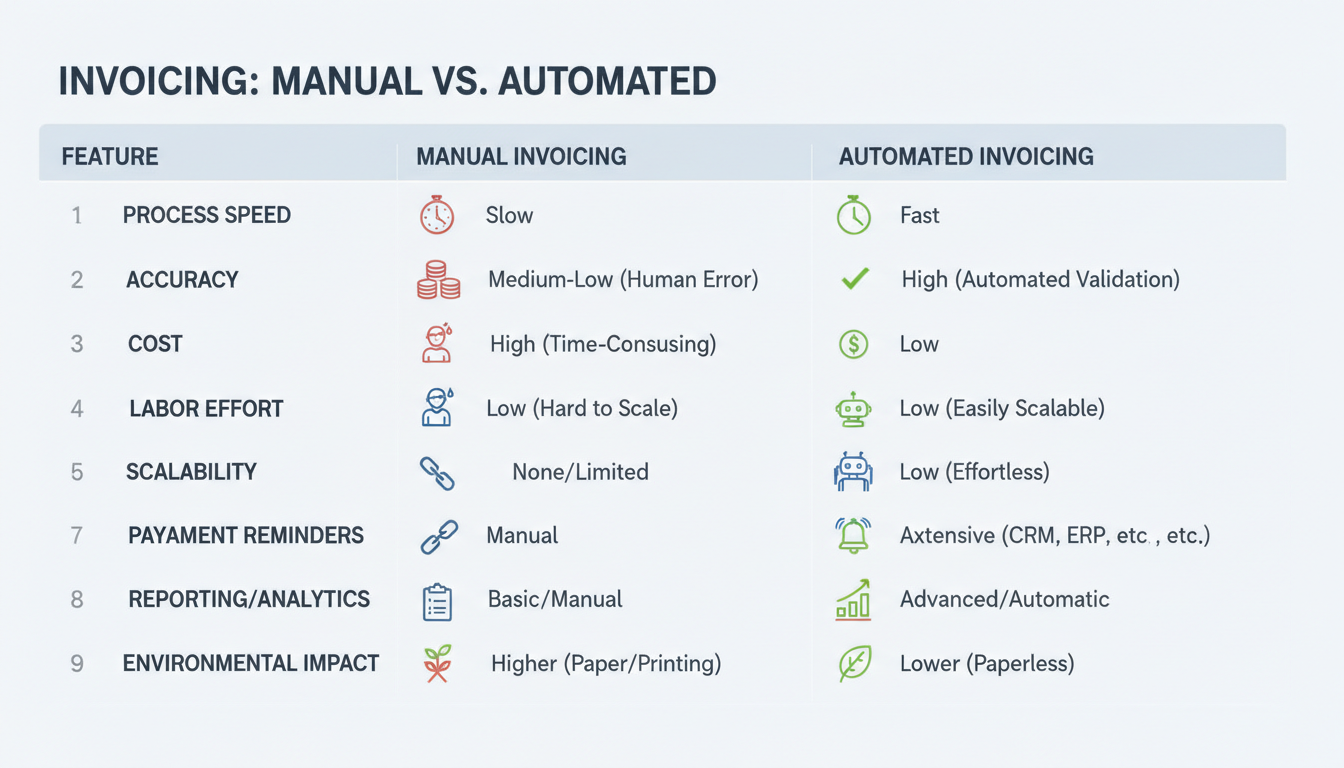
Still on the fence? Let’s look at the raw comparison. We broke down the workflow of a typical freelancer handling 10 clients a month.
| Feature | Manual (Word/Excel) | Invoice Generator |
|---|---|---|
| Time per Invoice | 10-15 Minutes | 1-2 Minutes |
| Calculations | Manual formulas (High risk) | Automated (Zero risk) |
| Payment Options | Bank transfer / Check | Credit Card / ACH / Click-to-Pay |
| Tracking | Manual spreadsheet entry | Dashboard with status updates |
| Mobile Access | Difficult / Impossible | Create invoices from phone app |
| Backups | Saved on your hard drive | Secure Cloud Storage |
🎯 Key Takeaway
Switching to an invoice generator isn’t just about saving 10 minutes per bill. It’s about shortening your payment cycle by weeks and eliminating the “admin anxiety” that plagues small business owners.
Top Features to Look for in an Invoice Generator
Not all tools are built the same. We’ve tested dozens, and here is what separates the “okay” tools from the “must-haves.”
- QR Code Integration: Smart businesses are using tech to speed up payments. Using a QR code generator to embed a payment link right on the PDF allows clients to scan and pay with their phone instantly.
- Status Tracking: You need to know if the client has viewed the invoice. This prevents the “Oh, I never got the email” excuse.
- Customizable Fields: Can you add a PO Number? Can you change the currency? Flexibility is key.
- Data Security: Ensure the platform uses SSL encryption. You are handling sensitive financial data.
Step-by-Step Guide to Using an Online Invoice Generator
Ready to send your first professional bill? Follow this workflow to ensure it gets approved instantly.
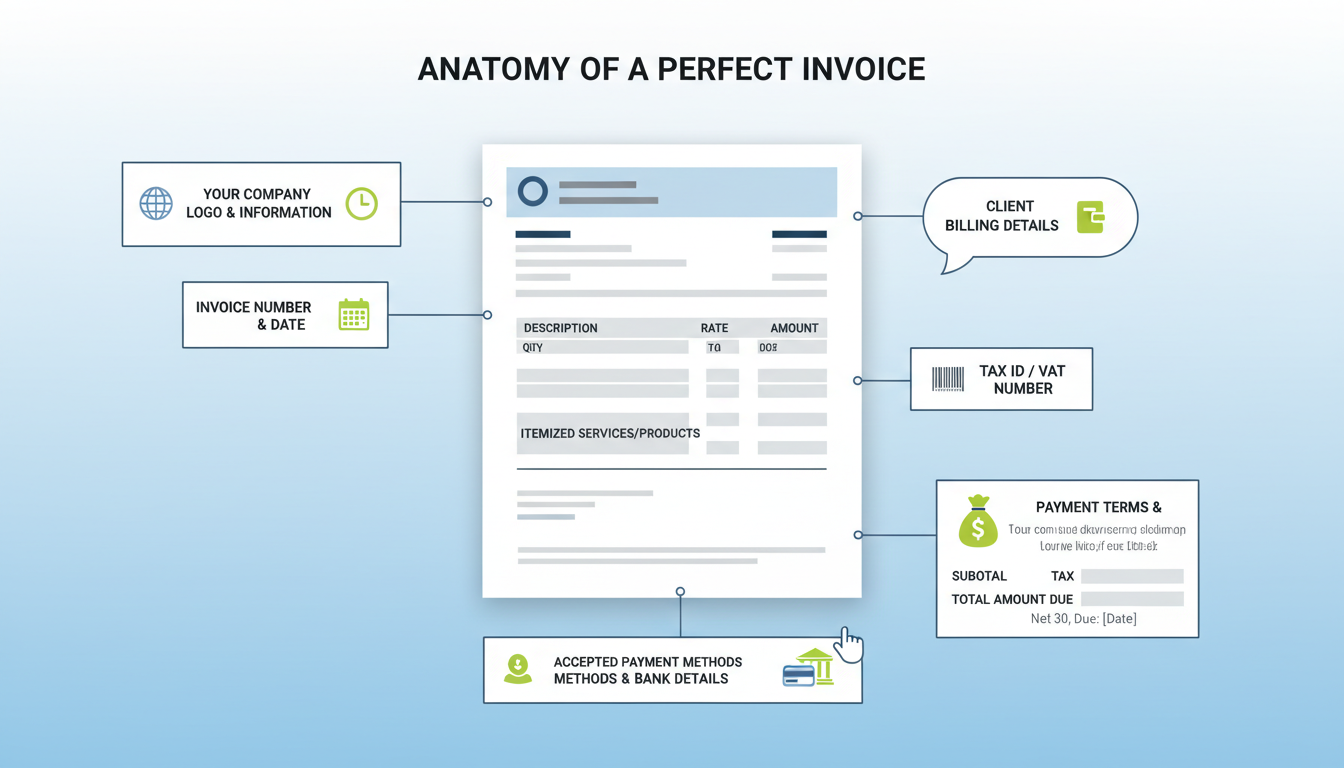
- Configure Your Profile: Before creating an invoice, upload your logo and fill in your legal business address. This builds the “header” of your document.
- Input Client Details: Add the contact person (the decision maker) and the billing address. Crucial: Ask your client if there is a specific email address for accounts payable.
- Itemize with Detail:
- Bad: “Web Design”
- Good: “UI/UX Design for Landing Page – 10 Hours @ $100/hr”
Vague descriptions are the #1 reason for payment delays.
- Set the Terms: Define the “Due Date.” Standard is often “Net 30” (due in 30 days), but for smaller projects, “Due on Receipt” is becoming common.
- Add Payment Methods: Clearly state how you want to be paid. “Bank Transfer to Account X” or “Click here to pay via Card.”
- Preview and Send: Always preview the PDF to check for formatting issues. Then, send it directly through the platform so you can track when it’s opened.
⚠️ Watch Out
Don’t forget to update your invoice numbers sequentially (e.g., #001, #002). If you send two invoices with the number #101, your client’s accounting software will flag it as a duplicate and reject payment.
Frequently Asked Questions
Is using an online invoice generator safe?
Yes, reputable platforms use bank-grade encryption (256-bit SSL) to protect your data. However, always check their privacy policy to ensure they don’t sell your client data to third parties.
Can I use an invoice generator for international clients?
Absolutely. This is one of their strongest features. Most tools allow you to change the currency symbol and language, and some even handle the exchange rate conversion for you automatically.
Do I need to install software?
No. Most modern generators are cloud-based (SaaS). You access them via a web browser, which means you can invoice from your laptop, tablet, or even your smartphone while on the go.
What is the difference between an invoice and a receipt?
An invoice is a request for payment issued before the money is sent. A receipt is proof of payment issued after the money has been received. Generators can usually create both.
Is an invoice generator free?
Many platforms offer a “freemium” model. You can generate a certain number of invoices for free, but features like removing the platform’s branding, recurring billing, or unlimited client storage usually require a small monthly subscription.
Conclusion
The days of mailing paper checks and typing out Word documents are fading fast. In a digital-first economy, an invoice generator is not a luxury—it is a necessity for any business that wants to scale.
By automating your billing, you aren’t just saving time; you are building a financial infrastructure that allows you to get paid faster and look better doing it. Whether you are a freelancer sending your first bill or an agency managing fifty clients, the right tool empowers you to focus on the work you love, not the paperwork you hate.
Ready to streamline your billing? Start by auditing your current process. If you are spending more than 5 minutes on an invoice, it’s time to switch to a dedicated generator today.

