
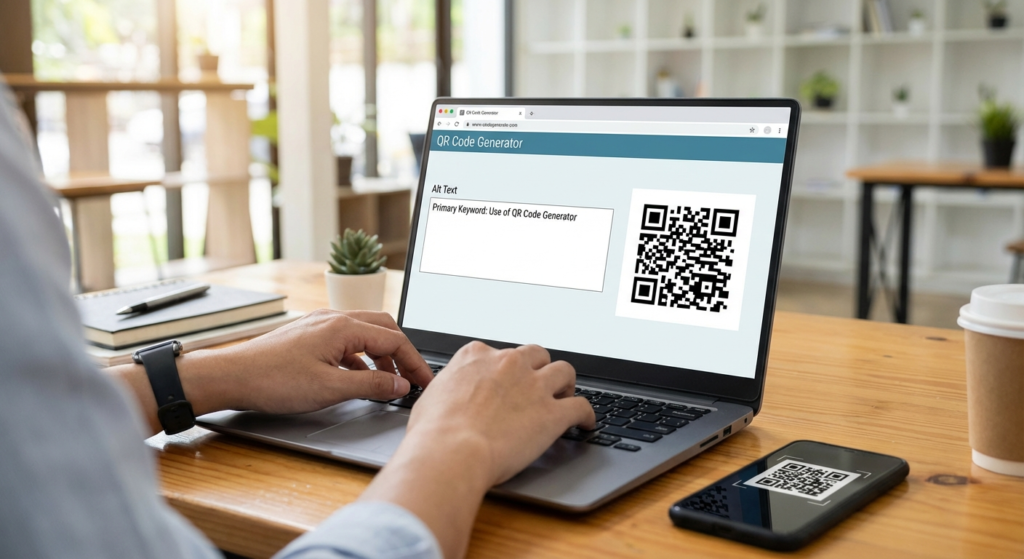
Picture this. You just spent $5,000 printing glossy brochures for your biggest product launch of the year. The design is flawless. The copy is punchy. But when a potential customer scans the little black-and-white square on the back page, they hit a glaring 404 error screen.
Disaster. I’ve seen this exact scenario play out more times than I care to count.
The culprit? Using a basic, static QR code generator without a proper strategy. What used to be a quirky tech novelty has morphed into the ultimate bridge between physical marketing and digital conversion. If you aren’t using these pixelated squares to track behavior, capture leads, and streamline user experiences, you are leaving serious money on the table.
Look, creating a barcode is easy. Crafting a high-converting, trackable offline-to-online funnel requires a bit more finesse. Based on hands-on testing across dozens of campaigns, this article breaks down exactly how to turn a simple scan into measurable business growth.
📑 What You’ll Learn
Static vs. Dynamic: The Million Dollar Difference
Before we get into the advanced tactics, we need to clear up the biggest point of confusion in the industry. Not all codes are created equal. When you open a QR code generator, you usually face a choice: static or dynamic.
In our experience managing omnichannel marketing, choosing the wrong type here is the number one reason campaigns fail.
| Feature | Static QR Codes | Dynamic QR Codes |
|---|---|---|
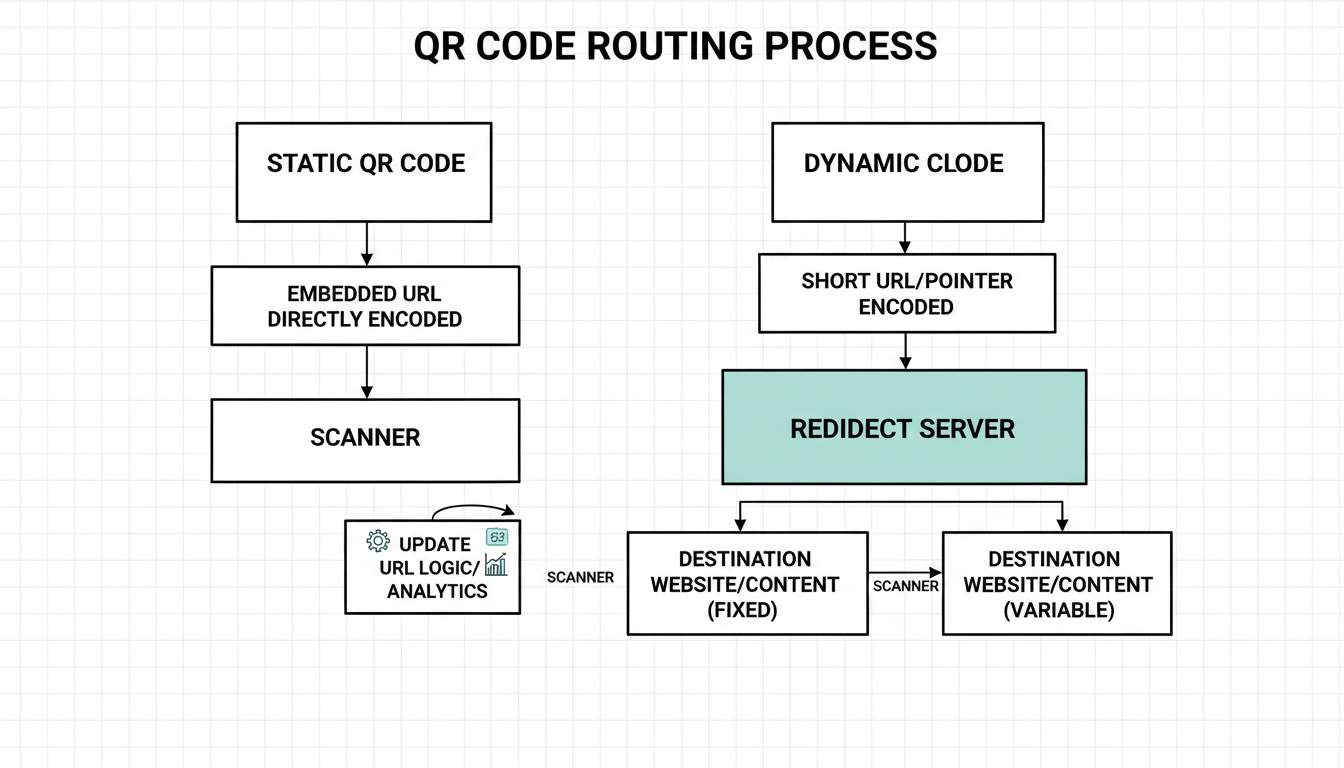
| How it works | Data is hard-coded directly into the pixel pattern. | Code contains a short URL that redirects to your final destination. |
| Editability | Permanent. Cannot be changed once generated. | Fully editable. Change the destination URL anytime. |
| Tracking & Analytics | None. You cannot track scans. | Extensive. Track location, device, time, and total scans. |
| Visual Density | Becomes dense and hard to scan with long URLs. | Always clean and easy to scan (short URL embedded). |
| Best Use Case | Wi-Fi passwords, plain text, personal vCards. | Marketing campaigns, product packaging, menus. |
If you are printing anything at scale, dynamic is the only way to go. It acts as an insurance policy against broken links and changing promotions.
💡 Pro Tip
Always append UTM parameters to the destination URL before pasting it into your dynamic QR code generator. This allows you to see exactly how much traffic and revenue your physical materials are driving directly inside Google Analytics.
10 Powerful Ways to Use a QR Code Generator
So, how are top-tier brands actually using this tech? Let’s break down ten strategic applications that go way beyond just linking to a homepage.
1. Frictionless App Downloads
Instead of asking users to search the App Store (where they might download a competitor’s app by mistake), use a multi-URL code. A smart QR code generator can detect the user’s operating system. Scan it with an iPhone? It routes to the Apple App Store. Scan it with a Samsung? It routes to Google Play. One code, zero friction.
2. Contactless Restaurant Menus & Ordering
The hospitality industry completely transformed its operations recently. Digital menus save thousands of dollars in printing costs. But the real magic happens when you link the code directly to a point-of-sale (POS) ordering system, allowing guests to order and pay from their table instantly.
3. Supply Chain and Inventory Tracking
Warehouse logistics rely heavily on scannable tech. You can generate unique identifiers for inventory batches. When a worker scans a pallet, they instantly see contents, destination, and expiration dates. For developers building these internal tools, keeping the data payload light is critical. We often recommend using a JSON minifier to compress the data before encoding it into a dense QR code for logistics apps.
4. Smart Business Cards (vCards)
Paper business cards get thrown away. A vCard QR code allows the scanner to instantly save your name, phone number, email, and LinkedIn profile directly to their phone’s contacts app with a single tap.
5. Educational Resources and Testing
Teachers and corporate trainers use codes to distribute materials without wasting paper. In computer science or statistics courses, instructors might use a random number generator to create unique datasets, encode them into QR codes, and have students build scanning apps to extract and analyze the data.
6. Gathering Instant Customer Feedback
Catch customers while the experience is fresh. Place a code on a receipt or a table tent that links directly to a short Google Form or Trustpilot review page. Conversion rates for reviews skyrocket when you remove the need to type in a URL.
7. Event RSVPs and Ticketing
Managing a conference or a wedding? Generate codes that link to RSVP forms. For ticketing, unique codes can be scanned at the door to prevent fraud and track attendance in real-time.
8. Product Authentication
Luxury brands are fighting counterfeits by integrating QR codes with blockchain technology. A quick scan proves the provenance and authenticity of a designer bag or a vintage watch.
9. Shoppable Video Content
If you run TV commercials or YouTube ads on smart TVs, put a prominent code on the screen. Viewers can scan the TV with their phones to instantly buy the product shown, bridging the gap between broadcast media and e-commerce.
10. Wi-Fi Access for Guests
Stop making guests type in “CoffeeShopNetwork_5G” and a 16-character password. A Wi-Fi QR code automatically connects the user’s device to the network the moment they scan it.
⚠️ Watch Out
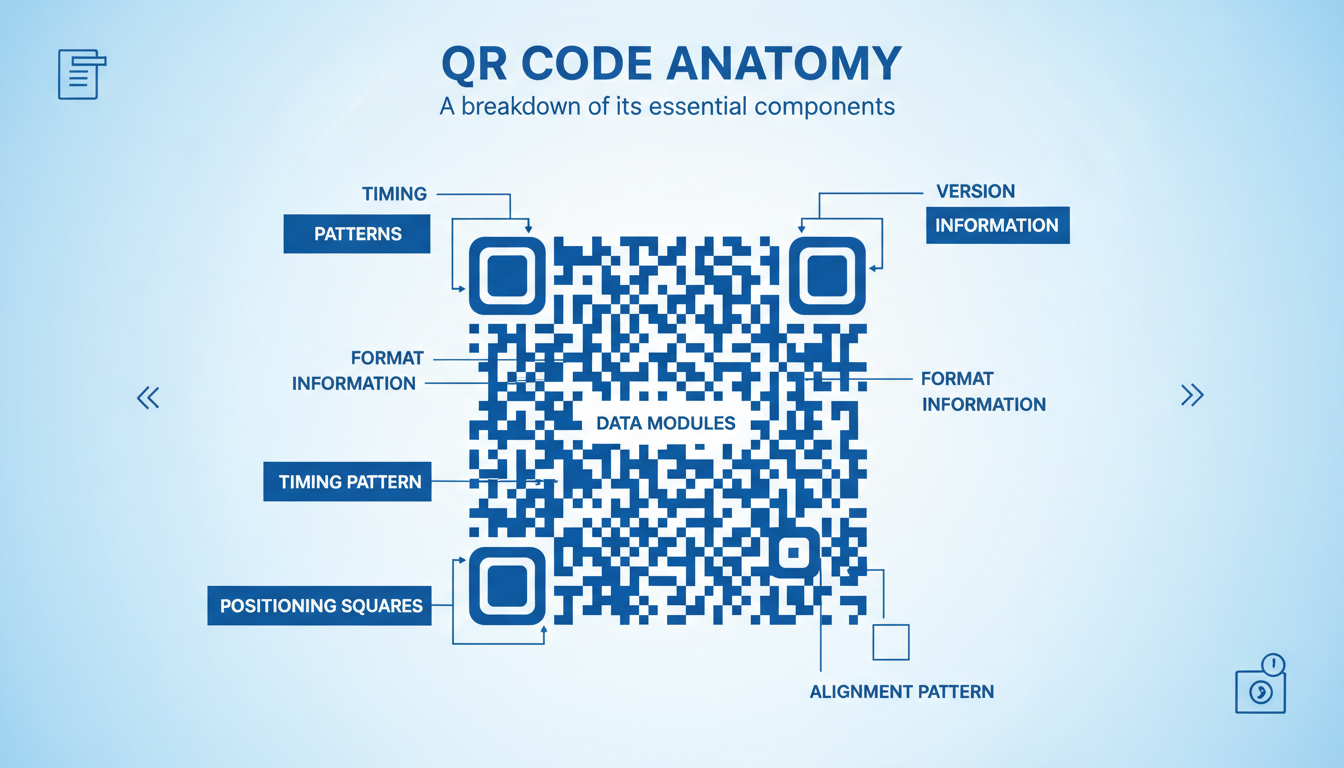
Never place a QR code on a moving vehicle (like a bus or a billboard on a highway) or behind highly reflective glass. If the user only has two seconds to scan it, or if glare obscures the positioning squares, the code is entirely useless.
Step-by-Step: Creating a Campaign That Converts
Ready to build your own? Don’t just generate and print. Follow this exact workflow to ensure your campaign actually works.
- Define the Conversion Goal: What do you want the user to do? Buy a product? Leave a review? Download an app? Your destination URL must be a mobile-optimized landing page built specifically for that goal.
- Select a Premium QR Code Generator: Choose a platform that offers dynamic routing and vector downloads (SVG/EPS).
- Customize for Brand Trust: People hesitate to scan generic, sketchy-looking codes. Add your brand colors. Soften the edges. Place your logo right in the center.
- Set Error Correction to High: QR codes use Reed-Solomon error correction. If you are placing a logo in the center, set the error correction level to ‘H’ (High). This ensures the code remains readable even if 30% of it is covered or damaged.
- Test on Multiple Devices: Before sending anything to the printer, scan the code with an iPhone, an older Android, and a third-party scanning app.
- Download in Vector Format: Never send a PNG or JPG to a commercial printer. They will pixelate when scaled up. Always use SVG or EPS formats for crisp, infinitely scalable edges.
Choosing the Right Generator Software
The market is flooded with free tools, but you get what you pay for. If you are running a business, you need enterprise-grade features.
| Feature | Free Generators | Premium/Paid Generators |
|---|---|---|
| Code Type | Usually Static only | Dynamic and Static |
| Ad-Free Experience | No (Users often see ads before your link) | Yes (Direct routing to your content) |
| Analytics Dashboard | None | Detailed (Scans by city, device, time of day) |
| Custom Domains (White-label) | No | Yes (e.g., scan.yourbrand.com) |
| Bulk Generation | Manual, one-by-one | Upload CSV to generate thousands instantly |
Trust me on this one. Paying $15 a month for a premium QR code generator is infinitely cheaper than reprinting 10,000 product labels because your free code expired.
🎯 Key Takeaway
Treat your QR codes like digital real estate. Always use dynamic codes for printed materials, customize them to build brand trust, and obsessively track the scan data to calculate your offline marketing ROI.
Security Risks and “Quishing”
We can’t talk about this tech without addressing the elephant in the room: security. As adoption skyrockets, bad actors follow.
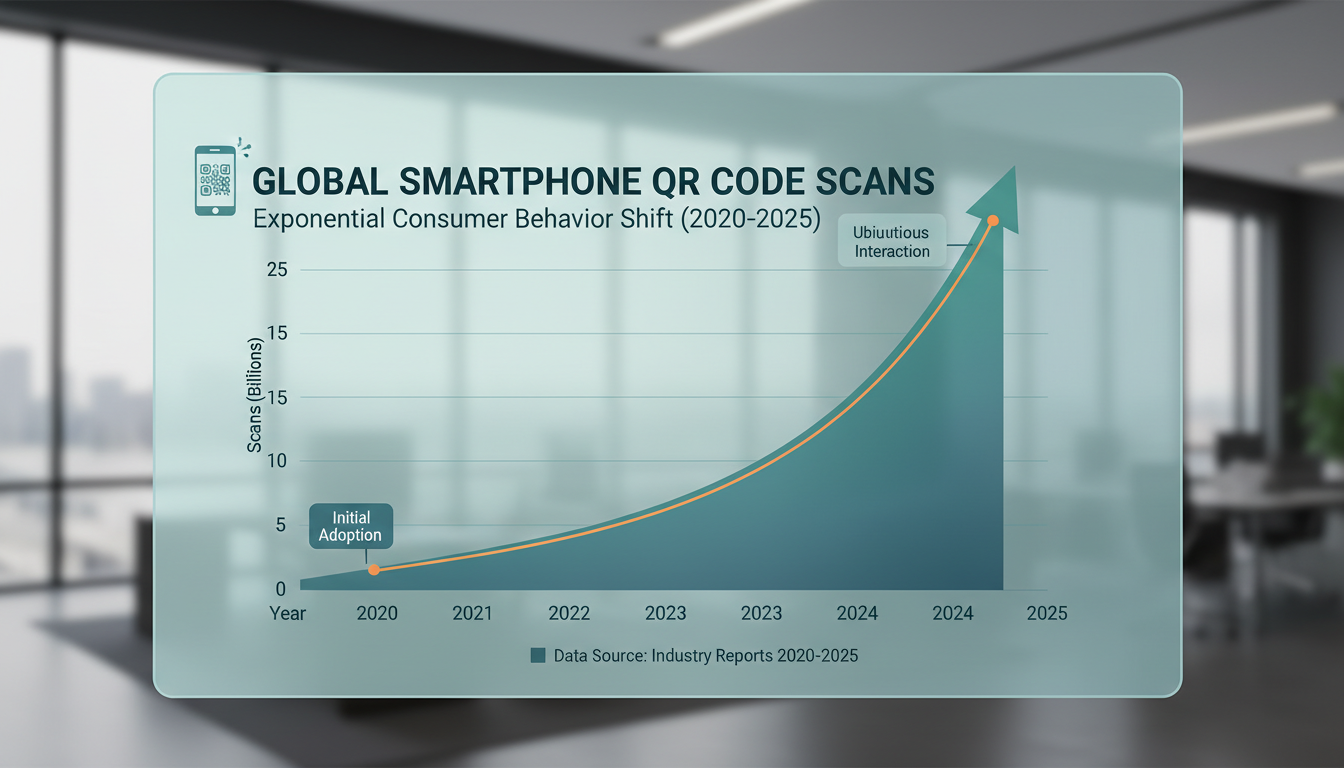
According to data from Statista, smartphone scanning has seen massive, sustained growth since 2020. With that growth comes “Quishing”—QR phishing. Scammers print malicious codes on stickers and place them over legitimate codes on parking meters or restaurant tables. When scanned, they route users to fake payment portals.
To protect your brand:
- Use Custom Domains: When a user scans your code, their phone shows a preview of the URL. If it says scan.yourbrand.com, they know it’s safe. If it says random-free-gen.xyz, they might bounce.
- Audit Physical Locations: If you have codes in public spaces, have your staff check them daily to ensure no one has placed a sticker over them.
⚠️ Watch Out
Broken links destroy trust. If you are managing a massive site and routing codes to deep internal pages, use a free internal link checker tool regularly. If a destination page gets deleted or moved, your dynamic code needs to be updated immediately to avoid hitting a 404.
For the true tech nerds out there, the exact specifications and security protocols governing these 2D barcodes are strictly defined. You can read the official technical requirements in ISO/IEC 18004.
Conclusion
The humble QR code generator is no longer just a shortcut to a website. It is a robust data-collection tool, a customer experience enhancer, and a vital component of modern supply chains.
By understanding the critical difference between static and dynamic routing, adhering to high-contrast design principles, and prioritizing user security, you can seamlessly connect the physical world to your digital ecosystem. Stop guessing whether your offline marketing works. Generate a dynamic code, track the scans, and watch your engagement metrics climb.
Your next step? Audit your current printed materials. Find one area where users experience friction—like typing in a URL or searching for a menu—and replace it with a branded, trackable code today.
❓ Frequently Asked Questions
Do QR codes generated by free tools ever expire?
Static codes never expire because the data is permanently baked into the image. However, dynamic codes created on free trials will absolutely expire once the trial ends, breaking the redirect link and rendering the printed code useless.
Can I change the destination URL after printing the code?
Yes, but only if you generated a dynamic QR code. Dynamic codes point to a redirect server, allowing you to log into your dashboard and swap out the final destination URL as many times as you want without changing the physical printed image.
What is the minimum size for a QR code to be scannable?
Industry best practice dictates a minimum size of 2 x 2 cm (0.8 x 0.8 inches) for close-range scanning, like on a business card. For posters or billboards, the size must increase exponentially based on the distance from the scanner to the code.
Why is my custom QR code not scanning?
The most common reasons are low contrast (e.g., yellow code on a white background), overcrowding the code with too much data (making the modules too tiny), or placing a logo in the center without increasing the error correction level to High.
Is it safe to use a free QR code generator online?
It carries risks. Many free generators inject their own ads before redirecting the user to your site, which looks incredibly unprofessional. Others may harvest scan data. For business purposes, investing in a secure, paid platform is highly recommended.

